Hero
Visual cutting list
Nesting strategies
CNC machines
Welding and corner cleaning
Off-cut management
Smart stickers
Glass sheet nesting
Numbers
Next
CTA
Buy & plan08 of 17 · Production manager, cutting and welding operators
Fewer bars, less waste: every cutting plan shows its own yield.
Material is the biggest number on a window factory’s cost sheet. With cutting optimization software, the difference between a good nest and an average one is measurable on every bar.
01Visual cutting list
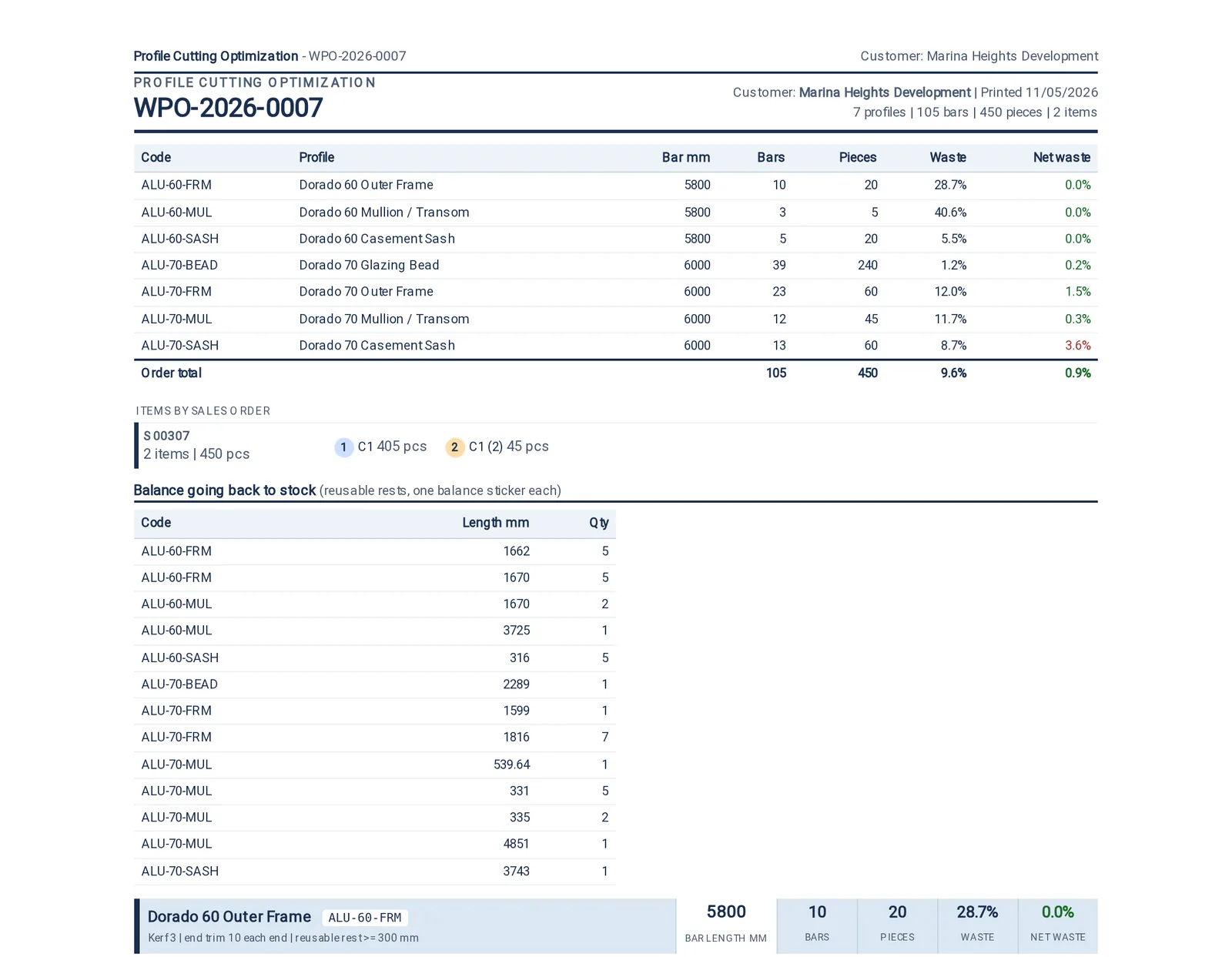
A cutting list the saw operator can read
SoloWorkshopFactory
- Every bar drawn, every piece named, with its real angles
- Pieces grouped in lanes per window
- Print it or show it at the saw

02Nesting strategies
Several strategies, and the plan tells you which one paid
SoloWorkshopFactory
- Several ways to nest, from fast to exact; the plan keeps the best
- Blade width, end trims and the shortest piece worth keeping
- Yield reported on the plan itself
- Usable remainders go back on the shelf, not into the skip
- Each profile cut from the bar length that wastes least, or the one on your rack
- Pieces longer than a bar are split at the best joint or sent to a special bar: ask, automatic or block

03CNC machines
Straight to the saw and the machining centre
WorkshopFactory
- Every saw and machining centre with its own file format and layout: CSV, XML, G-code or DXF
- Double-head saws: each piece carries both end angles, so both mitres are cut in one pass
- Downloaded, dropped into the machine's network folder, or pushed over HTTP, OPC-UA or Modbus, with every delivery logged
- DXF draws each cut as its real mitred outline; G-code sets the length stop and runs the machine's cut macro
- The cutting plan is the source, so the file and the paperwork cannot disagree


04Welding and corner cleaning
Welding and corner cleaning, on the floor and in the plan
WorkshopFactory
- Four-head welders and corner cleaners set up as machines, with their capacity and cost per hour
- Each window scanned through cutting, welding, glazing and hardware on the shop floor
- A quality check after welding; a weld fault is raised as a non-conformance with its cause
- Cut lengths come from your system's own cutting formula, allowances included

05Off-cut management
Every off-cut recorded, labelled and used first
SoloWorkshopFactory
- Every reusable rest recorded with its length, profile and the order that produced it
- A balance sticker on each rest: its length, its cut end drawn, and the rack it goes to
- Mitred ends flagged on the sticker: trim before reuse
- The optimiser takes off-cuts before it opens a fresh bar
- Available, reserved, consumed or scrapped, tracked per piece


06Smart stickers
Stickers that tell the floor everything
SoloWorkshopFactory
- A sticker on every cut piece: window, side, length, angles, order and barcode
- A finished-window sticker with the window drawn as designed, its size, room and floor, customer and glass
- A balance sticker on every reusable rest, and a sticker for every glass pane
- A4 sheets or a 100 x 50 mm thermal roll; Arabic and English printed correctly
- Labels sent straight to thermal printers, with every print logged and reprints on record


07Glass sheet nesting
Glass nested as sheets, not as a list
Factory
- Panes laid out on stock sheets, turned where the glass allows
- Utilisation per sheet
- A glass cutting list the cutter can work straight from


What this desk watches
The numbers on the wall
Yield and waste surface on the Production Control dashboard, with a per-day waste sparkline and a downtime Pareto beside it.
Yield per plan
Reusable length recovered
Waste rate against your threshold
What it produces
01A cutting plan with its yield
02A machine file per saw or machining centre
03Stickers for every piece, rest, window and pane
04A wastage summary