Take a contract advance through a BOQ invoice
الغرض
Window contracts start with money: an advance on signature, recovered piece by piece as the work is certified. The BOQ route handles both halves. Advance Payment using BOQ bills the advance as a down-payment invoice through a special advance BOQ; later progress claims then deduct the recoupment until the advance is repaid. This article covers taking the advance, the policy that decides how it is recovered, and the recovery itself.
قبل أن تبدأ
- A confirmed main sales order — the advance is always taken from the main contract, never from a variation order.
- The BOQ Invoice User group (manager to approve), and the advance counter-product configured in Settings › BOQ Invoice so recoupment lines post to the right account.
Billing the advance
-
01
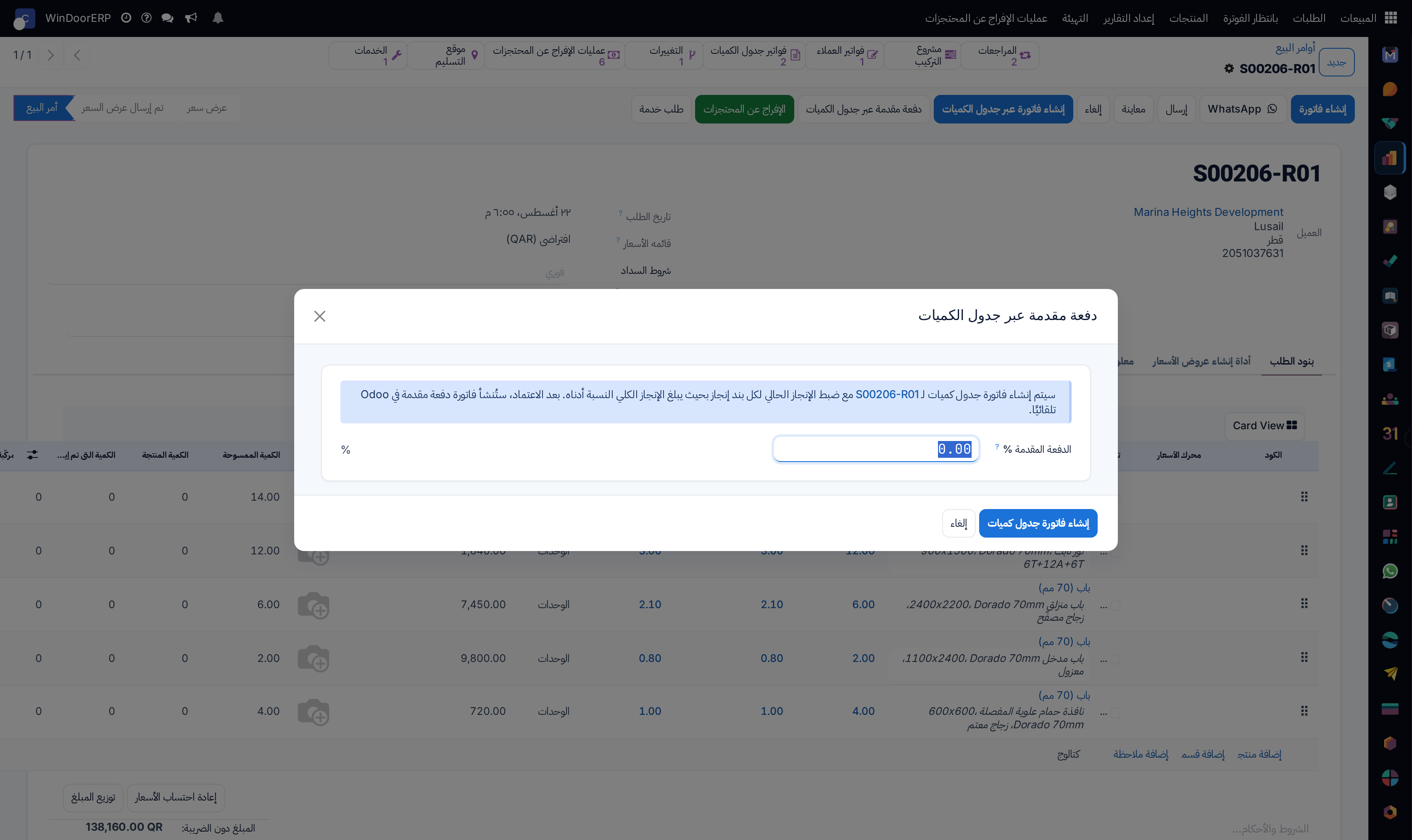
On the main order, click Advance Payment using BOQ and enter the Advance Payment % the contract stipulates — more than zero, at most 100.
-
02
Click Create BOQ Invoice. An advance BOQ opens with every progress line's current progress set to that percentage; it carries an Advance Payment ribbon and is locked to percentage entry.
-
03
Review, Submit, and have a BOQ manager Approve — like any claim, with the deduction split preview if deductions apply.
-
04
On approval, a down-payment invoice is created and posted per order for the advance amount net of deductions — this is the document the customer pays.
-
05
Register the customer's payment against it like any receipt; the contract's Total Advance Invoices figure now feeds the recovery machinery.
The policy switch: recoup later, or count as progress
Every order carries Count Advance Payments as Completed Progress, inherited by all its BOQs so the arithmetic stays consistent:
| Setting | What later claims do |
|---|---|
| Off — recoup later (the default) | The advance is temporary money. Each progress claim deducts its share through Less: Recoupment of Adv. Payment until the advance is repaid. |
| On — count as progress | The advance is treated as permanent billed progress: it flows into later claims' Less: Previous Progress automatically, and the recoupment field is not used at all. |
The switch locks once the BOQ leaves draft, and mixing policies mid-contract is exactly the double-deduction the guards exist to prevent — decide at contract start and leave it.
Recovering the advance on later claims
Under the default policy, each progress claim carries the recovery. Less: Recoupment of Adv. Payment is a cumulative running total like the other deductions; the Suggest link beside it pre-fills the pro-rata figure — advance × (cumulative progress ÷ revised contract price), capped at the advance actually invoiced — which matches the usual contract clause of recovering the advance in proportion to progress. Adjust it if the contract says otherwise. On the final invoice, tick Final Invoice: the system replaces the automatically generated down-payment deduction lines with the proportional recoupment amounts, so the closing invoice nets the whole remaining advance correctly across main and variation orders.
Note
The advance-recovery figures live on the whole project: advances taken on the main contract recover against progress across the main order and its variation orders, split pro-rata in the deduction preview at approval.
Troubleshooting
"Advance Payment % must be greater than 0 and at most 100." — the wizard needs a real percentage.
"Cannot create an advance-payment BOQ from a variation order. Please use the main contract." — advances belong to the main order; open it and start there.
"Nothing to invoice as an advance payment. Make sure progress lines have a non-zero Current Progress %." — the advance BOQ's lines carry no percentage; the wizard sets it for you, so this usually means the lines were edited to zero.
"No down-payment invoice could be created. The net amount per order after deductions is zero or negative." — the deductions eat the whole advance; reduce them or the split.
"This order counts advances as progress, so the advance is already netted against progress — suggesting a recoupment would deduct it twice. Turn off 'Count Advance Payments as Completed Progress' to use pro-rata recoupment." — the policy switch is on; recoupment does not apply to this contract.
"No posted advance payment was found for this sales order." — Suggest has nothing to recover: the advance invoice is not posted yet, or no advance was taken through the BOQ route.
أخطاء شائعة
- Taking the advance as a standard down payment outside the BOQ route, then finding Suggest has nothing to recover.
- Flipping Count Advance Payments as Completed Progress mid-contract — the telescoping totals stop matching what was actually billed.
- Forgetting the recoupment on progress claims all contract long, leaving the whole advance to swallow the final invoice.
- Recovering more than progress justifies because the cumulative recoupment was typed as a per-period figure.
- Skipping Final Invoice on the closing claim, so the native down-payment deduction and the manual recoupment fight each other.
هل كان هذا المقال مفيداً؟
شكراً — ملاحظتك تساعدنا.
تدير مصنع نوافذ أو أبواب؟
اطلب عرضاً تجريبياً