Manage produced units and their serials
What this does
Production › Shop Floor › Produced Units is the piece register: one record per serialized finished unit, from the moment production starts to the moment it is delivered. Each record carries its own serial, the order and item it belongs to, the stage it has reached, its quality state, its share of the job's costs, its CE and thermal declarations, and the scan history behind it. When a customer asks what happened to one window, this is the record that answers.
The screen belongs to the Finished-Goods Inventory & Delivery feature and the menu is gated on it.
Before you start
- The Finished-Goods Inventory & Delivery feature enabled.
- Units are created for you, never typed in: with the Barcode Scan-to-Advance feature on, one per piece when the order starts; with it off, they first appear when the order is marked Done and the finished-goods receipt creates them.
- For anything stock-backed, the finished-goods flow in place: units reach stock through the order being marked Done or through the finished-goods receipt, never by editing the stage.
Steps

-
01
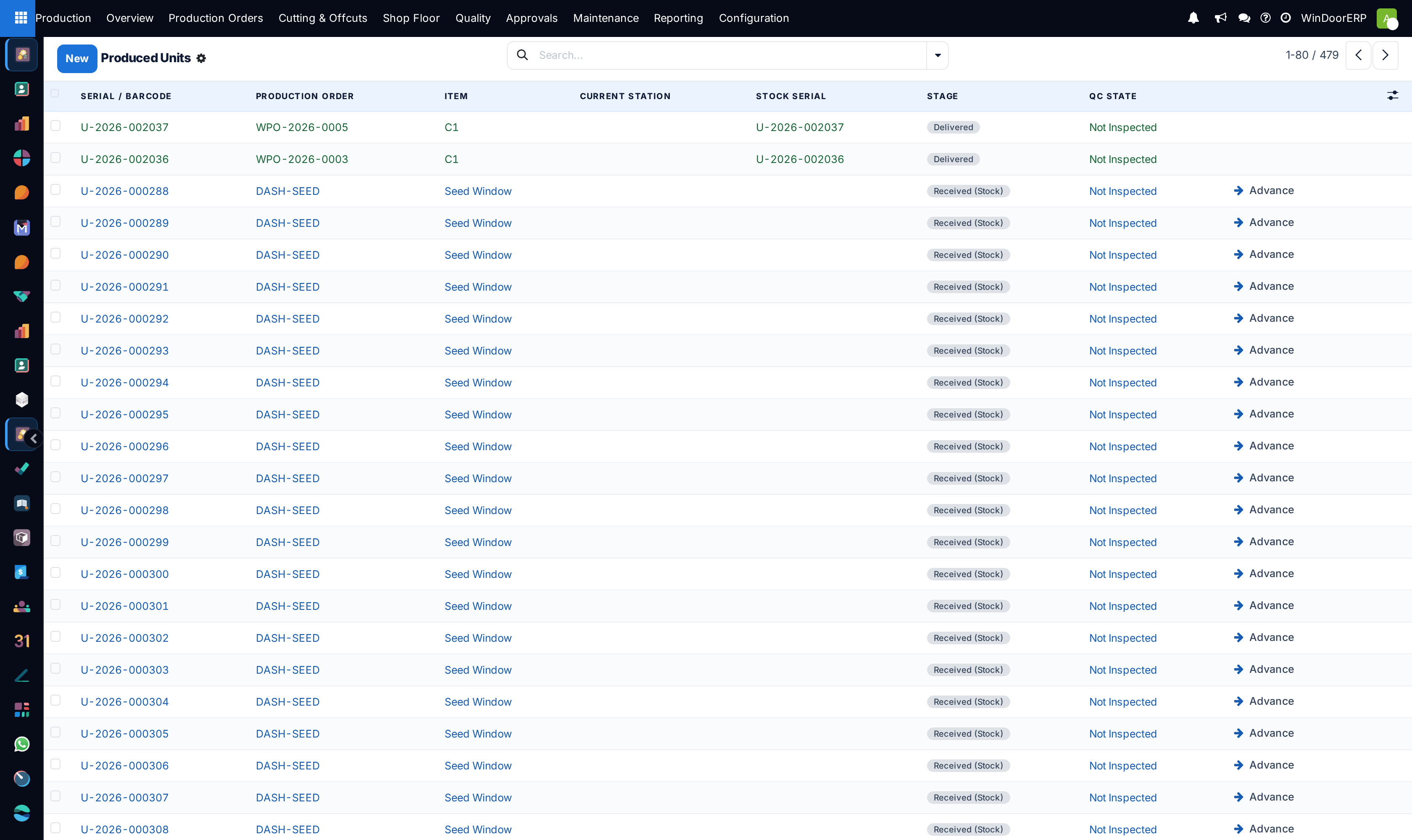
Open Production › Shop Floor › Produced Units. The list opens unfiltered; delivered rows are green, received rows blue, and anything on quality hold amber.
-
02
Narrow it with the search filters — In Stock, Delivered, On Hold, CE Marked — or group by Stage or Production Order to see a job's pieces together.
-
03
Open a unit. The status bar across the top is the pipeline; the header shows the serial, and the smart button counts its valuation snapshots.
-
04
Move a piece along the floor with Advance Stage, one stage per press. The button disappears at Packed and beyond.
-
05
Fill in what the piece needs for its paperwork: tick CE Marked, accept or overwrite the DoP Reference, and record the thermal declaration if the job calls for one.
-
06
Print what the floor and the file need: Print Label for the piece's own label, and Print DoP for its declaration of performance.
-
07
Once the piece is in stock, take a Snapshot Valuation to freeze what it cost at that moment.
The stage pipeline
Nine stages, in order: Queued, Cutting, Welding, Glazing, Hardware, Quality Check, Packed, Received (Stock), Delivered. The last floor stage is Packed; the final two are stock-backed and belong to the warehouse, not to the shop floor.
| Movement | How it happens |
|---|---|
| Queued → Packed | Advance Stage on the form, the Advance button on a list row, or a scan. One stage per action. |
| Packed → Received (Stock) | Only through the finished-goods flow. The manual button refuses: "%s is packed and ready. Receiving it into stock is a warehouse step — mark the production order Done (or run the finished-goods receipt) so a serial/lot and stock move are created." |
| Received → Delivered | Validating the finished-goods delivery flips every unit whose lot is on the move lines. |
Warning
The Advance button on a list row is hidden only once a unit is delivered, so it is still offered on units it cannot move. On a packed unit it produces the refusal above; on a received unit it is a silent no-op — nothing moves and nothing is said. Advance from the form, where the button disappears as soon as it stops being useful.
Two constraints protect the register. A serial is unique — "A produced-unit serial must be unique." — and a unit cannot be written into a stock stage without a lot: "%s cannot be marked '%s' without a stock serial/lot. Receive it through the finished-goods flow (order Done / FG receipt) so the inventory move is recorded."
The fields
| Field | What it is |
|---|---|
| Serial / Barcode | Read-only, unique, indexed, allocated as U-YYYY-######. This is the string the scanner expects. |
| Production Order, Item, Sale Order | Where the piece came from. The sale order is derived and read-only. |
| Finished Good, Stock Serial | The product, and the stock lot — read-only, because only the finished-goods flow sets it. |
| Current Station | The work centre the piece is at. |
| Material / Labour / Subcontract / Actual Cost | This piece's share of its item line's costs, computed and read-only. They move when the job's costs move. |
| Quality State | Not Inspected, Quality Hold, Released. Editable here — and this is the field the work-order gate reads, so clearing a hold on this form silently unblocks Mark Ready and Start on the item's operations. A hold colours the list row. |
| CE Marked, DoP Reference | The conformity tick and the declaration reference, auto-built as DOP-<order>-<serial> and overwritable. |
| Compliance Notes | Free text for anything the certificate needs. |
| Last Scanned Stage, Last Scanned By, Last Scanned | The most recent scan, stamped on the unit itself. |
| Scan History, Floor Time (min) | The piece's scan events and their total — "Total per-piece time across all completed stages (sum of scan durations)." |
| Valuation Snapshots | Smart button and count. Snapshots are created automatically by the finished-goods receipt when the order is marked Done, and on demand from Snapshot Valuation — which supersedes the previous one. |
Thermal performance
A block of fields records the piece's U-value: the thermal width and height, glass and frame areas, their U-values, the spacer psi and length, the resulting U-Value W/m²K, the declaration text, the source (Internal Calculator, External Certified Engine or Manual Declaration) and a report reference. Four buttons drive it.
- Calculate U-Value computes an area-weighted value from the dimensions and areas. With neither areas nor dimensions it does nothing visible — it only posts the chatter note "Set thermal dimensions or glass/frame areas first." and raises no error.
- Mark Thermal Certified refuses without a figure: "Set or calculate a U-value before certification." It disappears once the piece is certified.
- Prepare Thermal Engine builds the request payload for an external certified engine, and blocks with "Set thermal dimensions/areas before preparing the certified engine request." when there is nothing to send.
- Send to Engine posts it. The endpoint must be HTTPS — "The endpoint must use HTTPS.", "Invalid endpoint URL." — and an administrator may restrict hosts, giving "Endpoint host %s is not in the allowlist.", "Endpoint host cannot be resolved." or "Endpoint resolves to a non-routable address — blocked." A failed call does not raise: the Thermal Engine State badge goes Blocked and carries the message.
Troubleshooting
| "A produced-unit serial must be unique." | Two units were given the same serial. Serials come from a sequence; do not copy them between records. |
|---|---|
| "%s is packed and ready. Receiving it into stock is a warehouse step — mark the production order Done (or run the finished-goods receipt) so a serial/lot and stock move are created." | Exactly what it says: close the order or run the receipt. The stage is a consequence of the stock move, not a substitute for it. |
| "%s cannot be marked '%s' without a stock serial/lot. Receive it through the finished-goods flow (order Done / FG receipt) so the inventory move is recorded." | Something tried to write a stock stage onto a unit with no lot. Use the finished-goods flow. |
| Advance on a list row did nothing at all | The unit is Received. The list button is only hidden at Delivered, so it is offered but cannot act, and says nothing. |
| Calculate U-Value produced no number | No areas and no thermal dimensions. Check the chatter for "Set thermal dimensions or glass/frame areas first." |
| "Set or calculate a U-value before certification." | Certification needs a figure first — calculate it, or enter a manual declaration. |
| The thermal engine state went Blocked | The call failed or the endpoint was refused by the HTTPS and allowlist checks. The message on the record names the reason. |
| Snapshot Valuation is not offered | It appears only once the unit is received into stock. |
| The Produced Units menu is missing | The Finished-Goods Inventory & Delivery feature is off. |
Common mistakes
- Advancing units from the list, where the button survives past the point at which it can do anything.
- Trying to reach Received (Stock) or Delivered by hand instead of through the order's Done step or the finished-goods delivery.
- Ticking CE Marked and printing the DoP before a U-value has been calculated or declared.
- Editing the DoP Reference after the declaration has been issued, so the paper and the record disagree.
- Reading the per-unit costs as final. They are a computed share of the item line and will move whenever the job's costs do — take a valuation snapshot if you need the figure fixed.
- Expecting Floor Time to be filled when the pieces were advanced from the desktop dialog or the form: only terminal scans build the durations behind it.
Was this article helpful?
Thanks — your feedback helps.
Running a window or door factory?
Ask for a demo