Read the job cost of each finished serial
What this does
Production › Shop Floor › Serial Valuations holds one job-cost snapshot per finished serial: the material, labour and subcontract cost that went into that unit, frozen at the moment it was received into stock. It answers "what did this window actually cost us", per piece, and it is the bridge between shop-floor reality and accounting — with a deliberate manual step in the middle.
These are operational job costs. They do not post to the ledger by themselves; a manager prepares and marks the posting when accounting is ready.
Before you start
- The Finished-Goods Inventory & Delivery feature on — snapshots are created as units are received into stock.
- A production role to read them; Production Manager to run the posting buttons.
- Honest labour: the labour figure is whatever the terminal recorded against the unit's operations.
Steps
-
01
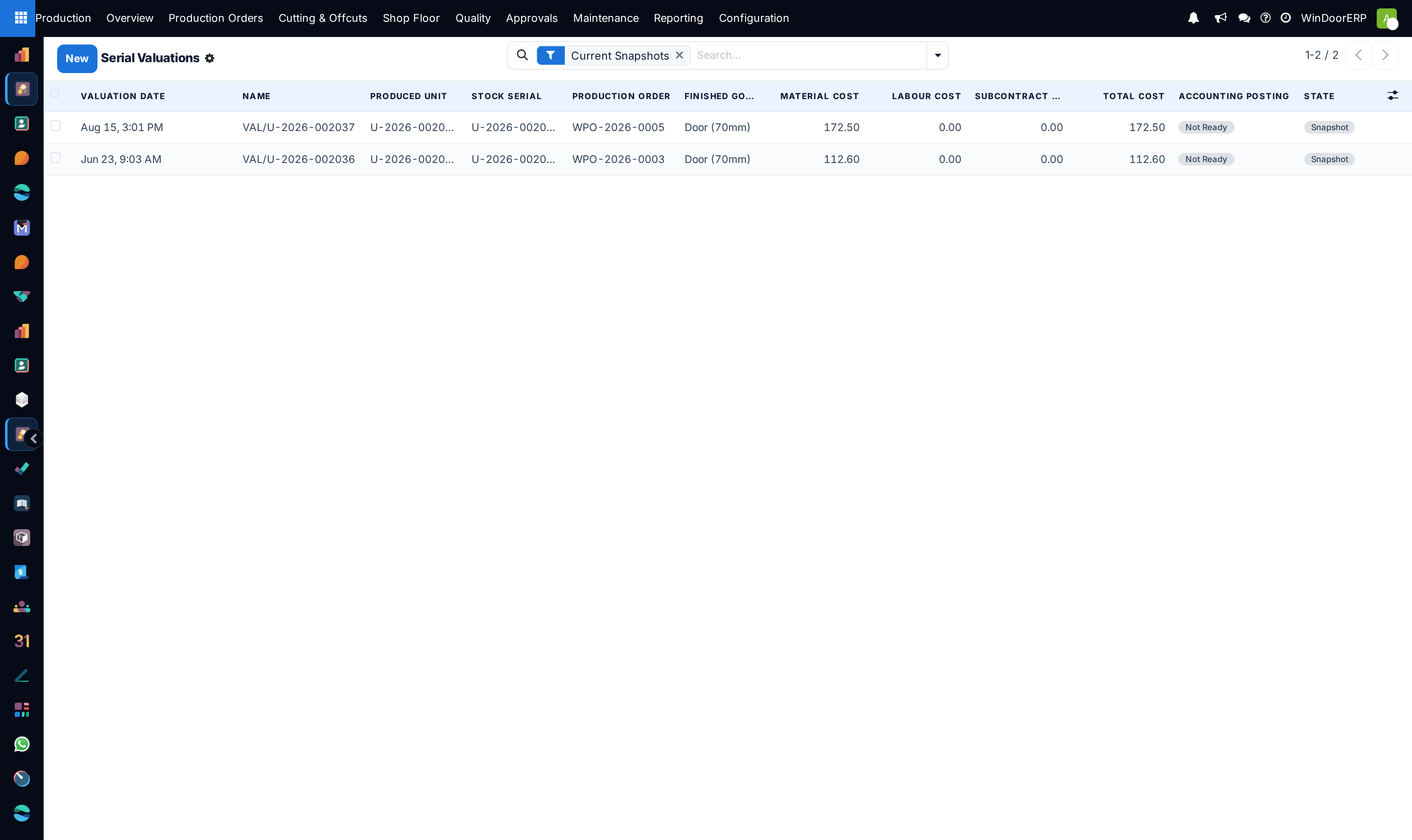
Open Production › Shop Floor › Serial Valuations. It opens on the Current Snapshots filter — the latest snapshot per unit.
-
02
Read a row: valuation date, the produced unit and its stock serial, the production order, the finished-goods product, then Material Cost, Labour Cost, Subcontract Cost and Total Cost, with the Accounting Posting and state badges.
-
03
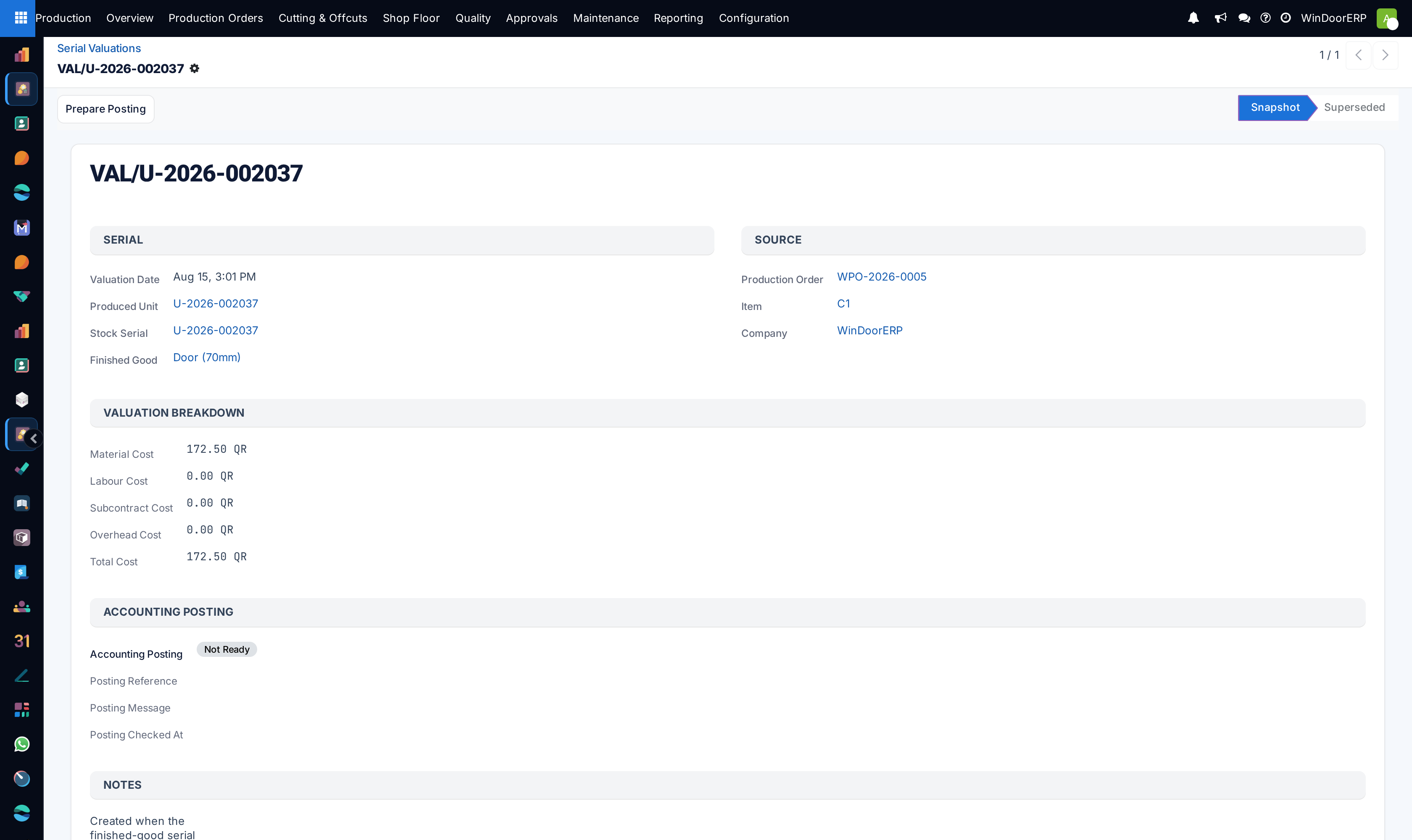
Open one for its detail — the same figures plus the overhead line (always zero today) and the notes; the record is read-only, created by the production flow rather than typed.
-
04
Refresh after rework: the produced unit's Snapshot Valuation button freezes a new snapshot and marks the previous one Superseded, so history is preserved and the Current Snapshots filter keeps showing one row per unit.
-
05
Hand off to accounting: a manager presses Prepare Posting — which validates that the product, serial, currency and a positive total exist — and then Mark Posted, which creates the valuation layer and journal entry.
Where the numbers come from
| Figure | Source |
|---|---|
| Material Cost | The unit's share of its item's material-list cost — the analysis-generated profiles, glass and hardware. |
| Labour Cost | The unit's share of the labour logs recorded at its operations: time × work-center rate, plus piece-rate amounts. |
| Subcontract Cost | Outsourced operations booked against the item. |
| Overhead Cost | Present in the model and always 0.00 today — no overhead absorption is configured. |
| Total Cost | The sum, and the figure stamped onto the stock serial as its WinDoor Actual Cost. |
Posting states
| Badge | Meaning |
|---|---|
| Not Ready | The default. Nothing has been prepared; nothing is in the ledger. |
| Ready to Post | Validation passed — product, stock serial, currency and a positive total are all present. |
| Blocked | Validation failed; the message names what is missing (finished-good product, stock serial, currency, positive total — or that inventory accounting is not installed). |
| Posted | A valuation layer and journal entry were created for this snapshot. |
Mark Posted is quieter than it looks. Run over several rows it skips the ones already posted, prepares the ones that were never prepared, and passes over in silence any that come back Blocked — so a batch can look successful and have posted only part of itself. What it creates is a valuation layer and an already-posted journal entry, debiting stock valuation and crediting stock variation, under the reference FG valuation <serial>. Neither the entry nor the layer is linked from this screen: to see them, search Accounting for that reference.
Important
The snapshot is a job cost, not an accounting valuation until someone posts it — the field stamped on the stock serial says so in its own description: "Operational job-cost snapshot for this serial. This does not post accounting valuation." Stock itself is valued by the product's costing method, so a serial's job cost and the inventory value of the same unit are two different, legitimately different, numbers.
Troubleshooting
| No snapshots for a finished order | Snapshots are created as units are received into stock — the Finished-Goods feature must be on, and the order marked Done. Otherwise use the unit's Snapshot Valuation button. |
|---|---|
| Labour cost is zero on real work | No labour logs were recorded against the unit's operations. The snapshot is only as honest as the terminal discipline behind it. |
| The posting badge stays Blocked | Read its message: it names the missing piece (product, serial, currency, positive total) or reports that inventory accounting is not installed. |
| The posting buttons are absent | They are manager-only; production users read the screen but do not post. |
| An old figure keeps appearing in reports | Superseded snapshots stay for history. Keep the Current Snapshots filter for one row per unit. They are easy to confuse, too: the reference is VAL/<serial> with no counter, so every snapshot of the same unit carries the same name and only the valuation date and the superseded badge tell them apart. |
| Nothing can be created here | By design — the form is read-only; snapshots come from the production flow and the unit's button. |
Common mistakes
- Quoting a snapshot as the accounting value of stock. It is the job cost; inventory is valued by the costing method.
- Comparing units' costs without checking labour completeness — a unit built during sloppy terminal use looks artificially cheap.
- Re-snapshotting repeatedly and then citing a superseded row.
- Expecting overhead in the split. It is structurally present and zero; if overhead matters, it is an accounting exercise outside this screen.
Was this article helpful?
Thanks — your feedback helps.
Running a window or door factory?
Ask for a demo