Coordinate team calendars, measurement schedules, and client showroom consultations
What this does
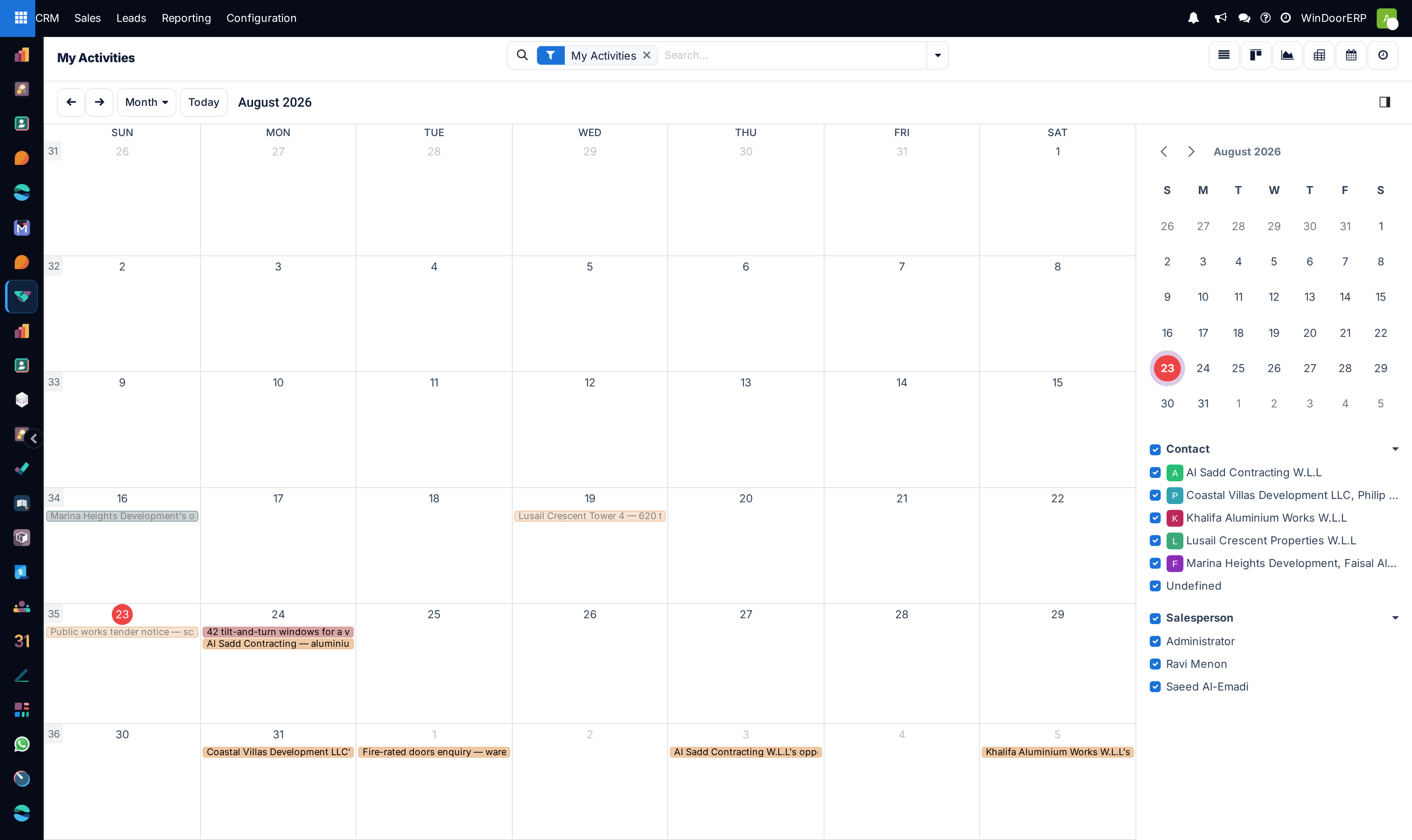
Synchronizes sales team and technical estimator calendars to avoid scheduling conflicts during site surveys, tender submission meetings, and material sample presentations.
Before you start
- Sales Representative access.
Steps
Important
Color-coded calendar entries distinguish between Site Surveys, Technical Consultations, and Contract Closings at a glance.
-
01
Open CRM › Sales › My Activities and switch to Calendar view.
-
02
Filter by team member on the right sidebar to view individual estimator availability.
-
03
Drag and drop calendar blocks to reschedule site survey visits based on client availability.
-
04
Sync appointments with external Google/Outlook calendars for seamless mobile reminders.
Common mistakes
- Failing to notify the client when moving appointment times on the calendar.
- Scheduling site surveys without factoring in regional travel times between construction sites.
Was this article helpful?
Thanks — your feedback helps.
Running a window or door factory?
Ask for a demo