CRM settings: predictive lead scoring, rule-based assignment and lead mining
What this does
The CRM settings page holds the switches that change how the whole application behaves: whether leads exist as a separate step, how the win probability on a deal is calculated, whether new leads are handed out automatically, and which paid lead-generation services are connected.
Everything on this page is company-wide. The page is only visible to a Sales Manager, and a few controls on it need system administrator rights on top of that.
Before you start
- Sales Manager rights to open CRM › Configuration › Settings.
- Administration rights (Access Rights) to see and use Update Probabilities — the button is hidden without them.
- Settings are only applied when you press Save at the top of the page.
Steps
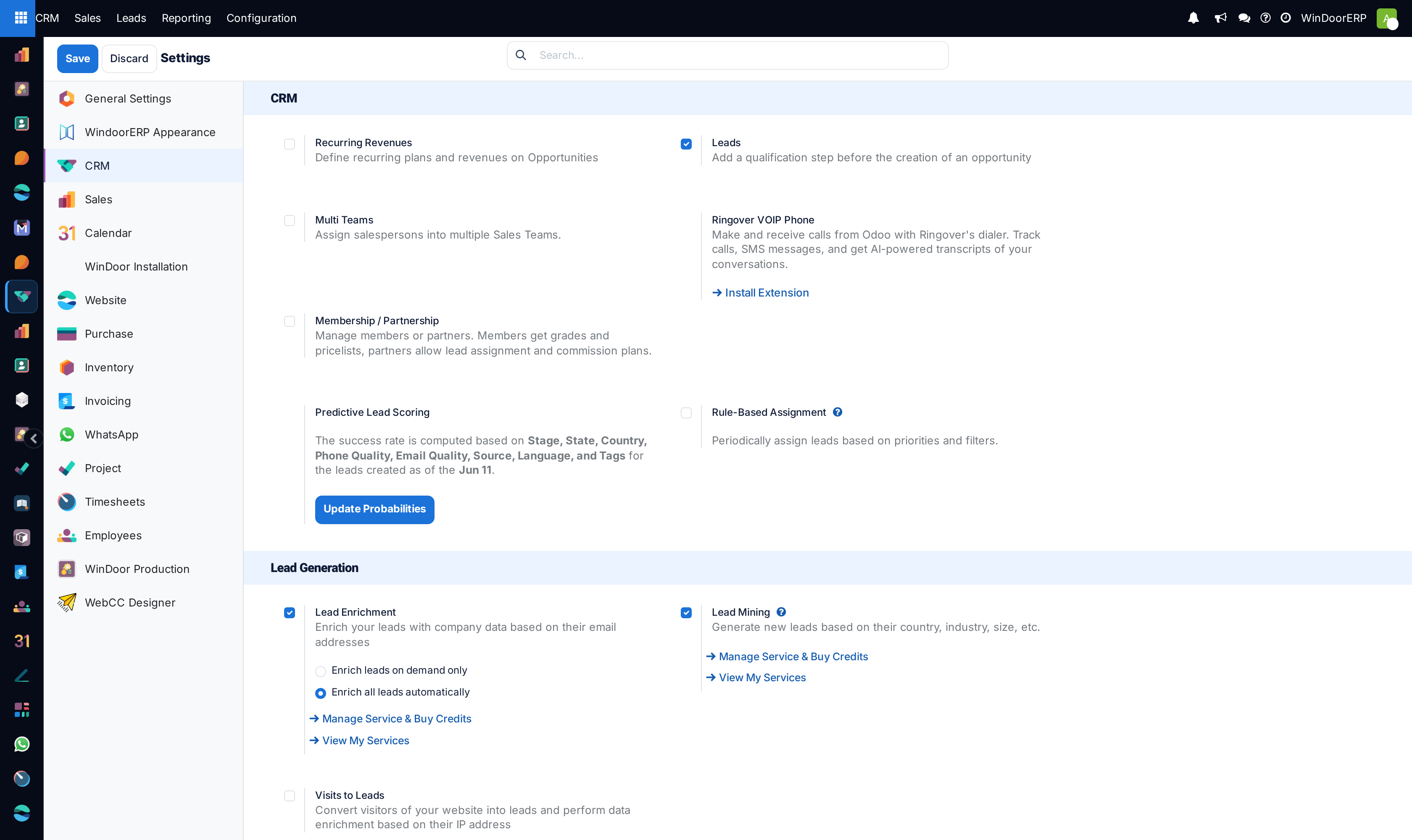
-
01
Open CRM › Configuration › Settings.
-
02
In the first block, decide whether to use Leads as a qualification step before an opportunity, and whether to record Recurring Revenues on deals.
-
03
In Predictive Lead Scoring, read the sentence describing what the score is currently based on, then press Update Probabilities to change the fields or the starting date and recompute.
-
04
Under Rule-Based Assignment, switch it on and choose Running: Manually or Repeatedly. If repeatedly, set Repeat every and check Next Run.
-
05
In Lead Generation, enable Lead Enrichment or Lead Mining only if the tenant has Odoo IAP credits — both are paid services.
-
06
Press Save. Enabling a module here installs it, which takes a moment and reloads the page.
The CRM block
| Recurring Revenues | Adds the recurring amount and plan to opportunities and reveals the Manage Recurring Plans link beside the switch. |
|---|---|
| Leads | Adds a qualification step before opportunities. Turning it on or off also rewrites every sales team: teams that handle opportunities are switched to handle leads as well, and each team's incoming mail alias is rebuilt to match. |
| Multi Teams | Lets one salesperson belong to several sales teams. |
| Membership / Partnership | Installs a separate module for member grades, partner lead assignment and commission plans. Not installed on a standard WindoorERP tenant. |
| Ringover VOIP Phone | A link to a browser extension. Not a setting — nothing is stored when you click it. |
Predictive lead scoring, and what the probability really is
Every opportunity carries a probability. Unless someone types over it, that number is produced by a statistical model: WindoorERP counts, across your own won and lost history, how often each value of each chosen field appeared on a win versus a loss, and combines those counts.
The block shows a sentence naming the fields in use. Stage is always one of them and cannot be removed. The shipped configuration adds phone quality, e-mail quality, state, country, source, language and tags, and considers deals created in the last eight days onwards.
Two consequences worth knowing. First, the model learns from your data, so on a young database with few closed deals the numbers mean very little. Second, the moment anyone types a probability by hand on a deal, that deal stops following the model — its value is pinned until someone clears it.
The Update Probabilities dialog
| Extra fields | The fields added to Stage in the calculation. Only fields of the opportunity can be chosen. |
|---|---|
| Consider leads created as of the | Required. History before this date is ignored. It is also the only place this date can be changed — the settings page shows it read-only. |
| Update | Saves both settings and recomputes every deal's automatic probability immediately, in batches of 5,000. |
| Discard | Closes without saving. |
Update Probabilities needs administration rights, and the check is made twice. The button is hidden from anyone without the Access Rights administration group, and the wizard tests the same right again when Update is pressed. That second test is silent: reach the dialog by any other route — a saved link, a shortcut — and pressing Update writes nothing, recomputes nothing and shows no error.
There is a scheduled job that would do the same work nightly, but it ships switched off. Until an administrator enables it, the only thing that refreshes the scores is this button.
Rule-Based Assignment
| Rule-Based Assignment | Turns automatic distribution on. Each sales team and each member then carries its own domain and capacity, which is where the actual rules live. |
|---|---|
| Running | Manually — assignment happens only when someone presses the button on a team. Repeatedly — a scheduled job does it. |
| Repeat every | A number plus minutes, hours, days or weeks. Zero or less is refused; 100 or more is refused with a suggestion to change the unit instead. |
| Next Run | When the job will next run. Editing it moves the schedule. |
| ↻ Update now | Runs assignment immediately for every team that has not opted out. |
These controls write directly onto the underlying scheduled job. Like the scoring job, it ships inactive: switching Running to Repeatedly and saving is what activates it.
Lead Generation
| Lead Enrichment | Looks up company data from a lead's e-mail address. Choose whether to enrich all leads automatically or on demand only. |
|---|---|
| Lead Mining | Adds CRM › Configuration › Lead Generation › Lead Mining Requests, where you describe a target audience and generate leads from it. |
| Visits to Leads | Turns website visitors into leads from their IP address. Not installed on a standard WindoorERP tenant. |
All three are paid Odoo IAP services and consume credits: one credit per company found, and one more per contact. A mining request may ask for at most 200 leads and at most 5 contacts per company. Without credits the request simply ends in an error state with the reason Insufficient Credits — the screens themselves give no hint beforehand that they are metered.
A lead mining request
A request is a saved search, not a one-off dialog. It carries the number of leads wanted, whether to fetch companies alone or companies with their contacts, whether the result should be leads or opportunities, and the sales team, salesperson and tags to stamp on whatever comes back.
The targeting filters are company size, countries, states and industries; when contacts are requested, a preferred role, other roles or a seniority. The request keeps a link to everything it generated, so a request that ran badly can be traced and its results removed.
Troubleshooting
| Update Probabilities does nothing | The dialog was reached without administration rights. The second check is silent by design — there is no error to search for. |
|---|---|
| Probabilities never change on their own | The nightly scoring job ships disabled. Either press Update Probabilities or have an administrator enable the job. |
| One deal ignores the model completely | Its probability was typed in by hand, which pins it. Clearing the manual value lets the model take over again. |
| Leads are not being handed out | Running is on Manually, or the teams have no assignment rules, or they have opted out of automatic assignment. |
| "Repeat frequency should be positive" / "Invalid repeat frequency" | The repeat number is zero or below, or 100 or above. Change the unit rather than the number. |
| A mining request ends in error | Its error type will say Insufficient Credits or No Result. The first needs credits; the second needs wider criteria. |
| A setting did not take effect | The page was left without pressing Save. |
Common mistakes
- Reading the probability on a young database as a real forecast. With few closed deals the model has almost nothing to learn from.
- Typing a probability to "correct" one deal, then wondering why it never updates again.
- Turning Leads off on a live tenant. It rewrites every team and rebuilds their mail aliases.
- Enabling Lead Mining or Lead Enrichment without credits, and taking the empty result for a bug.
- Switching Rule-Based Assignment on and expecting distribution to start. The rules live on the teams and their members; this switch only allows it.
- Leaving the settings page without saving.
Was this article helpful?
Thanks — your feedback helps.
Running a window or door factory?
Ask for a demo