Set up and run on-site quality checks with Site QC
What this does
Site QC puts a checklist between the crew and the tick. An installation action that carries a checklist cannot be marked done until its checks pass — and a failed check does not just say no: it raises a snag on that opening, can re-open earlier actions that must be redone, and can alert the project manager, all by itself.
It is deliberately separate from the factory's quality control: these are the checks made on scaffolding, against the installed opening.
Before you start
- Site QC is a feature toggle: Settings › WinDoor Installation › Site QC. Off, none of its menus or buttons exist.
- Checklist authoring is for Installation Managers; crews run inspections but never edit the questions.
Steps
-
01
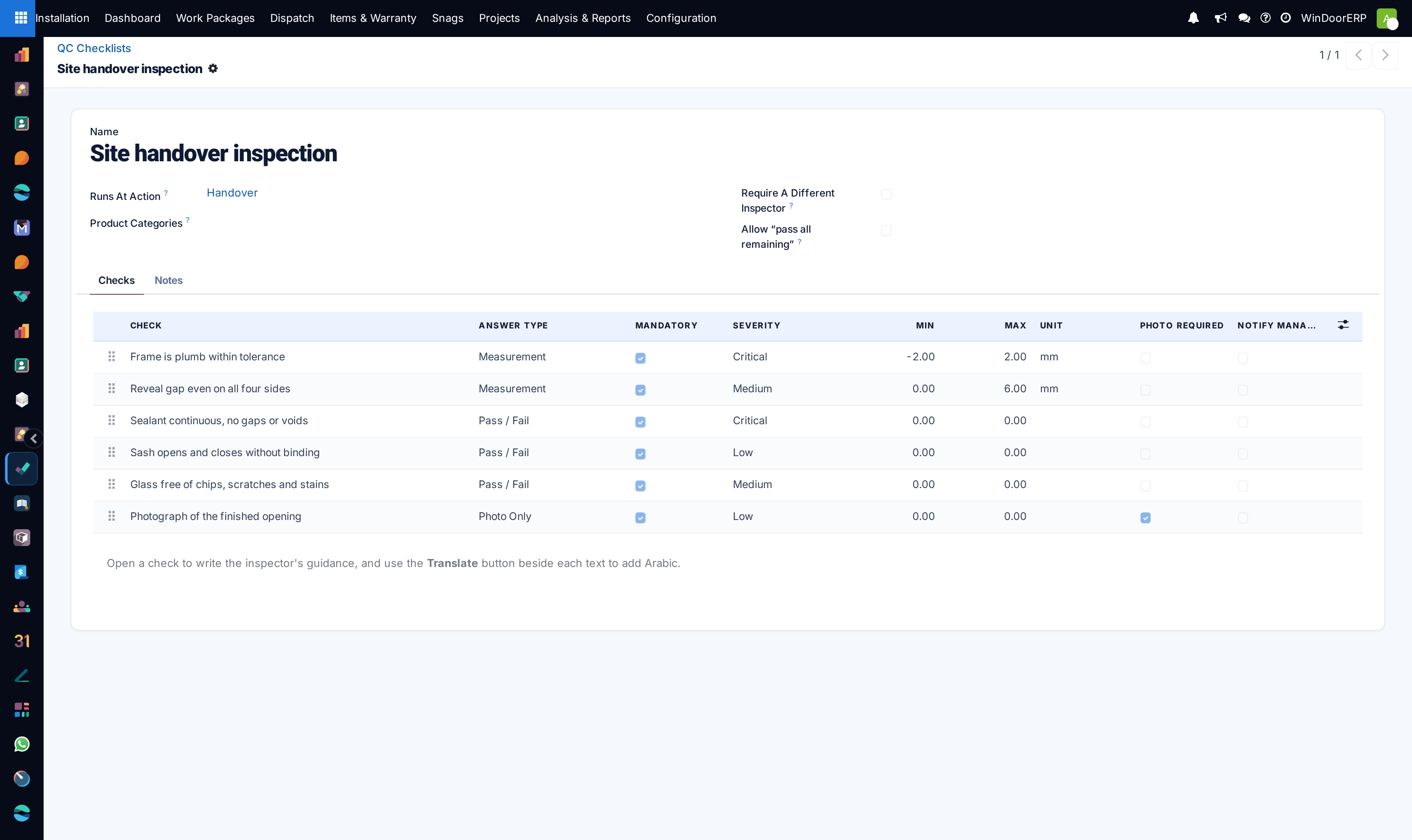
Build the checklist under Installation › Configuration › Site QC › QC Checklists: name it, and set Runs At Action — the installation action whose tick it gates, such as Final QC.
-
02
Add the checks. Each has an answer type — Pass / Fail, Yes / No, Measurement with a tolerance and unit, Pick From List, or Photo Only — plus a severity and a snag category.
-
03
Decide per check what a failure does: Mandatory blocks the action and raises a snag, advisory only records; Failure Re-opens flips earlier actions back to pending; Notify Manager Immediately emails the project manager on the first failure of the day.
-
04
Attach the checklist to each project: the project form's Site QC page holds the mode — Per opening, Per job, or both — and the checklists in play. Projects created from orders copy this from the project template.
-
05
On site, the crew answers the sheet from their portal (or the office opens the Site QC button on the opening's action row) and submits; a pass marks the action done in the same stroke.
-
06
Watch the results under Analysis & Reports: Site QC Results, Failures, First-Pass Rate, Rework and Measurements.
Designing checks that work on scaffolding
| Setting | What it really does |
|---|---|
| Answer Type | Measurement records a number and passes inside the Min–Max band — with both at 0 it is informational and always passes. Pick From List takes comma-separated choices plus the subset that counts as passing. Photo Only passes when a photo exists. |
| Photo Required | Demands photo evidence on top of any answer type — without the photo the answer cannot pass. |
| Mandatory | The teeth. A mandatory failure fails the inspection, blocks the action and raises the snag. Advisory failures are recorded and reported, nothing more. |
| Failure Re-opens | The named actions on the same opening flip back to pending when this check fails — the prior done-record is archived with who, when and why, and the item chatter says which action was re-opened. |
| Product Categories | Scope the checklist to certain products; empty applies to every opening. Matching walks up parent categories. |
| Require A Different Inspector | The person who did the work cannot sign its QC. Leave it off for one-man crews — and note managers are exempt from this rule. |
| Allow "pass all remaining" | Adds a bulk-pass button on the phone sheet — only when every checklist on the sheet allows it, and it fills only pass/fail and yes/no checks. Evidence cannot be bulk-entered. |
Question wording, tolerances and choices are snapshotted onto every recorded answer — editing a checklist later never rewrites history, and a checklist that has been used on site refuses deletion and asks to be archived instead.
What happens on a failure
- The answers are kept and an attempt is recorded — the sheet stays open for a re-check, and the office sees the failure immediately in the reports.
- One snag per opening and check is raised (or re-opened on a repeat failure), tagged Site QC, carrying the measured value and the photo. The snag blocks handover exactly like any other open snag.
- Any Failure Re-opens actions go back to pending, so the crew redoes the work, not just the paperwork.
- Checks flagged Notify Manager Immediately email the project manager and installation managers — once per work package, check and day; further failures the same day only increase the counter.
Per-opening checks vs job inspections
Per opening is the everyday mode: the sheet hangs on one action of one opening, the crew answers it from the portal stepper, and a pass ticks the action. Re-inspections of the same opening count attempt 2, 3… — that trail is what the Rework report measures.
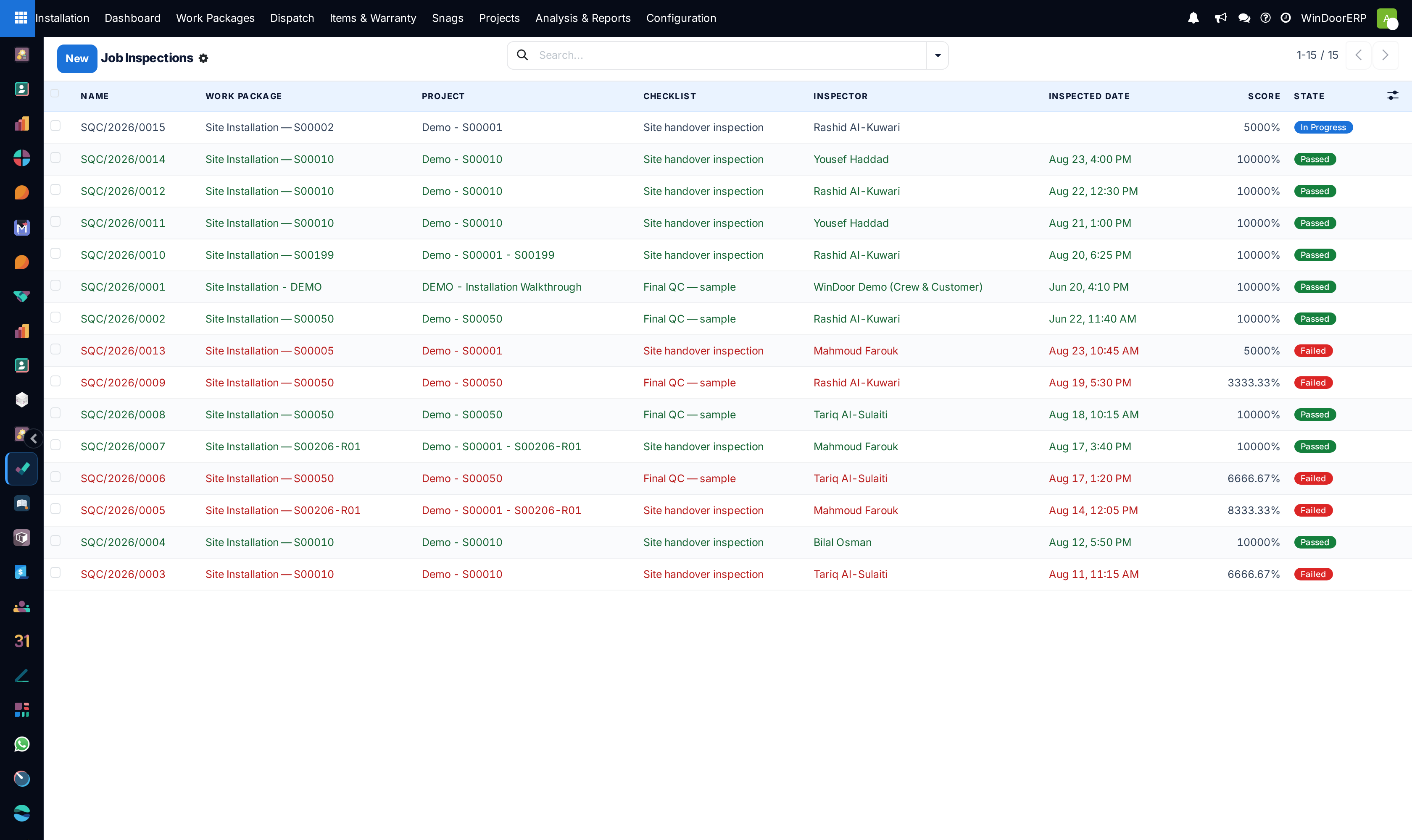
Per job adds a whole-work-package inspection: Site QC (job) on the work package starts one (reference SQC/…) on the project's first checklist, and handover then requires a passed inspection — the guard reads "This project requires a job-level Site QC inspection, and it has not passed yet." A submitted job inspection is frozen; a re-check is a new inspection, which is why job-level rework never appears in the Rework report.
The manager override
A failed mandatory check can be overridden only when three things line up: the Settings switch Managers May Override A Failed Check is on, the user is an Installation Manager, and they go through the Override & Mark Done wizard with a written reason. The override is posted to the opening's chatter verbatim. A manager ticking the cell normally is refused like anyone else.
Reading the five reports
- Site QC Results — every recorded answer; rows red where failed. Failures is the same data pre-filtered to answered-and-failed.
- First-Pass Rate — first attempts only, grouped by inspector: the share of work that passed without a re-visit.
- Rework — attempts numbered 2 and up, with hours between first attempt and the pass.
- Measurements — measurement answers; note it opens on the generic count graph, so pick Deviation as the measure yourself to see the drift chart. Deviation is the distance outside tolerance — watching it catch a crew drifting is the point of the report.
Troubleshooting
| Message or symptom | Cause and fix |
|---|---|
| "“…” is quality-controlled: complete its Site QC checks before marking it done." | The action carries a checklist; open its Site QC sheet and pass it — the tick follows automatically. |
| "Answer every mandatory check first: …" | Submit refuses while mandatory checks are blank. The named checks are the gap. |
| "This checklist must be signed by someone other than the person who did the work." | The different-inspector rule. Another crew member signs, or a manager (who is exempt) does. |
| "Overriding a failed check is switched off, or you are not an Installation Manager." | Both override conditions must hold; the Settings switch is off or the role is missing. |
| "No Site QC checklist is configured for this project's job-level check." | The project is in job mode with no checklist attached on its Site QC page. |
| Nobody is being asked anything | A project whose mode is set but whose checklist list is empty asks nothing — attach the checklists; the shipped sample checklist is attached to no project until you add it. |
| "This checklist has already been used on site, so deleting it would orphan…" | Archive instead of deleting: it stops being asked and its history stays readable. |
Common mistakes
- Making every check mandatory — advisory checks exist so housekeeping questions do not block a handover.
- Writing tolerances nobody measures to; a 0–0 tolerance silently turns the check informational.
- Judging crews on the Results list instead of First-Pass Rate — the second is the one that costs money.
Was this article helpful?
Thanks — your feedback helps.
Running a window or door factory?
Ask for a demo