Manage purchasable products and automatic replenishment
What this does
A product the company buys needs three things in order: the Purchase checkbox that makes it orderable, a vendor pricelist that prices it, and — for anything the factory cannot run out of — a reordering rule that buys it before the shelf is empty. This article walks the product side; the replenishment loop lives in Inventory but is run by buyers, so it is covered here too.
Before you start
- The Purchase tab on the product form appears for Purchase users; the vendor pricelist inside it is edited by Purchase administrators.
- Reordering rules act only on storable products with the Buy route.
Steps
-
01
Open Purchase › Products › Products — the list opens filtered to purchasable products.
-
02
On the product, tick Purchase, and on the Inventory tab give it the Buy route.
-
03
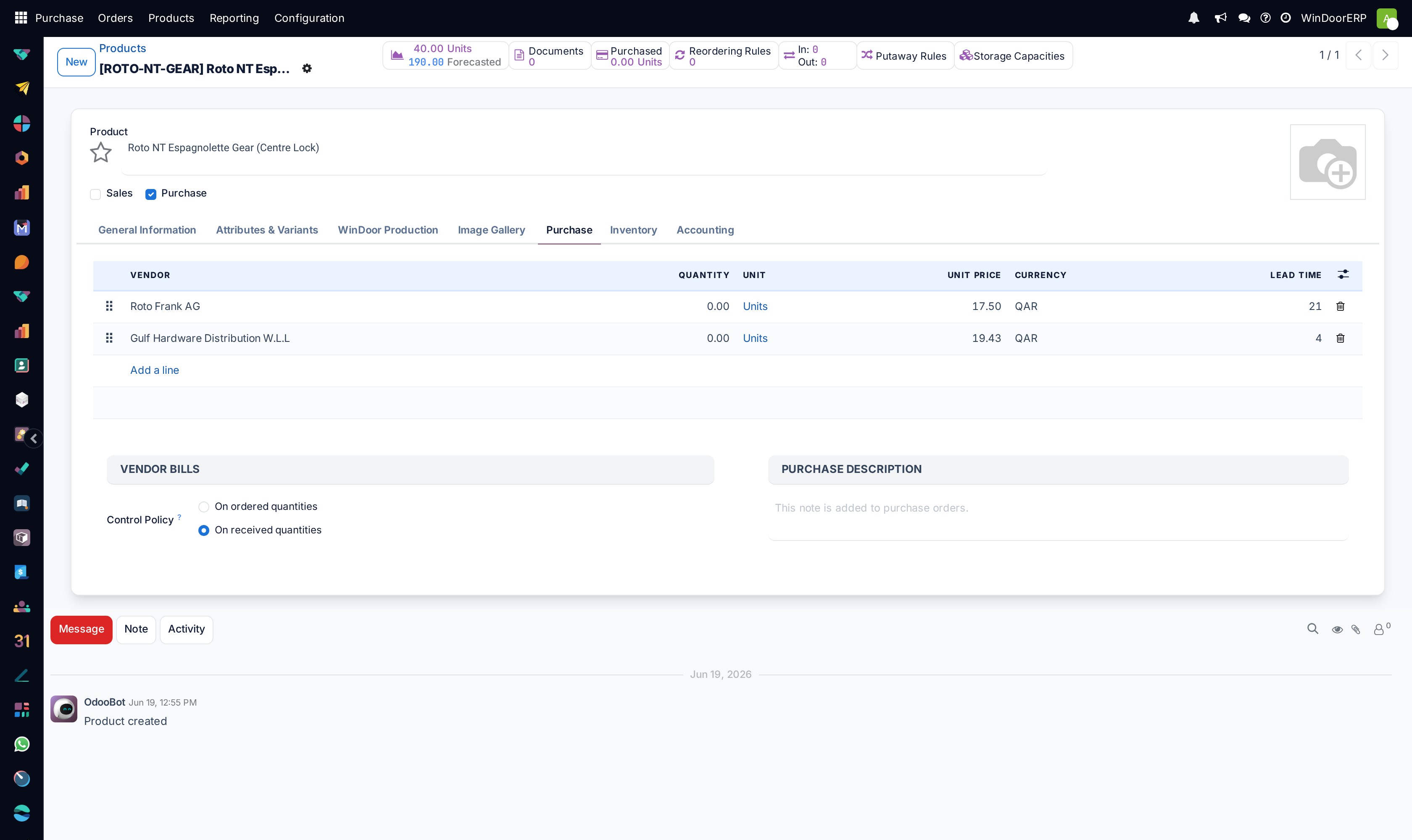
On the Purchase tab, add the vendors: each line is a pricelist row with price, minimum quantity and the vendor's Lead Time in days.
-
04
Write the Purchase Description if vendors need wording different from your internal name — it prints on every order line.
-
05
For must-never-run-out materials, open Inventory › Operations › Replenishment and give the product a rule: Min Quantity, Max Quantity, and its Trigger — Auto orders by itself; Manual proposes and waits for you.
-
06
Watch the To Order column and the ⚠ warning that appears when a Buy rule has no vendor on the product at all.
The Purchase tab, field by field
| Field | What it does |
|---|---|
| Vendor lines | The product's vendor pricelist, editable in place while the product has a single variant; with variants, the tab lists every variant's rows instead. Full detail in the vendor pricelists article. |
| Purchase Description | "This note is added to purchase orders." — appended under the product name on every order line. |
| Control Policy | Administrator-only: bill on ordered or on received quantities. Goods default to received — see the confirmed-orders article. |
| Purchased stat button | Quantity bought in the last 365 days; opens the purchase history of the product. |
How a rule becomes an RFQ
When the scheduler finds forecast stock below a rule's minimum, it creates procurement for the difference up to the maximum, picks the vendor — the rule's own Vendor column if set, otherwise the best pricelist row for the date and quantity — and writes a draft RFQ. Orders group by themselves: one draft RFQ per vendor, buyer, currency and receiving type collects everything due, and the vendor's Grouping preference (on the vendor form) can further batch by day or week. Lines for the same product merge, and a merged, larger quantity can reach a cheaper price break and reprice itself.
The dates work backwards from the need: the RFQ's order deadline is the needed date minus the vendor's lead time, minus the company's Days to Purchase (set in Inventory's Advanced Scheduling). A rule whose product has no usable vendor row falls back to the first row it finds; a product with no vendor at all fails with the "no matching vendor price" error below.
Note
Confirming any purchase order quietly adds its vendor to the products' pricelists (at the confirmed price, minimum quantity 1, lead time 0) when the vendor is missing and the product has ten sellers or fewer — vendor lists grow by themselves, and a zero-day lead time from this shortcut is worth correcting.
Troubleshooting
| Message or symptom | Cause and fix |
|---|---|
| "There is no matching vendor price to generate the purchase order for product … Go on the product form and complete the list of vendors." | The replenishment ran for a product with no usable vendor row. Add the vendor line on the Purchase tab. |
| 'This product has the "Buy" route checked but is not purchasable.' | The Purchase checkbox was removed while the Buy route stayed — untick the route or restore the checkbox. |
| "As other units of measure … have already been used for this product, the change of unit of measure can not be done…" | The unit cannot change once documents exist in another unit; archive the product and create a successor. |
| The rule ordered from the wrong vendor | The rule's Vendor column was empty, so the cheapest valid pricelist row won. Set the column — note it holds a pricelist row, and setting it also raises the ordered quantity to that row's minimum. |
| Nothing was ordered though stock is low | The rule's trigger is Manual (press Order Once or set it to Automate), the rule is snoozed, or the forecast — not the on-hand — is still above the minimum. |
Common mistakes
- Setting minimums to zero on high-turnover glass and hardware "to keep stock lean" — the rule then fires only after the shortage exists.
- Forgetting the vendor lead time is part of the trigger arithmetic: a 21-day vendor with a 2-day buffer needs the minimum set to cover three weeks of consumption, not three days.
- Leaving the auto-added zero-lead-time vendor rows from confirmations uncorrected, which teaches the scheduler that everything arrives instantly.
Was this article helpful?
Thanks — your feedback helps.
Running a window or door factory?
Ask for a demo