Quotation templates: lines, sections, validity, online signature and payment
What this does
A quotation template is a quotation you have already written: the lines, the sections, the terms, how long it stays valid, whether the customer signs and pays online, and which PDF pages wrap around it. Pick it on a new quotation and all of that arrives at once.
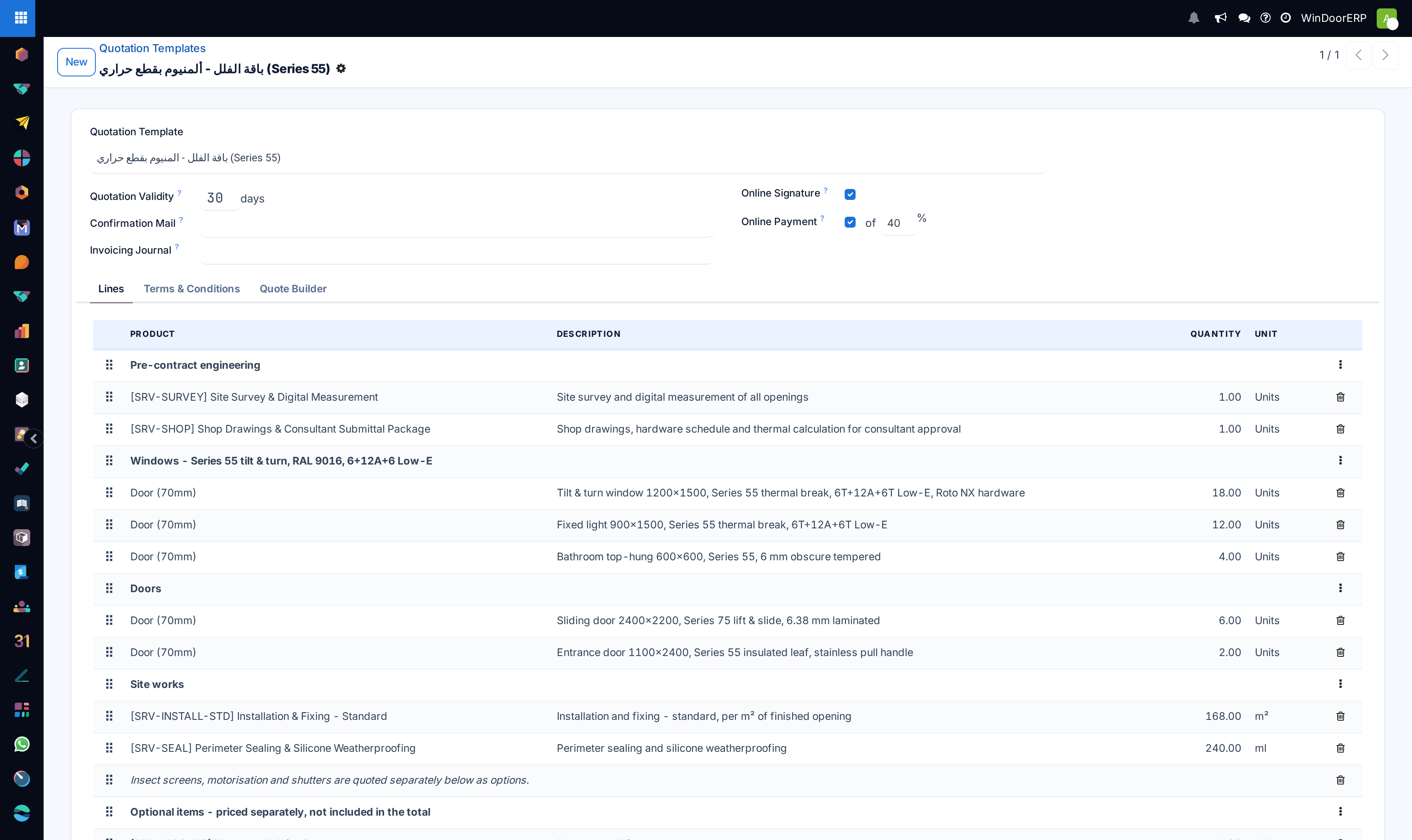
For fenestration work this is where the shape of a proposal is decided — the survey and shop-drawing lines, the openings grouped by type, the installation and sealing lines measured in square metres and linear metres, and the optional extras priced but left out of the total.
Before you start
- Enable Quotation Templates in Sales › Configuration › Settings.
- The products you want on the lines must exist, including the service lines — site survey, shop drawings, installation, sealing.
- Agree the template name with everyone who quotes. The name is a single value shared by every language, so it is not translated per reader.
Steps
-
01
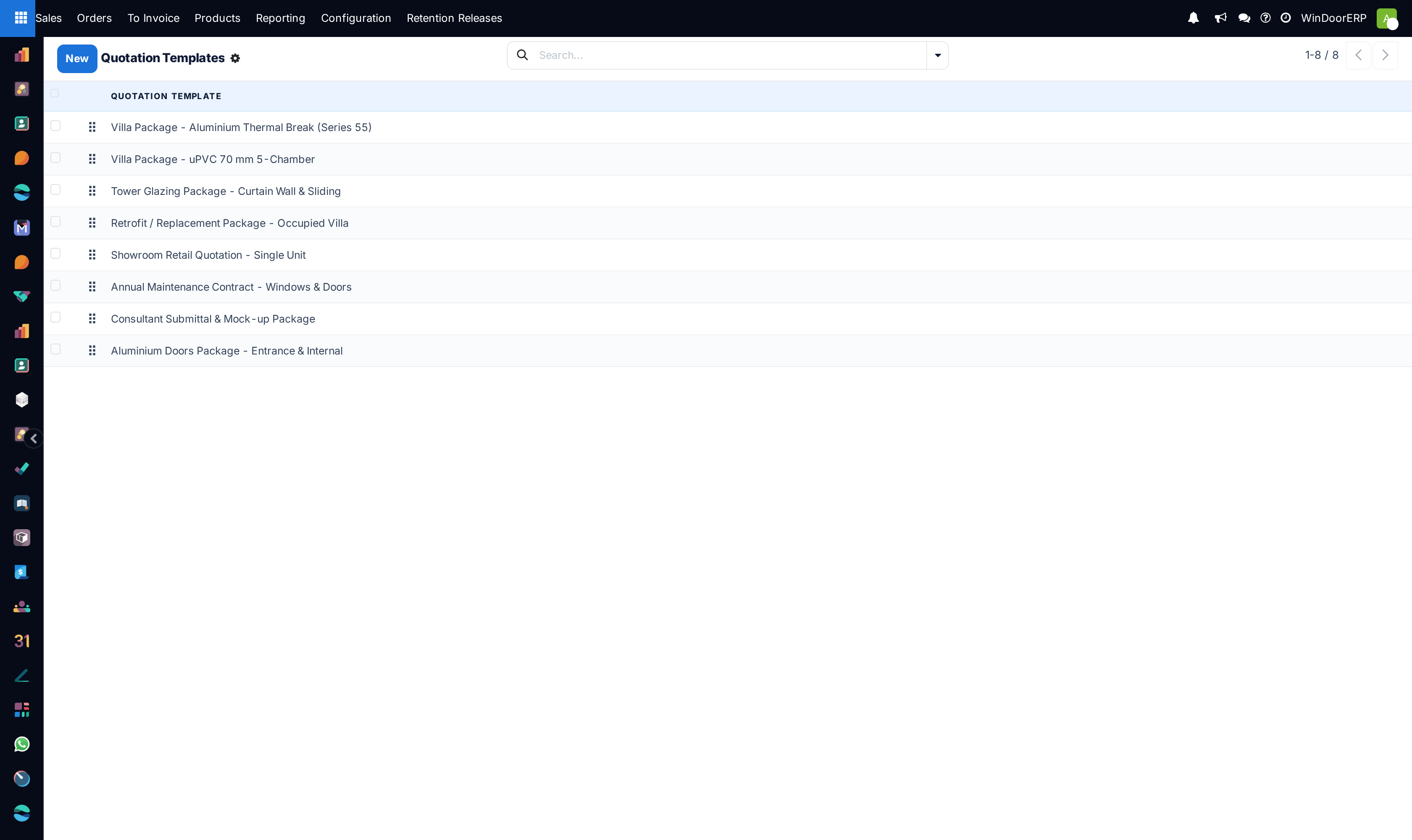
Open Sales › Configuration › Sales Orders › Quotation Templates and click New.
-
02
Name it after the job it quotes — the system, the building type and the scope, so the right one is obvious in a dropdown.
-
03
Set Quotation Validity in days. It becomes the expiry date on every quotation made from this template.
-
04
Tick Online Signature if the customer should be able to accept from the portal, and Online Payment if a deposit is required — then set the percentage beside it.
-
05
Choose a Confirmation Mail to go out automatically when the order is confirmed, and an Invoicing Journal if this kind of work is invoiced through its own journal.
-
06
Build the Lines tab: Add a product for a priced line, Add a section for a heading, Add a note for a sentence that carries no price.
-
07
Write the standing wording under Terms & Conditions.
-
08
On Quote Builder, pick the header and footer PDFs that should wrap quotations made from this template. Save.
The header of the template
| Quotation Template | The name. Required. One value for every language — see the note below. |
|---|---|
| Quotation Validity | A number of days. The quotation's expiry is counted from the day it is created, not from the day it is sent. |
| Confirmation Mail | An email template sent automatically when an order made from this template is confirmed. Leave empty to send nothing. |
| Invoicing Journal | Forces invoices from these orders into a particular journal. Empty means the company default. |
| Online Signature | Lets the customer accept the quotation from the portal by signing it. |
| Online Payment | Requires a payment before the order is confirmed, of the percentage typed beside it. Set it to 100 to demand the whole amount. |
The three kinds of line
The Lines tab takes three things, and the difference is what makes a long quotation readable.
| Product line | A real line with a quantity, a unit and a price. The description is where the detail belongs — the size, the system, the glass make-up, the hardware — because the product itself is usually generic. |
|---|---|
| Section | A bold heading that groups the lines under it. Use one per trade or per elevation; a fifty-line quotation without sections is unreadable. |
| Note | A line of text with no price, for a caveat that belongs at a particular point — what is excluded, what is quoted separately. |
Quantities and units come through as written, so a template can mix units freely: openings in units, installation in square metres, perimeter sealing in linear metres.
Optional extras are a section, not a feature
There is no "optional line" flag on a template. The way extras are quoted without inflating the total is a section headed as optional with the items under it priced at a quantity of zero, or listed and then removed on the real quotation. Whatever convention you adopt, write it into the template so every quotation follows the same one — a customer comparing two quotations from the same company should not have to work out which totals include the shutters.
Templates and headers and footers
The Quote Builder tab lists the PDF pages that wrap a quotation built from this template. Documents marked Add By Default arrive on every quotation whatever the template; anything else has to be chosen here or on the quotation itself.
This is how one company issues a villa proposal wrapped in a company profile and a warranty page, and a tower proposal wrapped in a curtain-wall credentials pack, from the same product catalogue.
Using a template on a quotation
On a new quotation, pick the template in the Quotation Template field. The lines, terms, validity, signature and payment settings are all copied in. They are copies, so editing them on the quotation changes that quotation only; and changing the template later does not reach back into quotations already made from it.
Choosing a different template on a quotation that already has lines replaces them. Anything typed by hand is lost, so pick the template first and edit afterwards.
Troubleshooting
| The Quotation Template field is not on the quotation | The setting is off. |
|---|---|
| Editing a template did not change existing quotations | By design — the lines were copied when the quotation was created. |
| The customer cannot sign or pay online | Online Signature and Online Payment are per template. Check the one that was actually used. |
| The wrong PDF pages are on the quotation | A document set to Add By Default arrives on everything. Look there before looking at the template. |
| The template name reads oddly for some users | It is a single shared value, not a translation. Rename it to something both audiences read comfortably. |
Common mistakes
- Building one template per project instead of per kind of project. A template is a starting point, not an archive.
- Leaving the detail in the product name rather than the line description, so every line of the quotation reads the same.
- Quoting extras inside the total and having to explain the difference later.
- Switching template after typing the lines, and losing them.
Was this article helpful?
Thanks — your feedback helps.
Running a window or door factory?
Ask for a demo