Sales settings: the features that unlock every other screen
What this does
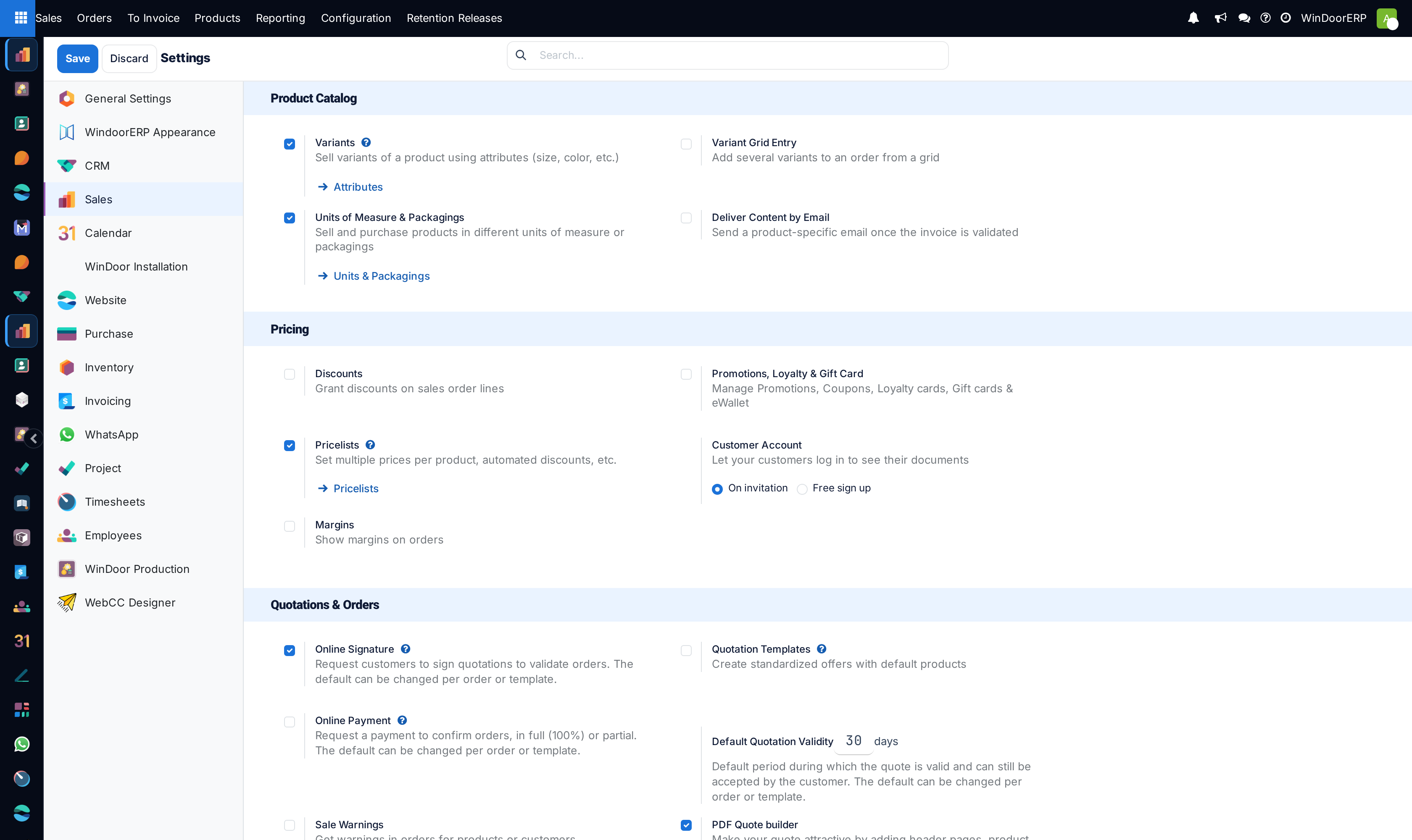
The Sales settings page is where features are switched on and company-wide defaults are set. Almost everything else in this chapter is invisible until something here is ticked — pricelists, variants, quotation templates and the PDF quote builder all hide their menus and their fields until they are enabled.
It is worth reading once as a list of what the system can do, then left alone. Settings changed casually reshape screens for everyone.
Each enabled feature also offers a shortcut straight to the screen it unlocks, so the settings page doubles as a map of where the configuration for each one lives.
Before you start
- Administrator rights. The page is not visible to salespeople.
- Know that a tick here can install software. Anything named as a feature module downloads and installs an app when saved, which takes a moment and cannot be undone by simply un-ticking it.
- Changes only take effect on Save. Leaving the page without saving discards them silently.
Steps

-
01
Open Sales › Configuration › Settings.
-
02
Under the product headings, enable Variants, Pricelists and Units of Measure & Packagings as needed.
-
03
Under quotations, set Default Quotation Validity in days and enable Quotation Templates, then pick a Default Template if new quotations should start from one.
-
04
Decide the portal behaviour: Online Signature and Online Payment, with a Prepayment percentage when a deposit is required.
-
05
Enable Discounts if salespeople may discount individual lines, and Margins if they should see cost and margin on the order.
-
06
Set the Invoicing Policy — invoice what is ordered, or what is delivered.
-
07
Enable PDF Quote builder to wrap quotations in header and footer pages.
-
08
Press Save. Some options only reveal further options once saved.
The settings that matter most here
| Variants | Turns on product attributes and variants. Without it a product cannot carry attributes at all. |
|---|---|
| Pricelists | Reveals the Pricelists menu and the pricelist field on customers and orders. Off, every order uses the product's own sales price. |
| Units of Measure & Packagings | Lets a product be bought, stocked and sold in different units. Necessary for quoting installation by the square metre while stocking profile by the length. |
| Discounts | Adds a discount column to order lines. Without it a discount has to be built into the price or into a pricelist. |
| Margins | Shows cost and margin on the order. Installs a module when enabled. |
| Quotation Templates | Reveals the templates menu and the template field on quotations. |
| Default Template | Applied to new quotations automatically. Only offered once templates are enabled and saved. |
| Default Quotation Validity | How many days a quotation stays valid when no template overrides it. |
| Online Signature / Online Payment | Whether customers may accept from the portal by signing, by paying, or both. Prepayment percentage sets how much must be paid. |
| PDF Quote builder | Enables headers, footers and their form fields. Installs a module. |
| Invoicing Policy | The company default: Invoice what is ordered bills the ordered quantity; Invoice what is delivered bills only what has actually gone out. It is a default — each product can override it. |
| Lock Confirmed Sales | Makes a confirmed order read-only, so changes need an explicit unlock. |
| Sale Order Warnings | Lets a warning be attached to a customer or product that appears when it is used on an order. |
| Pro-Forma Invoice | Adds the ability to send a pro-forma invoice from a quotation. |
A tick that installs a module is not really reversible
Options such as Margins and the PDF Quote builder install an application when saved. Un-ticking them afterwards does not uninstall it cleanly — the menus may go, but the data and the fields the module added remain, and a genuine removal is an administrator job with its own risks. Decide on a test database before enabling one of these on a live system.
Where the invoicing policy really bites
The setting here is only a default for newly created products. Each product carries its own invoicing policy, and that is what the order line actually follows, so changing the setting does not re-point products that already exist.
For made-to-measure fenestration the distinction matters more than usual: billing what was ordered lets you invoice a deposit and progress payments against the contract, while billing what was delivered ties invoicing to what has physically left the factory. Mixing the two across a single project is what produces invoices nobody can reconcile.
Email signatures are not here
A salesperson's email signature is a personal preference, not a company setting. It lives on the user's own record, reached from the avatar menu at the top right under My Profile, and each person maintains their own. Nothing on this page changes it, and an administrator wanting a consistent signature has to edit the users individually.
Troubleshooting
| A menu the manual describes is missing | Its feature is off. Pricelists, Quotation Templates, Variants and the PDF Quote builder each hide their own menu. |
|---|---|
| A change did not take | Save was not pressed. The page keeps edits in the form until then and discards them on navigation. |
| An option is missing right after enabling another | Some options only appear once the enabling one is saved. Save, then look again. |
| Changing the invoicing policy did nothing to existing products | It is the default for new ones. Change the policy on the products themselves. |
| The page will not open | Settings pages need administrator rights; a sales manager is not enough. |
Common mistakes
- Enabling features to see what they do on the live database. Each one changes screens for every user at once.
- Setting a default quotation validity and expecting it to change quotations already written.
- Assuming the invoicing policy here governs existing products.
- Looking for the email signature on this page. It is per user, under My Profile.
Was this article helpful?
Thanks — your feedback helps.
Running a window or door factory?
Ask for a demo