Find every customer or opportunity within a distance of a point
What this does
Radius Search answers a question a list cannot: what else is near this one. Give it a centre and a distance and it returns every contact, or every opportunity, within that circle — as records you can open, not as a map.
It is the tool for planning a surveyor's day, for finding who else to visit while a van is already in Lusail, and for judging whether a new enquiry sits near work you are already doing. Any user with access to the CRM can run it; there is no separate permission.
Before you start
- Records need coordinates. A contact whose latitude and longitude have never been set on their Map Location tab is invisible to this search, however close they are.
- Coordinates are set on that tab — typed in, pulled from the address with 🔄 Refresh from Address, or lifted from a pasted map link with 📍 Extract Coordinates from URL. None of this needs an API key: the address lookup uses the free OpenStreetMap service, and the map links are only links.
- Pick the centre from an existing contact where you can. Choosing one copies their coordinates for you and avoids typing latitude and longitude by hand.
- The result is a plain list of records. There is no map view of the results and no route planning here.
Steps
-
01
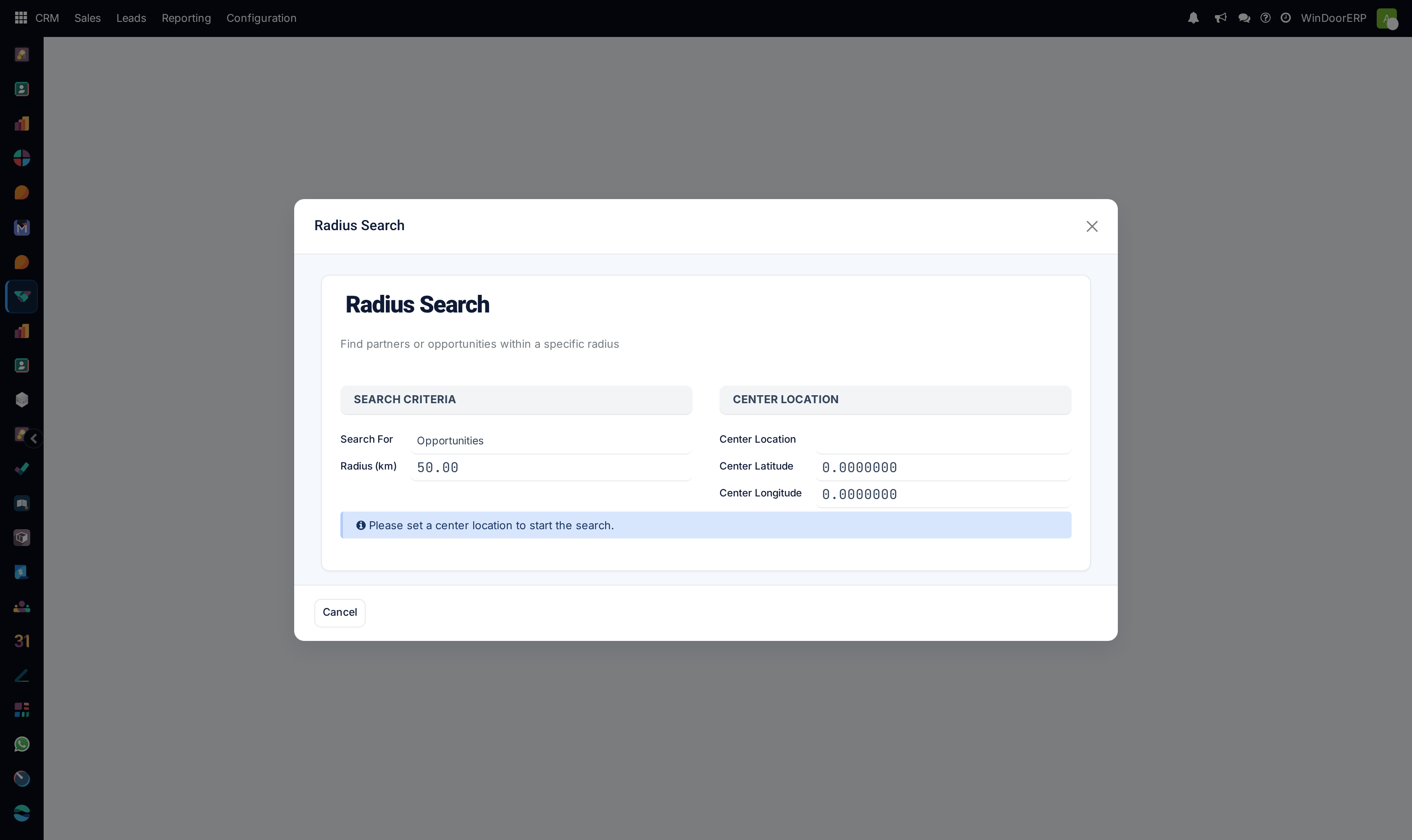
Open CRM › Sales › Radius Search. The dialog opens with the coordinates at
0.0000000, a blue notice reading "Please set a center location to start the search.", and only a Cancel button. -
02
Choose Search For: Opportunities (the default) or Partners.
-
03
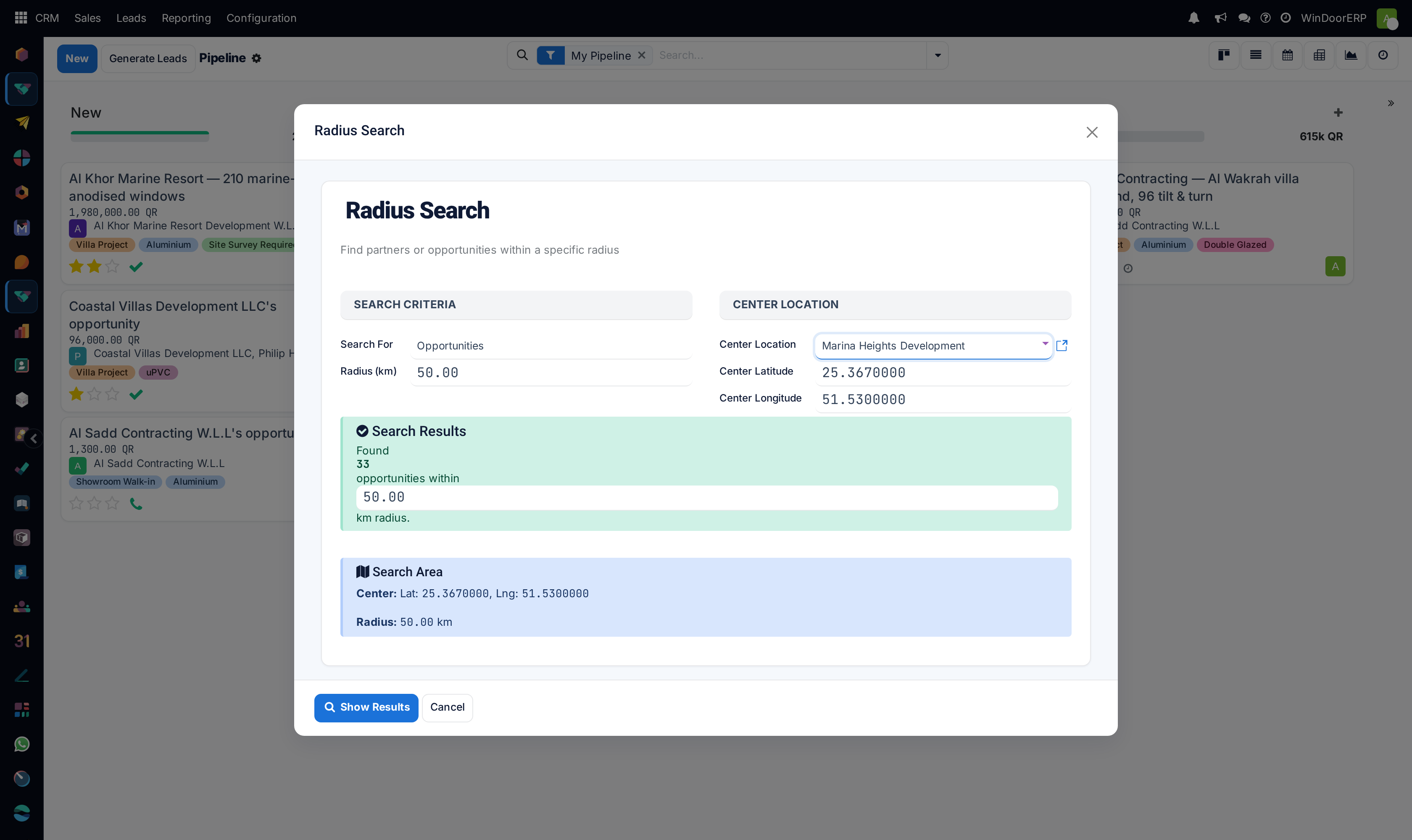
Set the Center Location by picking a contact. Their Center Latitude and Center Longitude fill in immediately. You can also type coordinates directly and leave the contact empty — the contact field is only compulsory while the latitude is still zero.
-
04
Set the Radius (km). It starts at 50.
-
05
Watch the panels change as you do. Once the search finds something, a green Search Results panel appears counting the matches, with the radius repeated inside it so you can tune the count without scrolling back; below it a blue Search Area panel restates the centre and the radius. If nothing is in range you get an amber "No results found within the specified radius." instead.
-
06
Press Show Results to open the matching records in a kanban you can work from.
The dialog, field by field
| Search For | Opportunities or Partners. Required, and it changes both what is counted and what the result list contains. |
|---|---|
| Center Location | A contact whose coordinates become the centre. Marked required while Center Latitude reads zero, and optional once you have typed a latitude yourself. |
| Center Latitude / Center Longitude | Decimal degrees to seven places. Filled from the chosen contact, and editable afterwards. |
| Radius (km) | Straight-line distance from the centre. Default 50, required, and repeated inside the results panel so it can be adjusted in place. |
| Results Found | A live count, recomputed every time you change the centre, the radius or the record type. It costs nothing to try three radii before committing. |
| Search Area | A read-only restatement of the centre coordinates and the radius, shown once a centre exists. It is there to confirm what you are about to search, not to be edited. |
| Show Results | Opens the matches. Hidden until the live count is above zero — see below. |
| Cancel | Closes the dialog. Nothing is saved either way: the search is a scratch record that is thrown away. |
How near is decided
Distance is measured with the haversine formula — the true distance across the curve of the earth, using a radius of 6,371 km — and anything at or inside the radius is returned. It is a straight line, not a driving distance, so a site across a bay is "near" even when the drive is an hour.
Opportunities are treated more generously than contacts. An opportunity is matched on its own coordinates or on those of its customer, so a deal that has never had a site location set is still found through the customer's address. A partner search uses only the contact's own coordinates. In both cases a record sitting at exactly zero latitude or zero longitude is treated as having no location and never matches.
Only opportunities are searched, never leads. If your system has the Leads stage enabled, an unqualified enquiry will not appear in these results however close it is.
A Partners search counts more than it will show you
The count in the green panel is taken across every contact record that has coordinates — companies, individual contacts, delivery and invoice addresses, suppliers, anything. But Show Results opens the contact list with the Customer Invoices filter already applied, which keeps only contacts that have been billed as customers.
So the list you land on can be shorter than the number you just read, with nothing to explain the difference. If a contact you were counting on is missing from the results, remove that facet from the search bar and it will come back.
An opportunity search has no equivalent gap — the count and the list agree.
The dialog will not let you run an empty search
The Show Results button is hidden until the live count is above zero, not merely until a centre is set. With a centre chosen and nothing in range you get the amber "No results found within the specified radius." and still no button, which is why the wizard's own refusal message, "Please set a center location.", is almost impossible to provoke from the screen.
The same guard covers the case of picking a contact who has no location: their zeros are copied into the centre fields, the wizard reads that as no centre at all, and the blue "Please set a center location to start the search." notice comes back. It does not quietly run a search off the coast of Africa. The tell is the coordinate fields reading 0.0000000 after you choose someone — set the location on their record, or type the centre yourself.
Troubleshooting
| The Show Results button is not there | The count is zero. Either no centre is set, or nothing lies within the radius. Widen the radius and watch the panel change colour. |
|---|---|
| Nothing is found | Check the centre is not 0,0, then widen the radius. Remember that only records carrying coordinates can ever match. |
| A contact you know is nearby is missing from the results | Either they have no coordinates, or they were counted but filtered out of the list by the Customer Invoices facet. Check the facet first — it is the quicker of the two. |
| The count seems too high | Opportunities also match through their customer's address, so several deals for one customer all fall at the same point. |
| Results include somewhere across the water | The measure is straight-line, not travel distance. |
| Nothing was saved when I closed it | Nothing is meant to be. The search is transient — reopen the menu and set it up again. |
Common mistakes
- Treating the radius as travel time. It is a circle on a globe.
- Choosing a centre without checking the coordinates that filled in.
- Reading a Partners count as the number of records you are about to get.
- Expecting a map or a route. This returns records; the planning is yours.
- Concluding an area is empty when what is actually empty is the location data.
Was this article helpful?
Thanks — your feedback helps.
Running a window or door factory?
Ask for a demo