Answer Andon calls from the floor
What this does
Andon is the shop floor's call for help. An operator taps 🔔 Call Manager on the terminal, and every production manager gets a live pop-up wherever they are in WindoorERP, a bell counter in the top bar, and a card on the Andon Calls board. Calls that nobody acknowledges escalate on a timer, so a raised hand is not lost when the office is busy.
Before you start
- Operators need terminal access and a work-center assignment; managers need the Production Manager role to receive the alerts.
- The board lives at Production › Shop Floor › Andon Calls, open to production users.
Steps

-
01
On the terminal, the operator opens the item and taps 🔔 Call Manager, types what they need and sends. The toast confirms: "Manager called — help is on the way."
-
02
Managers see a sticky notification — "🔔 <operator> needs a manager on <item>" with the note and order — plus the systray bell counting unresolved calls.
-
03
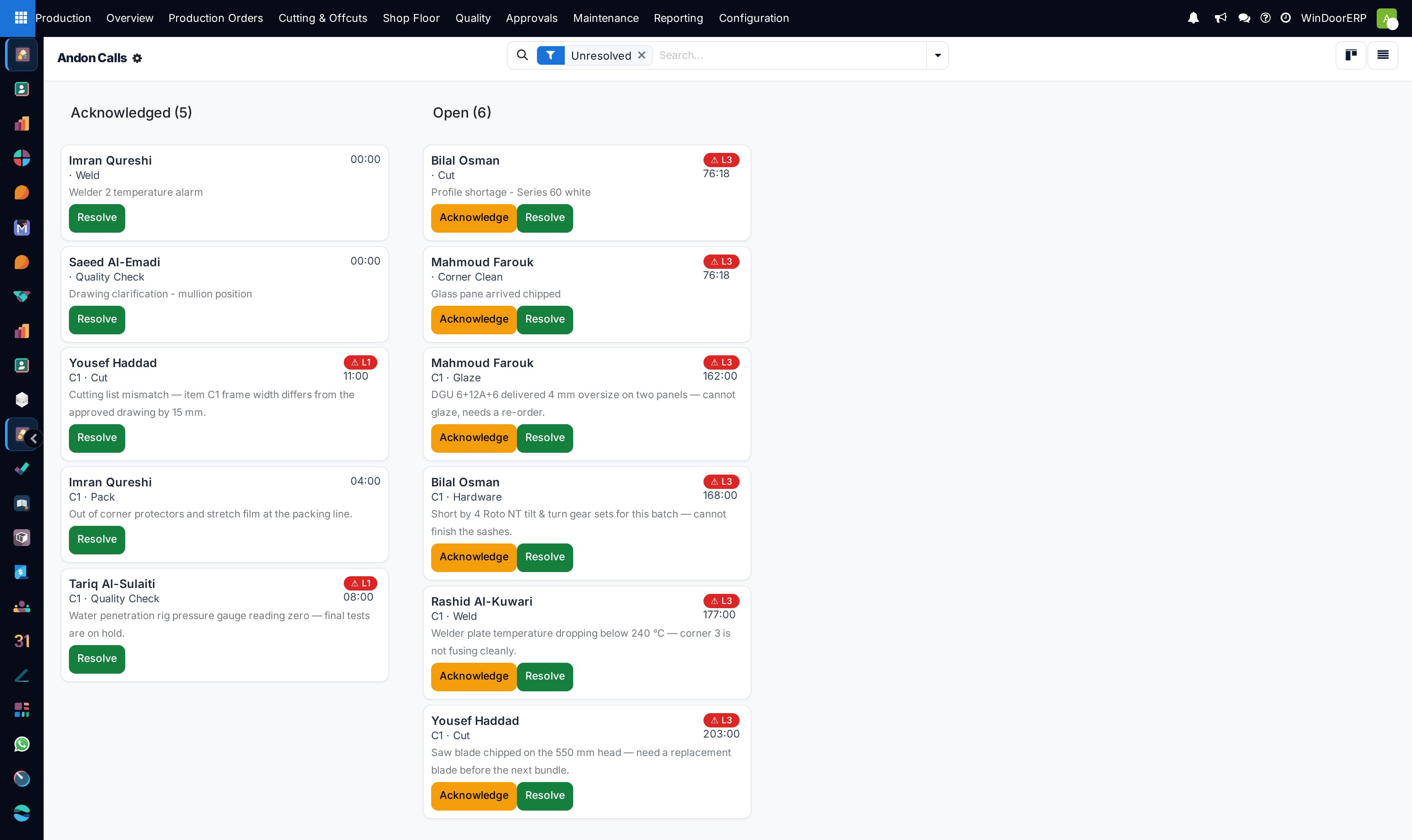
Open Shop Floor › Andon Calls. It opens on the Unresolved filter, as a kanban that refreshes itself.
-
04
Press Acknowledge on the way to the station — that stops the escalation clock and logs who is going.
-
05
Press Resolve once the operator is unblocked.
What a call carries
| Field | Meaning |
|---|---|
| Operator, Note | Who called and what they typed — defaulting to "Operator needs assistance." when they send it blank. |
| Order, Item, Work Center | Where the call came from. The work center is the item's own operation if that station is one the operator is allowed on; otherwise it falls back to the first station they are allowed on — so a call raised across centres can record the wrong one. |
| Waiting (min) | From the call until it was acknowledged — or until now, while it is still open. |
| Acknowledged By / At, Resolved By / At | The audit trail of the response — whoever clicked, which is not necessarily a manager: neither Acknowledge nor Resolve carries a role check, so any production user can press them. |
| State | Open → Acknowledged → Resolved. |
Escalation
A scheduled job checks unacknowledged calls every two minutes. Once a call has waited longer than the service target — five minutes by default, an administrator can change it — it escalates, posts "⚠ Escalated (level N) — still unacknowledged after N min." on the call, and re-alerts every manager with the note prefixed ESCALATED. The level is not a step counter: each pass recomputes it as the call's age divided by the target, capped at 3, so a call first seen twelve minutes old against a five-minute target arrives at level 2 straight away rather than climbing one level at a time. Acknowledging is what stops the clock; resolving is what closes the story.
Note
Alerting is best-effort by design: the call record and the live pop-up to all managers are the reliable parts, while the to-do activities are created for up to five managers and are allowed to fail silently rather than block the operator's call. If your team relies on activities rather than the board, keep the board open.
Troubleshooting
| Managers see no pop-up | Alerts go to members of the Production Manager group; check the role, and that the manager's session is live — the pop-up is a real-time push, not an email. |
|---|---|
| The systray bell is missing | It hides at zero unresolved calls, and for users without access to the call records. |
| Calls keep escalating although someone went | Only Acknowledge stops the clock — walking to the station does not. |
| An operator cannot call | Calling is per item on the terminal; an operator with no work-center assignment sees no items at all, which is the real problem to fix. |
| Resolved calls clutter the board | The default filter is Unresolved; clear it only when you want the history. |
Common mistakes
- Resolving without acknowledging: the waiting-time statistic is only meaningful when someone acknowledges on the way.
- Using Andon as a task queue. It is an interrupt for blocked work — an operator who calls for everything trains managers to ignore the bell.
- Closing calls from the office without a word to the floor. Acknowledging is for the board's audit trail — tell the operator too.
- Tuning the escalation target down to a minute — every call reaches level 3 and the signal is lost.
Was this article helpful?
Thanks — your feedback helps.
Running a window or door factory?
Ask for a demo