Build activity plans: reusable step lists launched on an opportunity
What this does
An activity plan is a short, reusable checklist of activities. Launch it on an opportunity and every step is scheduled at once, each with its own type, its own summary, its own due date and its own owner — instead of someone remembering to create them one at a time.
It suits any sequence you repeat: qualifying a new enquiry, chasing a quotation, walking a job from site survey to order. The plan holds the shape of the process; the dates are worked out when you launch it.
Before you start
- You need Sales Manager rights to reach CRM › Configuration › Activities › Activity Plans.
- Create the activity types you need first. A plan can only reference types that already exist.
- Agree the wording before you type it. A plan's name is a single value shared by every user in every language — unlike an activity type's name, which is translated. Whatever you write is what an Arabic reader sees too.
Steps
-
01
Open CRM › Configuration › Activities › Activity Plans and click New.
-
02
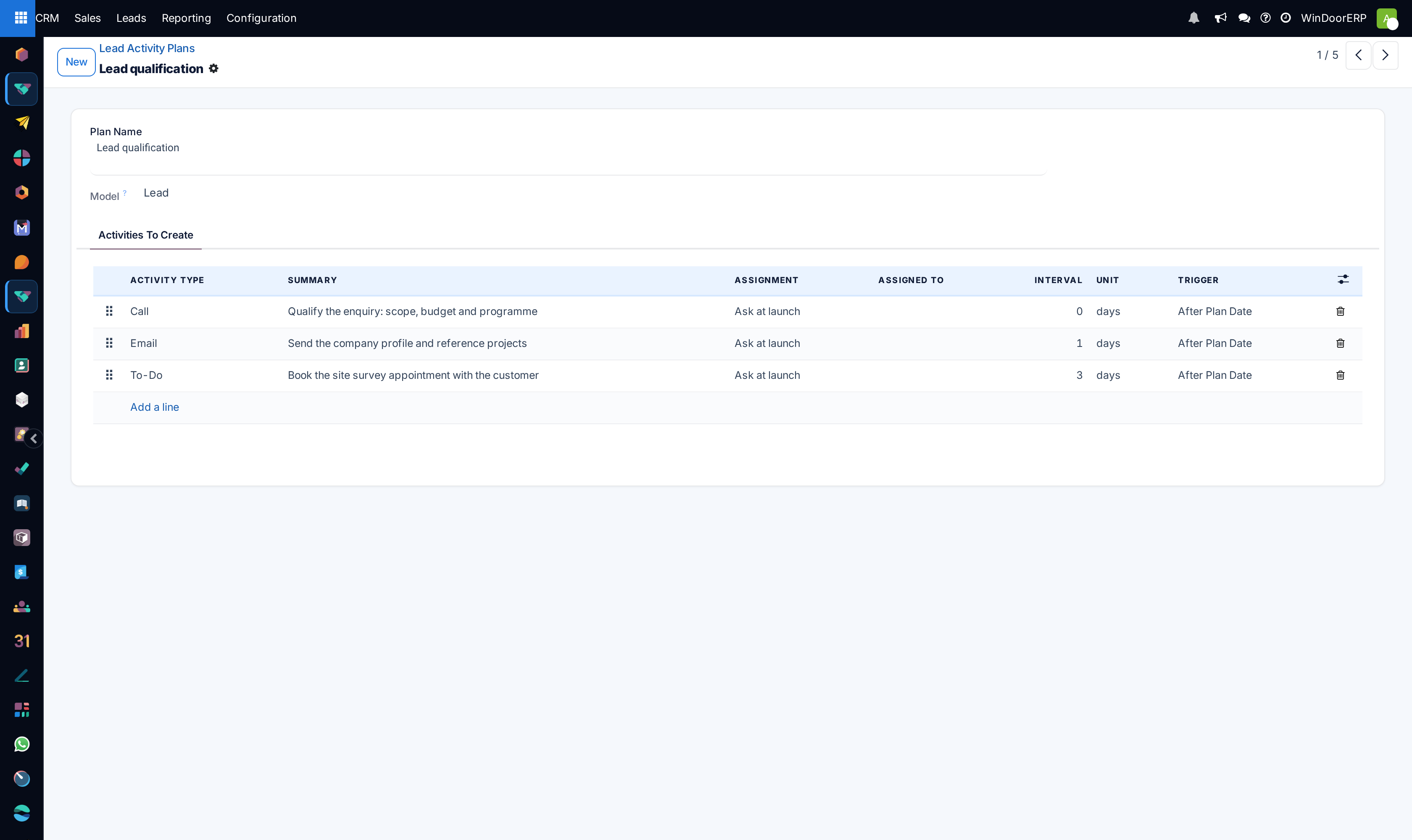
Type a Plan Name that reads as a process, not a task — Lead qualification rather than Call the customer.
-
03
Check the Model. It is read-only and set from the menu you came in through, so a plan created here always applies to leads and opportunities.
-
04
On the Activities To Create tab, add a line per step: choose the Activity Type, write a Summary, and set who it goes to under Assignment.
-
05
Set Interval, Unit and Trigger to place the step in time — for example 3 days after the plan date.
-
06
Drag the handle at the left of each row to order the steps, then save.
-
07
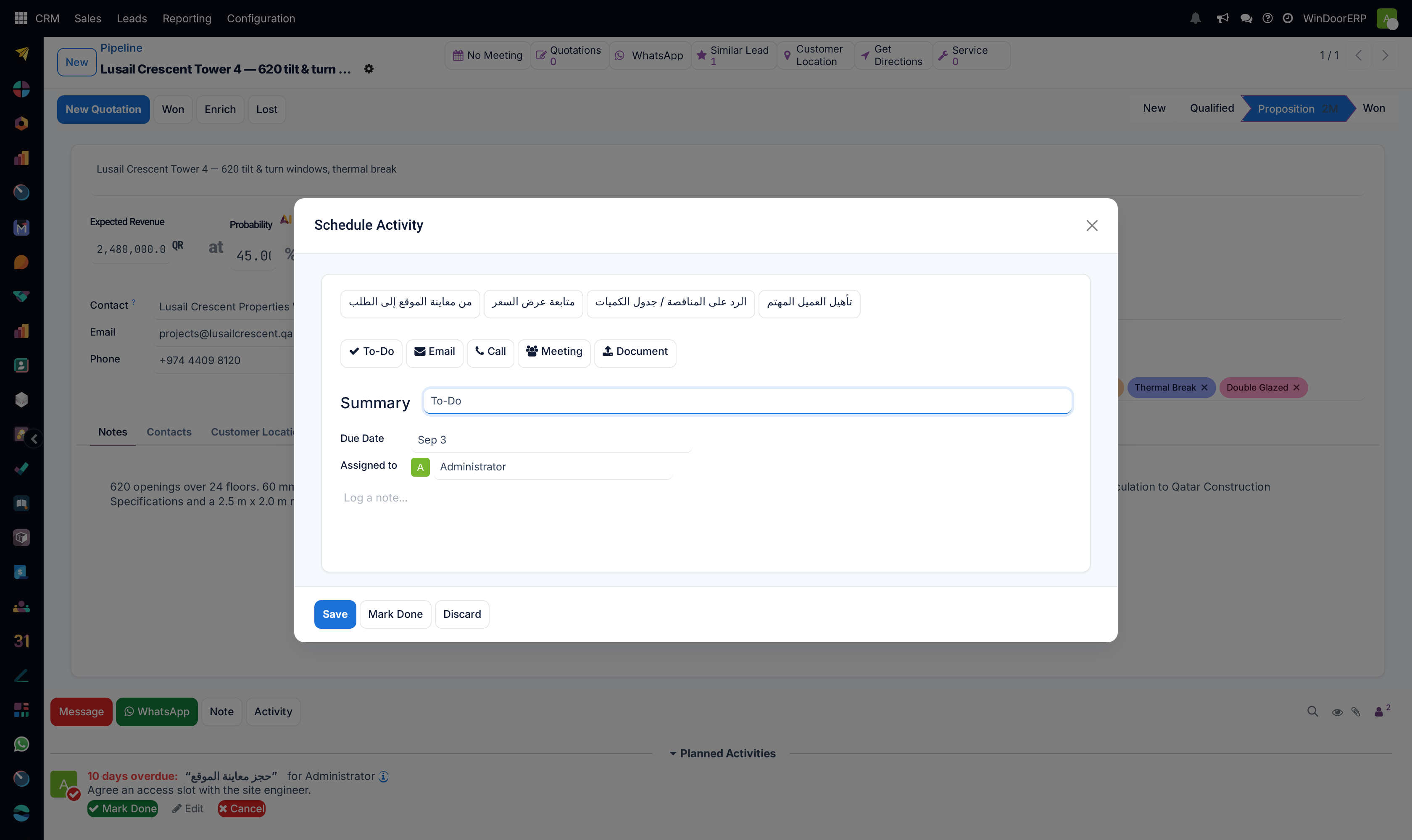
To use it, open an opportunity, click Activity in the chatter, and pick the plan from the row of buttons at the top of the dialog.
The plan, field by field
| Plan Name | Required. Placeholder e.g. Onboarding. Not translated — see the warning below. |
|---|---|
| Model | What the plan can be launched on. Read-only: it comes from the menu, so plans made under CRM are for leads and opportunities and cannot be repointed afterwards. |
| Company | Optional. Visible to all when left empty. |
| Activities To Create | The steps, in order. An empty plan is allowed but does nothing. |
A step, column by column
| Activity Type | Which kind of activity to create — Call, Email, To-Do, Meeting, Document. The type supplies the icon and its own default behaviour. |
|---|---|
| Summary | The one-line instruction the assignee sees. Placeholder e.g. Discuss Proposal. Leave it empty and the activity inherits the type's default summary, which is usually too vague to act on. |
| Assignment | Who gets it. Ask at launch leaves it to be chosen when the plan is run; Default user fixes one person now. |
| Assigned to | The person, editable only when Assignment is Default user. |
| Interval / Unit | How far out the step falls: a number, then days, weeks or months. |
| Trigger | After Plan Date or Before Plan Date — which side of the reference date the interval is counted on. |
| Next Activities | Hidden by default. An optional column, available from the ⚙ toggle at the right of the header row. |
How the dates are worked out
Every step is measured from one reference date you supply when you launch the plan, not from the moment you press the button and not from each other. An interval of 0 lands on the reference date itself, 3 days after puts it three days later, and a Before Plan Date trigger counts backwards — which is how you build a countdown to a fixed deadline such as a tender submission.
Because every step hangs off the same date, the steps are independent. Completing step one early does not pull step two forward, and letting step one go overdue does not push step three back. A plan is a schedule, not a workflow.
Plan names are not translated; activity type names are
A plan's name is stored once and shown to everyone, whatever language they use the system in. An activity type's name is stored per language and follows the reader. This is why the plan buttons in the Schedule Activity dialog can appear in one language while the To-Do, Email and Call buttons beside them follow the reader's own. If your team works in two languages, agree plan names that both sides can read.
Launching a plan
Open an opportunity and click Activity at the bottom of the form. The dialog lists every plan available for this model as a button along the top; choosing one replaces the single-activity form with the plan's summary, asks for the reference date, and asks who each Ask at launch step should go to. Confirm, and every activity appears at once in Planned Activities.
Launching the same plan twice creates a second full set. Nothing detects that the first is still open, so a plan run by mistake has to be cancelled activity by activity.
Troubleshooting
| The plan is not offered on an opportunity | Its Model is not leads and opportunities. Because the field is read-only, a plan created from the wrong menu has to be rebuilt from the right one. |
|---|---|
| Every step landed on the same day | All the intervals are 0. The interval is per step, and a new line starts at 0. |
| The activities have no owner | The steps are set to Ask at launch and the question was skipped. Set Default user on the steps that always belong to the same person. |
| The plan names are in the wrong language | They are not translatable, so there is nothing to fix in the translation. Rename the plan itself. |
| Deleting a step from a plan | Removes it from future launches only. Activities already created by earlier launches are untouched. |
Common mistakes
- Building a plan of ten steps. Anything past four or five gets ignored wholesale; short plans get used.
- Expecting the steps to chain. They do not — every date is measured from the reference date, and nothing waits for anything.
- Assigning every step to a named person, then having to edit the plan whenever someone changes role. Ask at launch ages better.
- Writing a summary that repeats the activity type. Call as the summary of a Call step tells the assignee nothing.
Was this article helpful?
Thanks — your feedback helps.
Running a window or door factory?
Ask for a demo