Track and reuse profile offcuts
What this does
Production › Cutting & Offcuts › Offcut Inventory is the register of usable bar remnants: every leftover long enough to cut from again, listed by product and by length, with a status that says whether it is free, spoken for, already cut up, or thrown away. Rows should only ever come from the bar optimizer rather than be typed in — this screen is where you look up what the rack holds and where you write off a piece that no longer exists.
It is deliberately not warehouse stock: a simple length-indexed table that creates no stock quants, whose Storage Location field is described as Purely informational. Nothing here moves inventory or appears in a stock report; it is a rack list the optimizer can read.
Before you start
- A production role. The menu sits under Cutting & Offcuts, open to production users.
- An order that has run Optimize Bars with Generate Offcut Pieces switched on — that is the only thing that fills this list.
- Some idea of where the rack is: the location on a row is a label, not a stock location that holds anything.
Steps
-
01
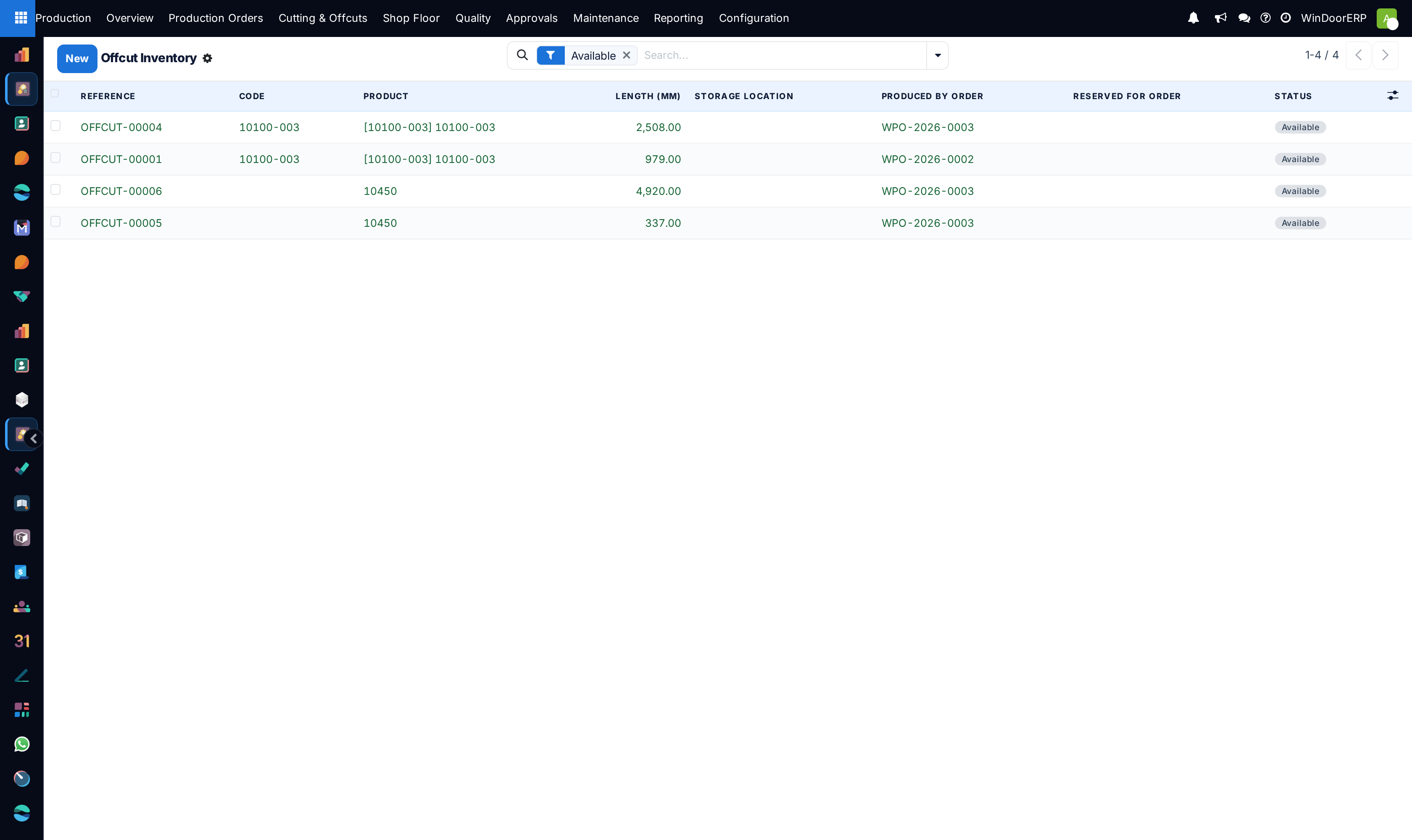
Open Production › Cutting & Offcuts › Offcut Inventory. It opens with the Available filter already applied, so you are looking at free stock, not history — clear the filter to see reserved, consumed and scrapped pieces.
-
02
Read a row by its reference and its display name. The name is built as
OFFCUT-##### · CODE · 1234mm ×N: the product code, the length in millimetres, and ×N — how many identical pieces that single row represents. -
03
Open a piece for the whole record: product, code, length, storage location, status, the order and bar that produced it and, once it is spoken for, the order and bar it is reserved for.
-
04
Write off a piece that has been lost, bent or cut down: press Scrap. It leaves the Available list but the row stays for the record.
-
05
Undo a mistaken write-off with Restore to Available, which appears only on scrapped rows.
-
06
Otherwise leave the list alone. Reserving, releasing and consuming are done for you — see The lifecycle below.
The fields
| Field | What it is |
|---|---|
| Reference | Read-only, allocated from a sequence as OFFCUT-#####. |
| Display name | Computed as REFERENCE · CODE · LENGTHmm ×N. The ×N is the only place the quantity is visible anywhere in this screen. |
| Product / Code | The profile or reinforcement bar the remnant came from. Required, and a product with offcuts cannot be deleted. |
| Length (mm) | Required. The usable length of one piece — not the total of the row. |
| Quantity | How many identical pieces this row stands for. Defaults to 1. It is not a column in the list and not a field on the form. |
| Storage Location | Informational only. New rows are filed at the location an administrator configured for produced offcuts; correct it so the floor can find the rack, but nothing reads it back. |
| Status | Available, Reserved, Consumed, Scrapped. The status bar on the form shows the first three; scrapped is a dead end reached from the button. |
| Produced By Order / Bar | Read-only provenance: the order whose cutting plan left this rest, and which bar of that plan. |
| Reserved For Order / Bar | Read-only, and the group only appears once the piece is reserved or consumed. |
| Notes | Free text. |
Warning
A row is not a piece. Quantity is stored but appears in neither the list nor the form, so a row reading OFFCUT-00042 · PVC-70F · 1180mm ×40 is forty bars, and a reader who skims the reference and length sees one. Read the display name to the end before you count the rack, and before you scrap a row — Scrap writes off every piece the row represents, not one of them.
The lifecycle
Three of the four states are driven entirely by the optimizer and the order state machine. You never set them by hand, and there is no button for them. Creation is discipline rather than enforcement: a production user can add a row here by hand, and nothing stops them — but a hand-made row is invisible to the optimizer's own bookkeeping, so it will never be reserved, reconciled or consumed.
| Transition | What triggers it |
|---|---|
| Created Available | Optimize Bars on an order with Generate Offcut Pieces on, one row per bar pattern with the pattern's repeat count as its quantity. |
| Available → Reserved | A later Optimize Bars run nests pieces on this remnant. The run refuses anything not free: "Cannot reserve offcut(s) that are not available: %s". Toast fragment: "Reserved %d offcut(s) from inventory." |
| Reserved → Available | Re-running Optimize Bars on the borrowing order, or cancelling it, releases the reservation before rebuilding. |
| → Consumed | Confirm on the borrowing order commits the material. Consume accepts a piece that is available or reserved. |
| Any → Scrapped | The Scrap button. It is hidden on consumed and scrapped rows, and if you reach a consumed record another way the method skips it silently rather than erroring. |
| Scrapped → Available | Restore to Available. Guard: "Only scrapped offcuts can be restored to available. The following are not scrapped: %s" |
Partial use splits a row rather than over-committing it: if a plan needs 3 of a ×40 row, the reservation carves out the three it needs and leaves the rest available, so the count on the rack keeps matching the count in the list.
What becomes an offcut
A rest is booked into this list only when all three conditions hold: the order has Generate Offcut Pieces on, the bar was a fresh bar rather than a remnant itself, and the leftover reaches the reusable threshold. That threshold is the product's own Reusable Rest Threshold if it has one, otherwise the fleet default of 300 mm. Anything shorter is waste on the cutting plan and never appears here.
Filling the list and drawing on it are two different switches. The second one is Use Offcut Pieces on the order that is optimising: with it off, the optimizer never looks at this inventory at all, and the Available → Reserved → Consumed lifecycle below simply never happens — remnants keep accumulating and nothing ever spends them.
Both switches take their default, and produced offcuts take the storage location they are filed at, from three settings that are rendered on no screen at all. An administrator sets them; a user cannot.
Note
Consumed is deliberately a one-way door: there is no Restore on a consumed piece, because restoring one would put a bar back on the list that has already been cut into a job — phantom inventory that the saw would eventually be sent to find. Scrapped rows restore; consumed rows do not.
Troubleshooting
| The list looks empty although the floor has racks full of remnants | The default Available filter is on, or no order has run Optimize Bars with Generate Offcut Pieces enabled. Only the optimizer creates rows. |
|---|---|
| "Only scrapped offcuts can be restored to available. The following are not scrapped: %s" | Restore works on scrapped pieces only. A consumed piece cannot be brought back at all. |
| "Cannot reserve offcut(s) that are not available: %s" | Optimization tried to take a piece that another order already reserved or consumed, or that was scrapped after the plan was built. Re-run Optimize Bars. |
| "Optimize Bars: %d offcut(s) previously produced by this order are now reserved or consumed by downstream orders and cannot be rolled back: %s" | Re-optimising deletes the free remnants this order produced, but pieces another order has already taken stay put. The chatter names them; nothing is wrong. |
| Rows pile up as Available and are never reserved | The orders being optimised have Use Offcut Pieces off, so nothing is drawing on the rack. Switch it on for the order, or ask an administrator to change the default. |
| Scrap does nothing on a row | The row is already consumed. The method skips consumed records without an error. |
| A short rest never turned into an offcut | It fell below the reusable threshold (product override, else 300 mm), or it came off a bar that was itself an offcut — rests of rests are always waste. |
| Storage Location is set but the piece is not in that stock location | Correct. The field is informational; no stock move or quant is ever created by this screen. |
Common mistakes
- Counting rows instead of reading the
×Nat the end of the display name, and under-ordering bars as a result. - Scrapping a row to write off one damaged piece, which writes off all of them.
- Expecting this list to reconcile with warehouse stock. It never will — offcuts have no quants and no valuation.
- Judging availability from a list opened before someone re-optimised a big order: reservations move without warning.
Was this article helpful?
Thanks — your feedback helps.
Running a window or door factory?
Ask for a demo