Nest glass onto sheets
What this does
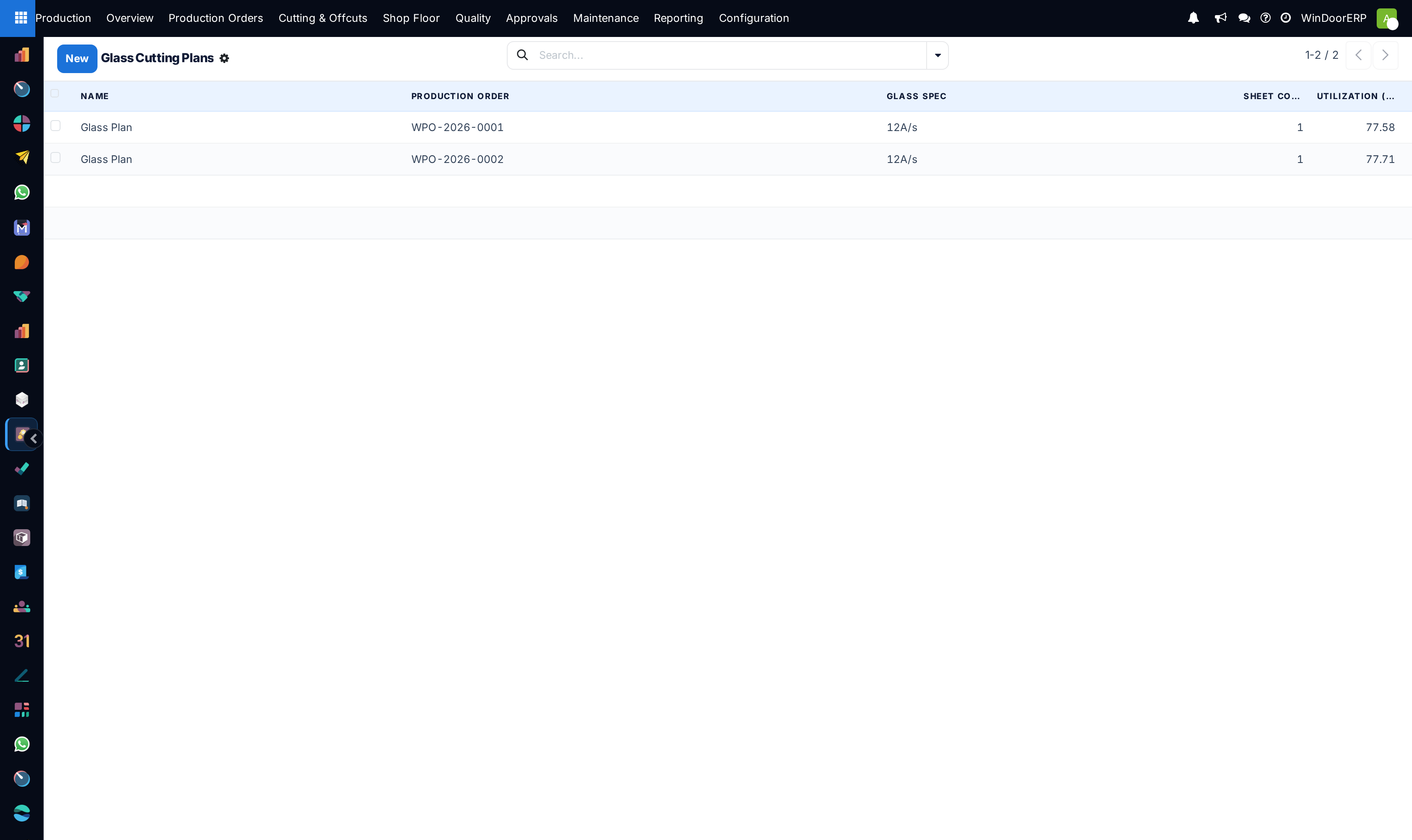
Production › Cutting & Offcuts › Glass Cutting Plans holds the sheet-nesting results: one plan per glass product and specification on an order, holding the sheets it needs, the rectangle each panel occupies on its sheet, how much of the glass was used, and the leftovers big enough to keep. The glass table works from these plans; the vendor receives the order's glass cutting PDF, which the glass purchase wizard attaches automatically.
Plans are computed, never composed. The only thing that creates them is Nest Glass on the production order's Material tab.
Before you start
- A production role; the menu sits under Cutting & Offcuts, open to production users.
- A production order with its material list generated, containing rectangular glass lines with a width and a height above zero.
- An agreed sheet size, because the plan's own defaults are what will be used — see the callout.
Steps
-
01
On the production order, open the Material tab and press Nest Glass. It asks first: "This regenerates the glass nesting plans from the order's rectangular glass panels. Continue?"
-
02
Read the toast it returns. It states how many plans and sheets were produced, and appends a fragment for each thing that happened: remnants returned to stock, irregular panels skipped, and — as a warning toast — panels too big to nest.
-
03
Open Production › Cutting & Offcuts › Glass Cutting Plans and pick the plan for the product and specification you are cutting. Every plan is named Glass Plan; the order, product and glass spec on the row are what tell them apart.
-
04
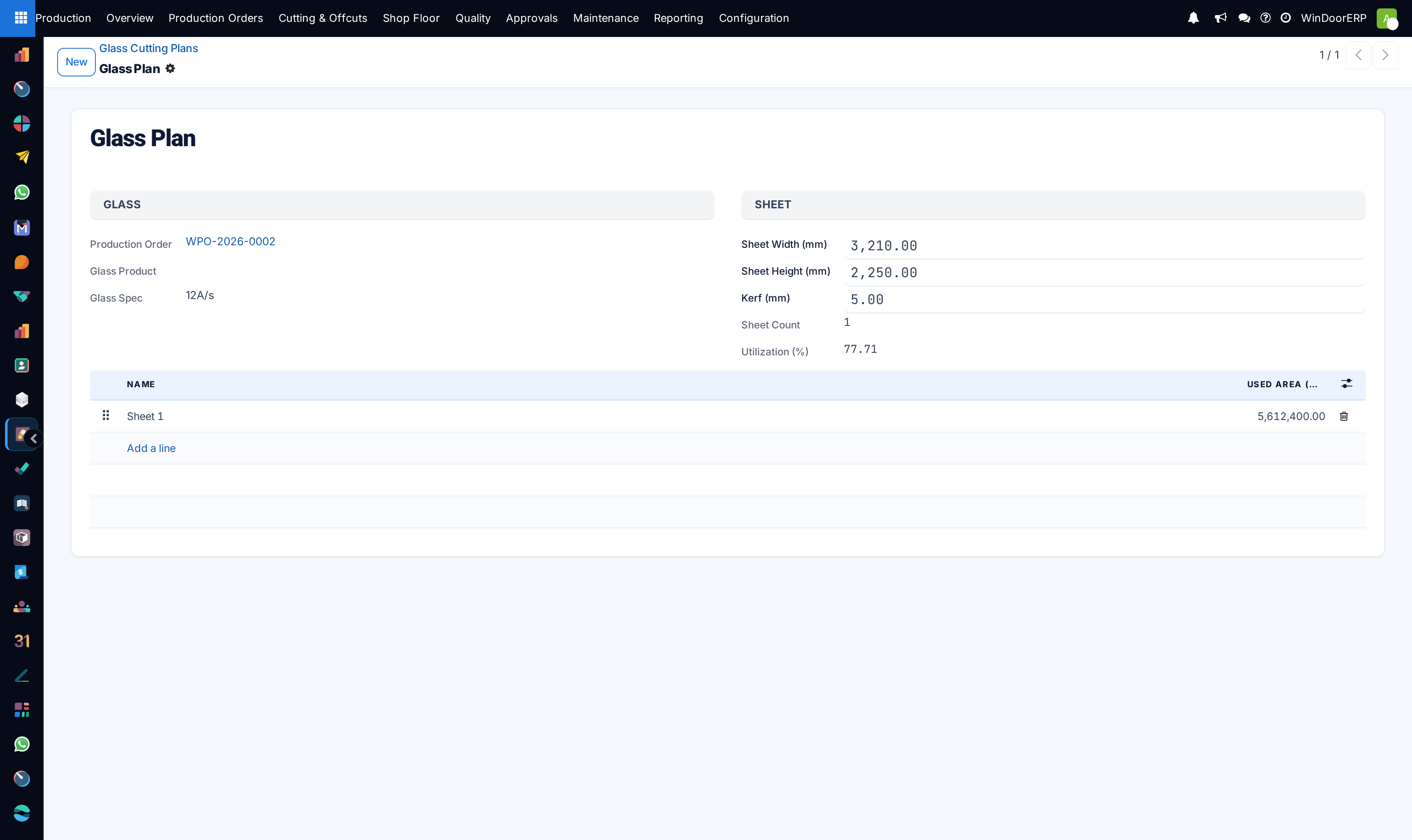
Read the header: sheet width and height, kerf, the sheet count and the Utilisation percentage.
-
05
Work the Sheets tab: one row per physical sheet, with the used area and its list of pieces. Open a sheet to see each panel's label, its
x/yorigin, its width and height, and whether it was rotated to fit. -
06
Cut the skipped panels by hand. Oversize panels are not in any plan; irregular shapes are kept per panel and are not nested either.
How the nesting works
Glass material lines are grouped by product and glass specification, and each group is packed with a guillotine best-short-side-fit algorithm: every cut runs edge to edge, as a glass table requires, and each panel is placed in the free rectangle whose shorter side it fits most tightly. Rotation is allowed, so a panel may be laid on its side if that fits better — the piece row says so.
Before it packs anything, Nest Glass clears the ground: it deletes this order's still-available glass offcuts, so remnants recorded by a previous run do not survive as phantom cullet, and it deletes the order's existing glass plans. What you see after a run is always the whole current answer, never a merge with the previous one.
After packing, the plan harvests its leftovers: every remnant rectangle measuring at least the minimum on both sides — 300 mm by default — is written into Glass Offcut Inventory, with identical sizes grouped onto one row with a quantity.
The fields
| Field | What it is |
|---|---|
| Name | Read-only and always the literal text Glass Plan. It is not a reference; identify a plan by its order, product and spec. |
| Production Order | The order the plan belongs to. Deleting the order deletes its plans. |
| Glass Product / Glass Spec | The grouping key: one plan per product and specification. |
| Sheet Width (mm) / Sheet Height (mm) | The stock sheet the nesting assumed. Plan defaults are 3210 × 2250. |
| Kerf (mm) | The blade allowance charged per cut. Plan default 5. |
| Sheets / Sheet Count | The nested sheets and how many there are. |
| Utilisation | Used glass area as a percentage of sheet area × sheet count. Recomputed and stored. |
| Sheet: used area, remnant rectangles | Per sheet, the area consumed and the leftover rectangles as raw data. The remnant column is hidden by default in the list. |
| Piece: label, X, Y, width, height, rotated | Where each panel sits on its sheet, measured from the sheet origin, and whether it was turned. |
There is no status, no confirm step and no button anywhere in the glass-plan hierarchy. A plan exists or it does not.
Important
Nesting always assumes a 3210 × 2250 mm sheet and a 5 mm kerf. Those are fixed defaults: every run rebuilds the plans with them, so editing a plan's sheet size or kerf changes nothing about the layout — the pieces stay where the packer put them and only the utilisation percentage recalculates, which means an edited plan reports a flattering number over a layout that no longer fits. Cutting to a different sheet is a configuration change for an administrator, not a field on this screen. (The Glass Sheet Width / Height settings you may find elsewhere feed the order component summary, not this nesting.)
What the run tells you
| Message fragment | What it means |
|---|---|
| "%(plans)d glass plan(s) generated using %(sheets)d sheet(s)." | The headline result: plans built, sheets consumed. |
| " %d reusable remnant(s) returned to stock." | Remnants at or above the minimum on both sides were booked into Glass Offcut Inventory — as a record for manual picking. Nesting never draws on them: the next run always starts from full sheets. |
| " %d irregular panel(s) skipped (kept per-panel)." | Counted for every glass line without usable width and height — genuinely shaped panels and lines whose dimensions are simply blank. Check for missing sizes before assuming the glass is irregular; skipped panels are cut to the drawing. |
| " %d panel(s) exceed the sheet size and were NOT nested — cut them manually." | Appears with a warning toast. Those panels are larger than the sheet and are in no plan at all. |
Troubleshooting
| "No rectangular glass panels with dimensions to nest." | The run found nothing to pack — no glass lines, or none with a positive width and height. Check the material list for blank dimensions. |
|---|---|
| The order has no glass plans | Nest Glass has not been run, or the material list has no rectangular glass lines with a positive width and height. |
| "Sheet dimensions must be greater than 0." | The packer was handed a zero or negative sheet size. Fix the sheet width and height before nesting. |
| A panel is missing from every plan | Either it is oversize — the warning toast names how many — or it is irregular and kept per panel. Both are cut by hand. |
| Utilisation changed but the sheets did not | Someone edited the sheet size or kerf on the plan. Editing does not re-nest; only the percentage moves. Re-run Nest Glass. |
| Glass offcuts recorded yesterday have disappeared | Re-nesting deletes this order's still-available glass offcuts before packing. Pieces already scrapped or otherwise no longer available are not touched. |
| Every plan is called "Glass Plan" | Expected — the name is a fixed read-only label. Sort or group by production order and glass product instead. |
| Two plans exist for the same glass product | They differ by glass specification: grouping is per product and spec. |
Common mistakes
- Editing Sheet Width, Sheet Height or Kerf on a finished plan and believing the layout followed.
- Cutting from a plan printed before the last Nest Glass run — re-nesting deletes and rebuilds everything, so old paper describes sheets that no longer exist.
- Reading the toast's headline and skipping the appended fragments, which is where the panels nobody nested are reported.
- Assuming irregular shapes were nested somewhere. They never are; only rectangles enter the packer.
- Treating Utilisation as a yield figure for the job as a whole. It measures the nested rectangles only, and ignores every panel that was skipped.
Was this article helpful?
Thanks — your feedback helps.
Running a window or door factory?
Ask for a demo