Maintain vendor pricelists: prices, quantity breaks and lead times
What this does
The vendor pricelist is the purchase brain: who sells each product, at what price from which quantity, in which currency, with how many days of lead time, and until when the offer is valid. RFQ lines price themselves from it, replenishment picks vendors by it, and arrival dates are computed from its lead times.
Before you start
- Editing pricelists is Purchase-administrator work; buyers consume the prices.
- Rows live in two views of the same data: Purchase › Configuration › Vendor Pricelists across all products, and the Purchase tab of each product form.
Steps
-
01
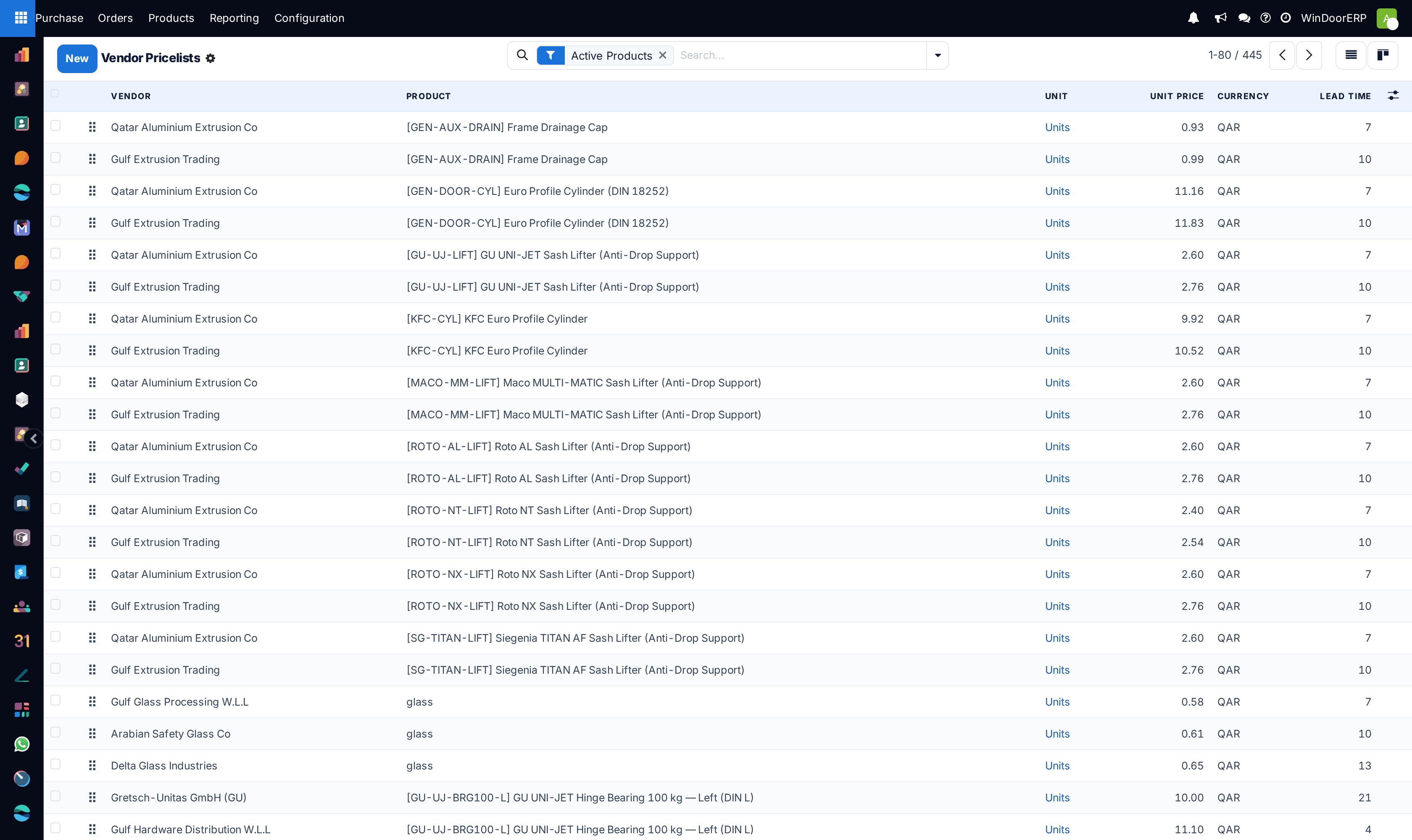
Open Purchase › Configuration › Vendor Pricelists — one row per vendor-product-quantity offer, filtered to active products.
-
02
Create the row: Vendor, product, Unit Price and Currency — the currency follows the vendor's supplier currency by itself.
-
03
Set Quantity — the minimum from which this price applies. Quantity breaks are simply several rows: one at 1, one at 100, one at 500, each cheaper.
-
04
Set the Lead Time in days from order confirmation to your dock — this single number drives every computed arrival date for the vendor's product.
-
05
Bound the agreement with Validity dates, and record the vendor's own Vendor Product Code and Vendor Product Name — they print on the RFQ instead of your internal ones.
How a row is chosen
When a purchase line needs a price, the candidates are the product's rows for that vendor (or its parent company) that are valid on the order date, match the line's variant — a row with no variant matches all — and whose minimum quantity is reached. Among candidates, the cheapest price after discount wins; the Sequence handle only breaks ties. No candidate: the line falls back to the product's cost price, and a price someone typed by hand is never overwritten.
Two consequences worth internalising: a "better" row that is ignored usually fails one of the filters (quantity, dates, variant, unit); and putting a preferred vendor on top does not prefer them on a mixed product — vendor choice on replenishment is also cheapest-valid-row unless the reordering rule names a vendor explicitly.
The columns that hide by default
The list keeps Vendor Product Name/Code, Validity dates, Discount (%) and the per-variant column behind the column picker. The Discount works with the price: what the selection compares and the order line applies is the discounted price.
Where rows come from without you
Confirming a purchase order adds missing vendor rows automatically — confirmed price, minimum quantity 1, lead time 0 — for products with ten or fewer sellers. Treat those as drafts: the zero lead time in particular will make every computed schedule optimistic until corrected.
Troubleshooting
| Symptom | Cause and fix |
|---|---|
| A row shows under the Archived filter | "Archived" here means its End Date has passed — validity ended; there is no archive toggle on pricelist rows. |
| The RFQ used the cost price instead of the vendor's | No row matched: minimum quantity above the line's, dates expired, wrong variant, or a different unit. Fix the row, then re-pick the product on the line. |
| The price break never triggers | The line quantity is compared in the row's unit — a 500-piece break on a row priced per box needs the quantity in boxes. |
| Prices in the wrong currency | The row's currency defaulted from the vendor's supplier currency; correct either the row or the vendor's setting. |
Common mistakes
- One row per vendor forever — without validity dates, last year's price quietly keeps pricing this year's orders.
- Expecting sequence order to choose the vendor; the engine compares prices, and sequence only breaks exact ties.
- Leaving auto-created zero-lead-time rows uncorrected — every schedule computed from them promises the impossible.
Was this article helpful?
Thanks — your feedback helps.
Running a window or door factory?
Ask for a demo