Find progressive billing and cash collection figures: there is no analytics screen for them
What this does
This page answers one question honestly: where do I read the numbers on a progressively billed contract, and what can I total?
The short answer is that there is no billing-analytics screen in WindoorERP. No menu opens a pivot of progress claims, no chart plots certified value against invoiced value, and nothing anywhere forecasts collections from a contract. Older versions of this page described such a screen, gave it measures, and told you to export it. It has never existed. What does exist is a set of ordinary screens, each holding one part of the picture, and this page is the map between them.
That is not a gap somebody forgot to fill. Progressive billing on this system is deliberately built on running cumulative totals restated on each claim, and most of those totals are worked out at the moment you look at them rather than being stored — which is exactly what makes them impossible to aggregate. The section Why there is no pivot for this explains it, because knowing why saves you looking.
Before you start
- Two access rights decide what you can see: salesperson access for the Sales queues, and the BOQ Invoice User group for anything bill-of-quantities. Neither implies the other.
- Progressive billing only produces figures on contracts that are actually billed that way. A contract billed with standard invoices has no claims, no cumulative progress and no retention, and none of the screens below will have anything to say about it.
- Nothing on this page changes anything. Every screen named here is read-only work; the pages that raise documents are cross-referenced where they belong.
Steps
-
01
Start from the contract. Open the main sales order, and read its bill-of-quantities smart button and its BOQ Inv Options tab: that one record carries the contract's own progress, deductions and retention position.
-
02
For the claim history, go to Accounting › Customers › BOQ Invoices. Each row is one claim, with its sequence number, its date and its receivable amount; open one for the full cascade.
-
03
For what is still billable across all contracts, use Sales › To Invoice › Orders to Invoice — and read the warnings in Work the Orders to Invoice queue before you quote its total.
-
04
For money held back, use Sales › Retention Releases and the retention summary on the contract, covered in Release contract retention and invoice it.
-
05
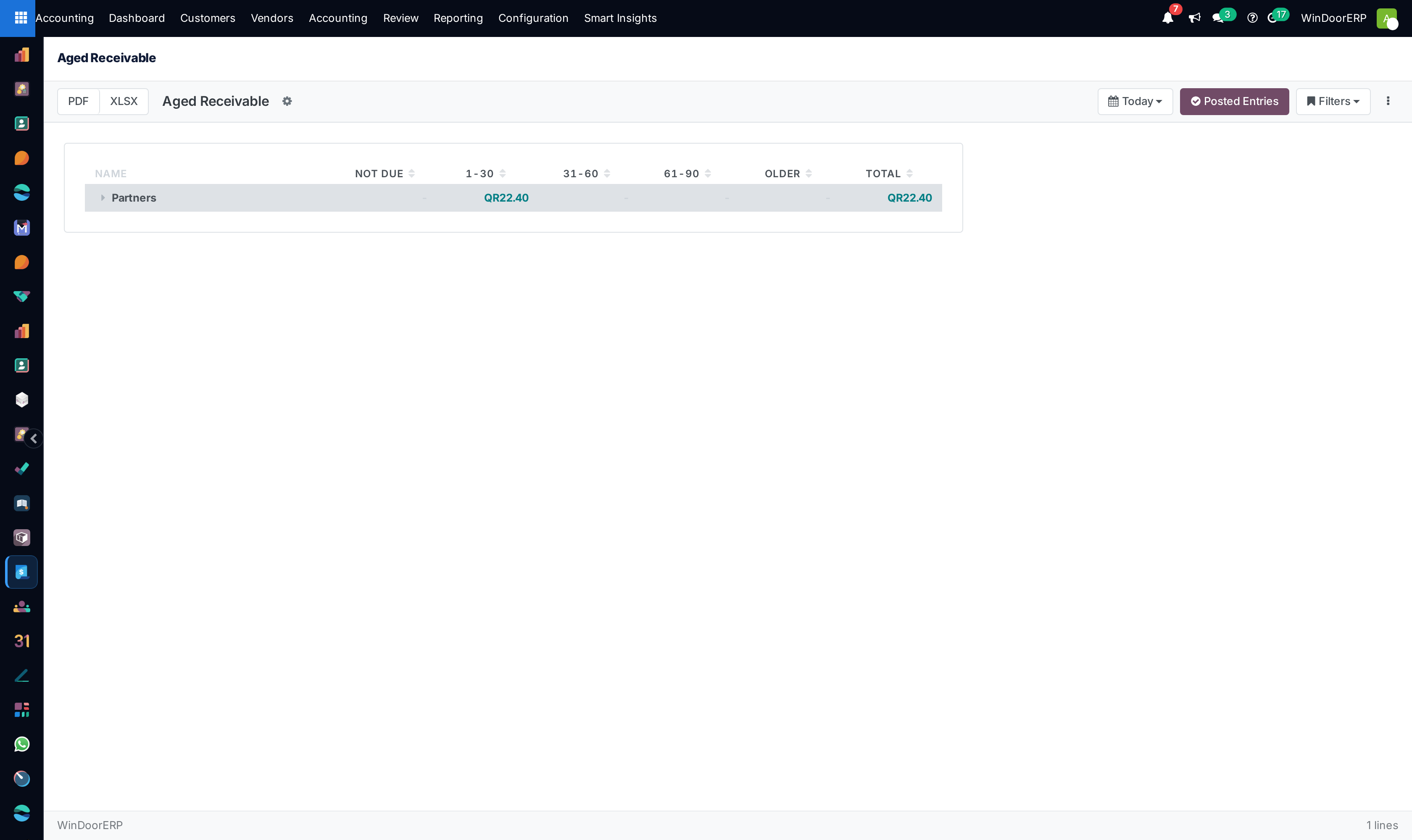
For collection — who owes what, and how late — leave the Sales app entirely and go to Accounting › Reporting › Partner Reports › Aged Receivable.
-
06
For invoice-level analysis with a real pivot behind it, use Accounting › Reporting › Management › Invoice Analysis. That is the nearest thing to the screen this page used to promise, and it works on invoices rather than on claims.
Where each figure actually lives
| The figure you want | Where it is, and what shape it is in |
|---|---|
| Revised contract value, cumulative progress, previous progress, deductions, amount due | On a single bill-of-quantities claim, in Accounting › Customers › BOQ Invoices. One claim at a time — the screen has no filters, no group-by and no totals row. |
| Retention held, released and remaining | On the main contract's BOQ Inv Options tab, split between the main contract and its variation orders, and again on each release record under Sales › Retention Releases. |
| What is left to invoice on an order | The Un-invoiced Balance and Already invoiced fields on the order itself, and the Orders to Invoice queue for the list of orders that have any. |
| What is left to invoice on a line | Sales › Orders › Sales Orders Lines, measure Quantity To Invoice or Untaxed Amount To Invoice in its pivot. This is the one place a to-invoice figure can genuinely be totalled — see Analyse order lines in the pivot and the chart. |
| Invoiced value by customer, product category, salesperson or month | Accounting › Reporting › Management › Invoice Analysis, which opens as a graph and a pivot on posted customer invoices, grouped by invoice month. |
| Who owes money and how overdue it is | Accounting › Reporting › Partner Reports › Aged Receivable: one row per customer across Not Due, 1-30, 31-60, 61-90, Older and Total, exportable to PDF and XLSX. |
| The transactions behind one customer's balance | Accounting › Reporting › Partner Reports › Partner Ledger — covered in Audit the ledger: general ledger, trial balance, partner ledgers, tax screens and daily books. |
| Anything described as a collection forecast | See The forecast, and what it is worth below. Read that section before you use one. |
Why there is no pivot for this
A pivot can only add up a value that is stored in the database. On this system the progressive-billing amounts are not:
- On the sales order, Un-invoiced Balance and Already invoiced are computed on read. They are shown on the order and in the queues, and they are absent from the measures list of every sales order pivot — the nine measures offered there are the order totals, the tax, the currency rate and a few technical numbers.
- Bill-of-quantities claims have no pivot or graph view at all. The model is offered as a list and a form and nothing else, and the list declares no column sums, so even the receivable column does not total.
- The claim figures are cumulative to date, not per period. Each claim restates the running total rather than adding to it, so summing a column of claims double-counts. The retention article puts it plainly: a contract whose three claims recorded 0, 200 and 460 is holding 460, not 660. Any aggregation that ignores that is wrong by construction.
Which is why the honest answer is a map rather than a screen. If a figure has to be aggregated across contracts, take it from the invoices — those are stored, posted, and what Invoice Analysis and the receivables reports are built on.
What the Orders to Invoice queue can and cannot tell you
The queue does have a pivot and a graph, and this page used to send readers there for "billing analytics". It is worth being precise about what they hold, because it is not what the old text claimed.
The pivot opens with Order Date down the rows and one measure, Total — the whole order value, tax included, for every order with anything left to bill. It is not the amount outstanding: an order that is 80% billed still contributes its full value. There is no measure for the un-invoiced balance, because that field is not stored. Work the Orders to Invoice queue: what lands there and how to clear it covers the screen properly, including its filters and what puts an order in or out.
Cash collection, honestly
Collection is an accounting question, and it is answered on accounting screens. Aged Receivable is the working tool: unpaid customer invoices bucketed by how overdue they are, per customer, with the buckets running Not Due, 1-30, 31-60, 61-90, Older and a Total. It counts posted entries, it exports, and it says nothing at all about which contract the money came from — receivables are per customer, not per project.
That is a real limitation on this fleet, and worth stating rather than working around: a contract's own collection position cannot be read from one screen. You get the claims from the bill-of-quantities record, the invoices they raised from the contract's Invoices smart button, and their payment state from the invoices themselves.
The forecast, and what it is worth
Two things in this system carry the word forecast, and neither is a collection forecast you can rely on.
Do not plan cash from either forecast screen
The receivables Cash Flow Forecast list is populated by a routine that no button, wizard or scheduled job ever calls — its own empty-state text points at a Generate Forecast button that does not exist. Rows can only appear if somebody runs the routine from a shell. Separately, the accounting report of the same name only ever counts receivables due within thirty days: its overdue bucket was defined without a formula and always renders blank, so everything already late is silently dropped from the projected balance. Both are described in Read the receivables dashboards: aging, risk grades, credit holds and the cash flow forecast. Use Aged Receivable and the invoice due dates instead.
Which invoice route produced the figure
Before comparing two numbers, be sure they came from the same billing route. There are four, and they are described together in Ways to create customer invoices, which is the parent of the four articles that cover them: Create a standard customer invoice, Send a pro-forma invoice, Bill contract progress with a BOQ invoice and Take a contract advance through a BOQ invoice.
The rule those pages share matters here too: once a bill-of-quantities claim exists on a contract, every later claim must go the same way. A standard invoice raised "just this once" on a progressively billed contract is invisible to the claim cascade, and from that point the contract's running totals and its ledger stop agreeing — which is usually how somebody discovers it.
Troubleshooting
| What you see | Why, and what to do |
|---|---|
| You cannot find a billing analytics or invoicing schedule menu | There is none. Use the map above. |
| BOQ Invoices has no filter bar and no group-by | Correct — the screen ships without a search view. Reach a claim through its contract, or by its reference. |
| The BOQ Invoices list shows no total under the receivable column | No column sum is declared, and summing that column would double-count anyway, because each claim restates the cumulative position. |
| You cannot add Un-invoiced Balance as a measure anywhere | It is computed, not stored, so no pivot can aggregate it. Use the order-lines pivot with Untaxed Amount To Invoice instead. |
| The Orders to Invoice pivot total is much larger than the outstanding amount | Its measure is the whole order value including tax, not the remaining balance. |
| The whole BOQ Invoices menu is missing | You are not in the BOQ Invoice User group. |
| Aged Receivable shows nothing for a contract you are chasing | It is organised by customer and by posted invoice. An approved claim that has not produced a posted invoice is not a receivable yet. |
| The Cash Flow Forecast list is empty and its help says to generate | The button it names does not exist. See the warning above. |
Common mistakes
- Summing a column of bill-of-quantities claims. They are cumulative; the highest is the position, not the sum.
- Quoting the Orders to Invoice total as the amount customers still owe. It is whole order values, tax included, for orders with anything at all left to bill.
- Treating Aged Receivable as a project report. It is per customer, and a customer with three contracts shows one balance.
- Building a collection plan on either screen with forecast in its name.
- Mixing a standard invoice into a progressively billed contract and then wondering why the running totals no longer match the ledger.
- Looking for the missing analytics screen instead of reading the map — it is not hidden behind a permission.
Was this article helpful?
Thanks — your feedback helps.
Running a window or door factory?
Ask for a demo