Configure the chart of accounts, taxes, journals, payment terms and currencies
What this does
Accounting › Configuration is where the ledger's shape is decided: the Chart of Accounts every entry posts into, the Taxes applied to documents (on this Qatar configuration, exemptions and withholding — there is no VAT), the Journals that number and route each document type, the Payment Terms that split a contract into instalments and retention, plus Currencies, Fiscal Positions, Account Groups, and the smaller screens around them. Everything here is administrator territory: the whole Configuration menu requires accounting-administrator access.
Before you start
- Accounting administrator access — and restraint: most of these records are referenced by years of postings.
- For rarely-used screens (Tax Groups, Incoterms): Developer Mode, and for Cash Roundings the cash-rounding feature enabled in Settings — these menus are hidden otherwise.
Chart of Accounts
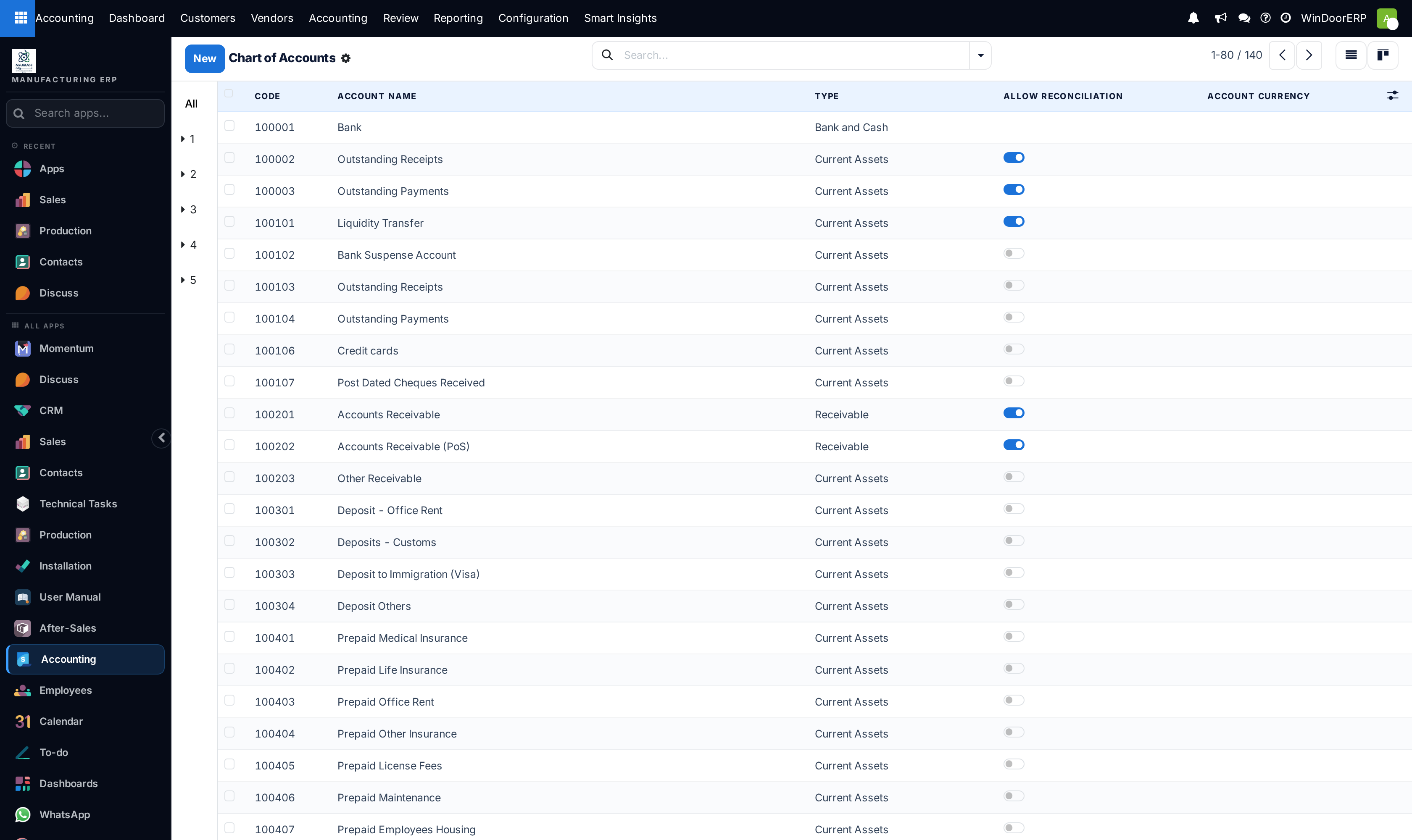
WindoorERP ships a fabricator's chart of about 140 coded accounts — receivables split from PoS receivables, post-dated cheques received, customs and visa deposits, prepaid licences. The left rail filters by code prefix; each account carries:
| Field | What it decides |
|---|---|
| Code / Account Name | Identity. Keep the numbering scheme — reports group by prefix ranges (Account Groups). |
| Type | One of nineteen types (Receivable, Bank and Cash, Current Assets, Fixed Assets, Payable, Equity, Income, Cost of Revenue, Depreciation, Off-Balance Sheet…). The type places the account on the Balance Sheet or P&L and drives every built-in report — a wrong type quietly misplaces figures everywhere. |
| Allow Reconciliation | Whether open items on the account can be matched off — on for receivables, payables, and clearing accounts like Outstanding Receipts. |
| Default Taxes / Tags / Account Currency | Pre-applied taxes, report tags, and an optional single-currency restriction. |
| Cash Flow type | Which section of the legacy cash-flow report the account feeds. |
Account Groups (same menu) define the code-prefix ranges that make the trial balance and statements fold into sections; 31 groups ship with the chart.
Taxes — the Qatar reality
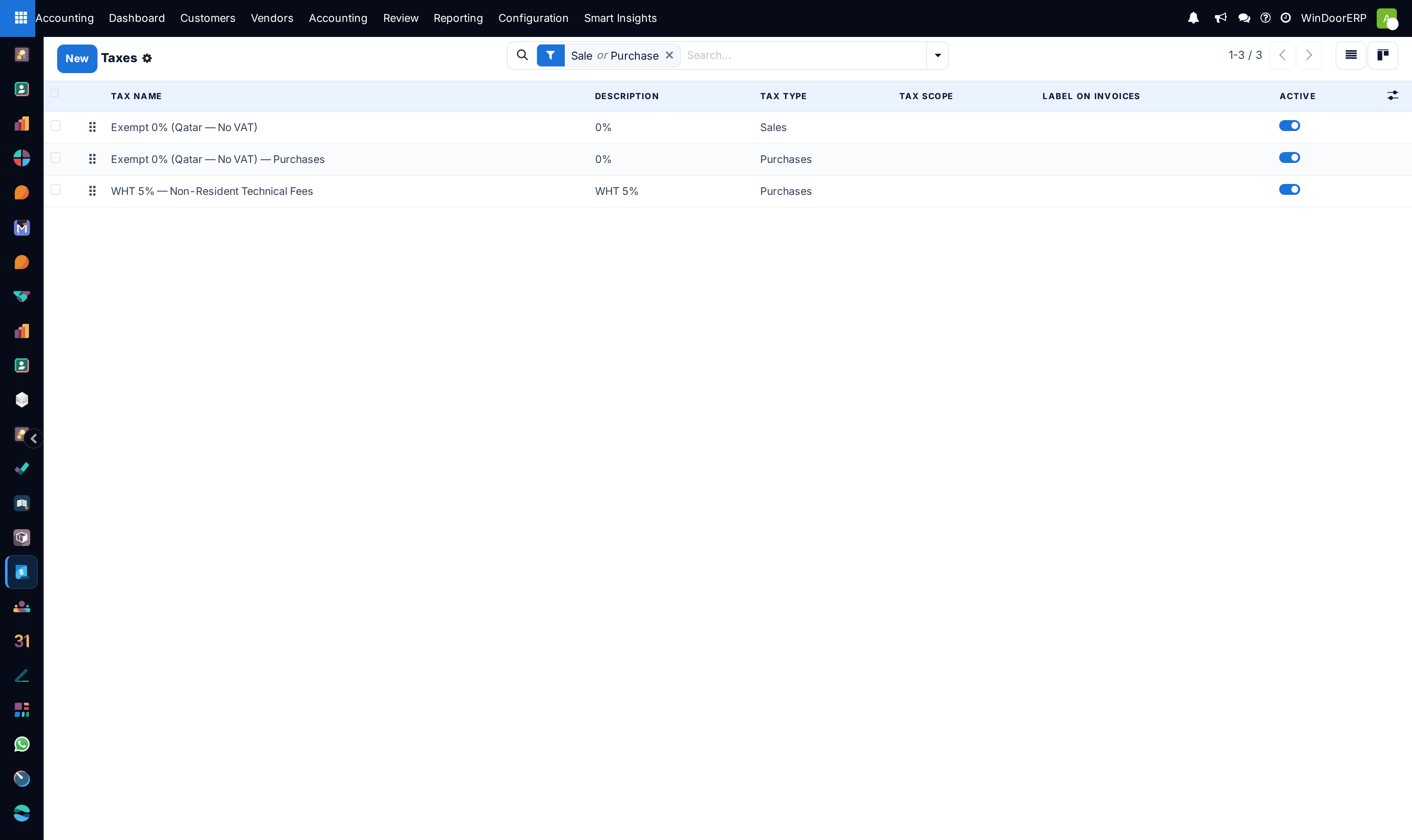
Qatar levies no VAT, and the configuration says so honestly: Exempt 0% (Qatar — No VAT) for sales, its purchases twin, and WHT 5% — Non-Resident Technical Fees — a negative purchase tax that withholds 5% from qualifying non-resident supplier bills. A tax record holds its type (Sales / Purchases), computation (percentage, fixed…), the invoice label, and distribution lines that say which account and tax grid each portion posts to. The Fiscal Positions screen maps taxes and accounts automatically per customer situation — shipped positions cover Qatar — Domestic Supply (No VAT), GCC Export — Zero Rated, Non-Resident Supplier — 5% Withholding, and QFZ Customer — Out of Scope, each matchable by country and auto-applied when set to detect automatically.
Note
If VAT is ever introduced, taxes are added here — not by editing the 0% records, which sit on years of posted documents. Create new taxes, set them as defaults on accounts and products, and archive the old ones.
Journals
Ten journals ship: Sales (INV), Purchases (BILL), the banks (BNK1, DOHB — Doha Bank), Petty Cash — Factory (CSH1), and the general journals — Miscellaneous Operations, Exchange Difference, Cash Basis Taxes, Inventory Valuation, Assets & Depreciation. A journal's form sets its type, short code (the prefix on every document number), default account, dedicated credit-note sequence, and — for banks — the account number and the incoming/outgoing Payment Methods (this is where PDC is enabled for post-dated cheques). Two extras worth knowing: Secure Posted Entries with Hash switches on the tamper-evidence chain per journal, and the Multiple Invoice Copies block configures labelled duplicate printing (Original / Duplicate / Triplicate) for the print menu.
Payment Terms
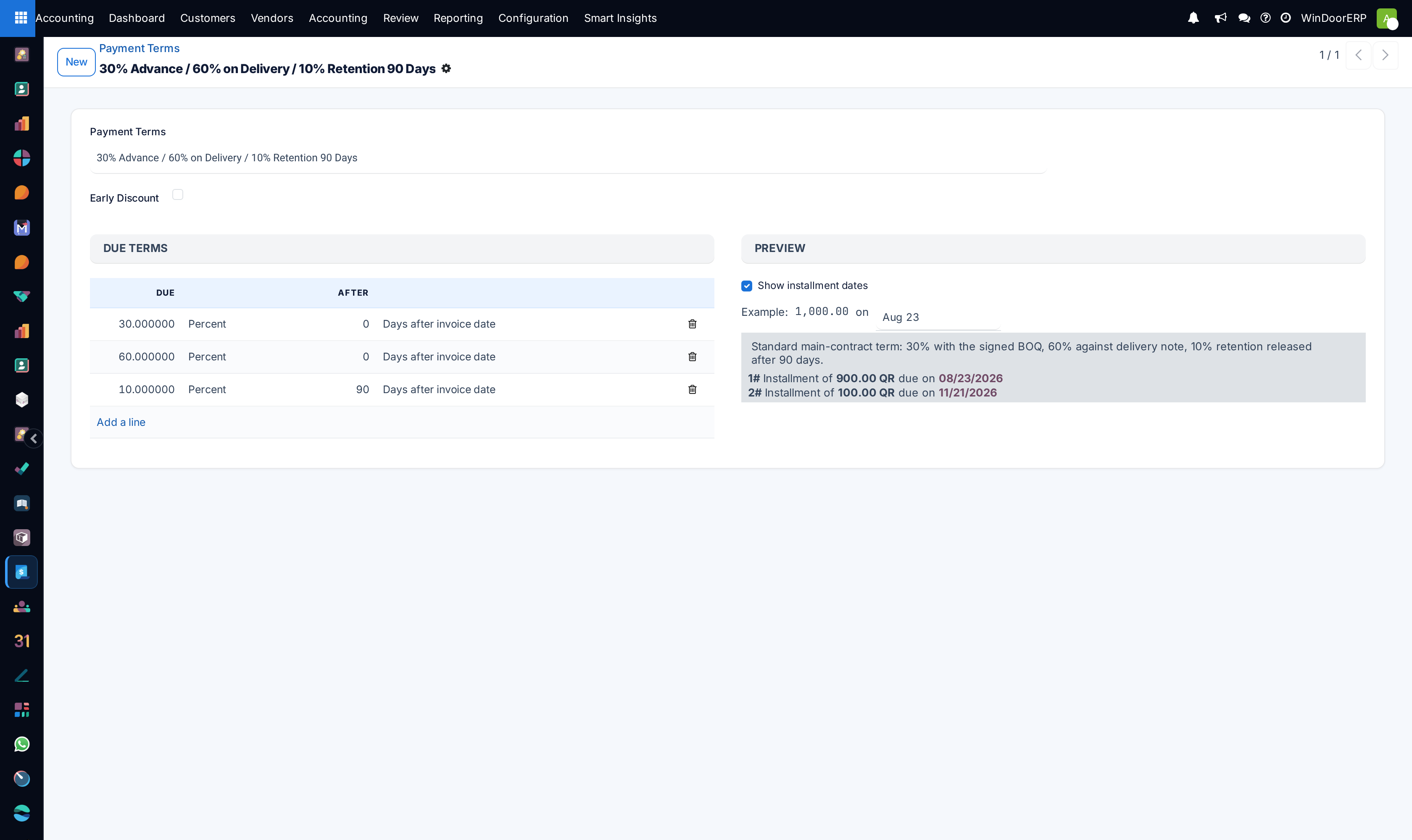
A payment term is a list of due-term lines — percentage or fixed amount, due so many days after the invoice date or at month ends — with a live preview of the instalments it produces. The shipped set includes the fabricator's contract shapes: 30% Advance / 60% on Delivery / 10% Retention 90 Days, 50% Advance / 50% Before Glazing, 20% Advance / Balance Net 30, Net 60 Days — Main Contractor, alongside the standard immediate/15/30/45-day terms. An early-payment discount can be switched on per term. Assign terms on the customer or vendor record, and remember they schedule due dates on one invoice — progressive contract billing itself is the BOQ invoicing flow, not a payment term.
Currencies and the rest
Currencies: QAR and USD are active; activate others as suppliers require. Rates are entered manually per date on each currency — this installation includes no live-rate synchronization service, so agree internally who maintains the USD rate and how often. Multi-Ledger defines named ledger groups, each listing the journals it excludes — the basis for alternative views of the books. Product Categories (under Configuration › Invoicing) carry the income/expense accounts and stock-valuation accounts products inherit. Cash Roundings and Incoterms exist for the cases that need them, behind their feature/developer gates. Account Reports and Interactive Reports hold the definitions behind the Reporting menu — edit them only deliberately; the reporting article covers what they render. Setup Interactive Reports regenerates the Reporting menu entries for report definitions that lack them.
Troubleshooting
The Configuration menu is missing entirely — you have accounting access but not the administrator role; only administrators see it.
Tax Groups or Incoterms are nowhere to be found — both menus require Developer Mode; Cash Roundings additionally requires the cash-rounding group granted by its Settings toggle.
An account cannot be deleted — accounts with postings are permanent; archive them (the ⚙ menu) to retire them from pickers.
A new document numbers into the wrong sequence — check which journal it was created in; the journal's short code owns the numbering.
Foreign-currency amounts convert at a stale rate — rates are manual here; update the currency's rate table before posting, not after.
Common mistakes
- Creating a near-duplicate account (Sales Account 2) instead of finding the right existing one — every duplicate splits reporting forever.
- Fixing a misclassified account by deleting and recreating it rather than correcting its Type in place.
- Posting manual adjustments into Exchange Difference or Inventory Valuation because they were alphabetically handy — those journals belong to their automatic mechanisms.
- Editing the 0% tax records "temporarily" for an experiment — they are referenced by every posted document.
- Modelling retention by invoicing 90% and remembering the rest — use the retention payment term, or the BOQ flow's retention machinery for progressive contracts.
Was this article helpful?
Thanks — your feedback helps.
Running a window or door factory?
Ask for a demo