Read utilisation and decide which hours are billable
What this does
The Timesheets › Reporting menu turns the logged entries into four ready-made cuts of the same question — where did the hours go: By Employee, By Project, By Task and By Billing Type. The last one is the step that turns a timesheet from a record into an invoice defence: it separates hours attached to something a customer pays for from internal time, using the sales-order link each entry carries. The Configuration menu holds the app's few but consequential settings.
Before you start
- Hours are being logged with real projects and tasks — the reports only reshape what was entered.
- For the billing split to mean anything, billable project tasks are linked to their sales order items.
A month-end review
-
01
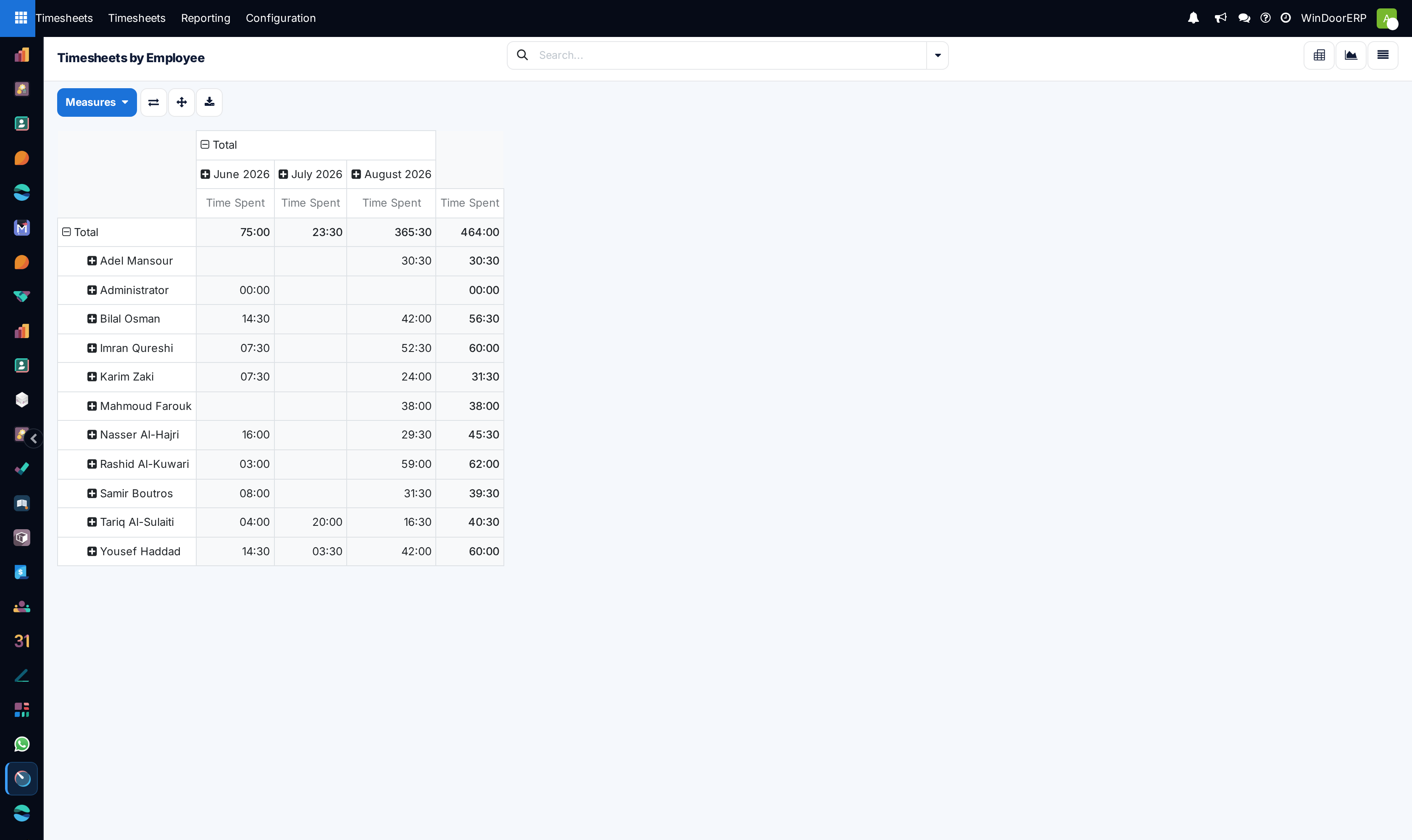
Open Reporting › Timesheets › By Employee. The pivot compares each person's logged hours over the period — the first look for gaps and overload.
-
02
Switch to By Project to read labour burn per contract, and drill any project that outruns its plan.
-
03
Use By Task when one project's total needs explaining — it names the task the hours sank into.
-
04
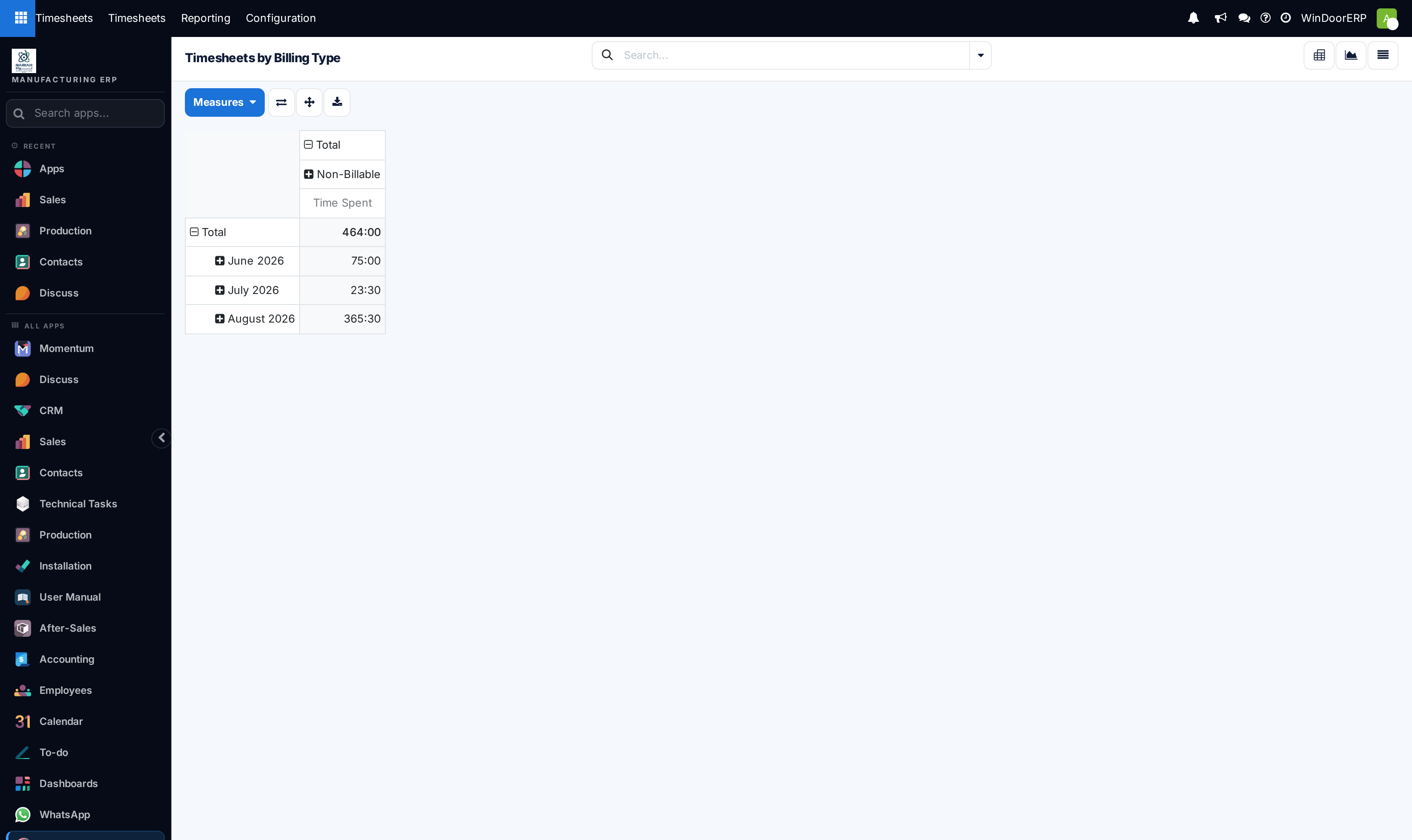
Open By Billing Type and read the split of billable against non-billable hours; the ratio, per employee and per project, is the utilisation figure management asks for.
-
05
Take corrections back to the entries themselves in All Timesheets — the reports are read-only reshapes.
How the reports work
All four menus open the same analysis dataset — one row per timesheet entry, carrying its employee, department, manager, project, task (and parent task), date, hours, and the billing fields — as pivot and graph, each menu simply pre-grouped differently. Anything the entry knows can become a row, column or filter, so "hours by department by month" or "billable share per manager" are one drag away from any of them.
The billing classification is derived, not typed: an entry inherits its type from where it was logged. Hours on a task tied to a sales-order item count as billable time; hours on tasks with no order behind them count as non-billable. That is why the split is trustworthy — nobody chooses a flattering label at entry time — and why it is only as good as the project-to-order links made when the projects were set up.
Configuration
Timesheets › Configuration opens the app's settings, and there are exactly three: the Encoding Method — whether people record time as Hours / Minutes (the WindoorERP default; durations render as HH:MM) or as Days / Half-Days; Time Billing, a shortcut to configuring the service products that make hours invoiceable; and Time Off, which when enabled writes timesheet entries automatically for validated leave and public holidays so utilisation does not punish absence. Change the encoding early if at all — a team trained on 7:30 misreads 7.5, and the other way around.
Troubleshooting
Hours you know are billable show as non-billable — the task they were logged on has no sales order item behind it; fix the task's link, not the entries.
The pivot shows fewer hours than All Timesheets — check the date filter; the reporting screens open on their own default period.
Someone's utilisation looks heroic — check their working schedule before applauding: a part-time schedule under full-time hours inflates every ratio.
A number needs correcting — the reports cannot edit; open the same period in All Timesheets and fix the entry.
Common mistakes
- Reading utilisation without the billing split — total hours reward being busy, the split rewards being useful.
- Fixing report anomalies by reclassifying projects at month-end instead of linking tasks correctly at setup.
- Switching the encoding unit mid-year and letting half the company type minutes as decimals.
Was this article helpful?
Thanks — your feedback helps.
Running a window or door factory?
Ask for a demo