Record skills, certifications and training
What this does
This is the step that makes the factory setup safe. Journey 6 named, per machine, the competence it takes to run it — here is where you record who actually holds which skill at which level, which certificates they carry and until when, and which courses they attended. It all lives in the Employees app: the Learning menu for recording, the Reporting › Skills menu for reading, and Configuration for the vocabulary.
Before you start
- Skills Management is on in the Employees settings (it is, in WindoorERP).
- Decide the skill vocabulary with production — the same names should be used here and on the machines.
Build the skills record
-
01
Open Configuration › Employee › Skill Types and create one type per family — fabrication, glazing, site safety, languages — each with its Skills list and its Levels (each level carrying a progress percentage, one marked default).
-
02
Tick Certification on the types that represent formal certificates — that flag is what routes their entries to the Certifications screens with validity dates.
-
03
Record what people hold: on each employee's Resume tab add the current skills with their levels; certification-type entries appear on the Certifications tab with From and To dates.
-
04
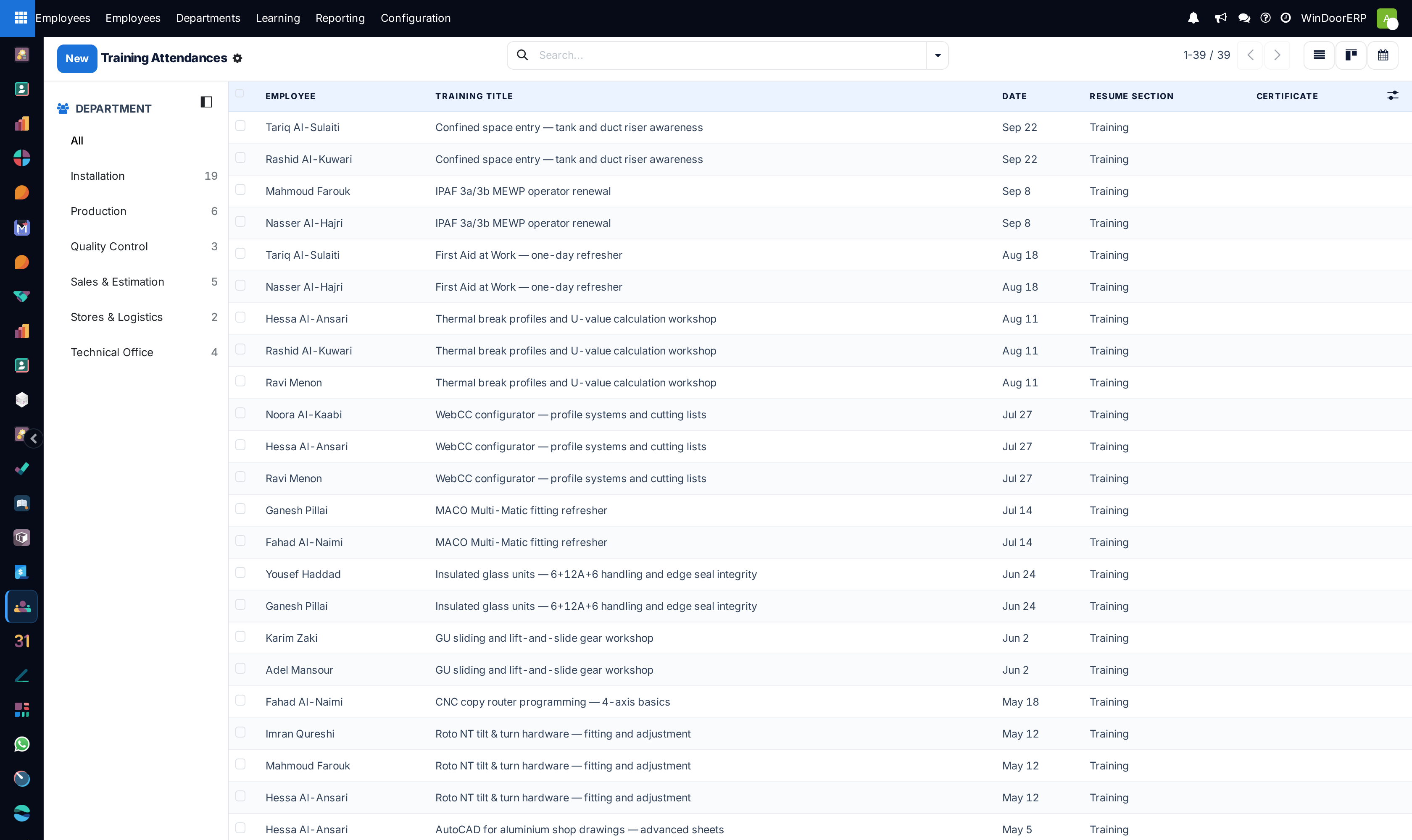
Record courses under Learning › Training Attendances — each attendance is a dated resume line of a course-type section, with a duration and, when useful, an external link; the calendar view doubles as the training planner.
-
05
Read the result in Reporting › Skills › Skills Inventory (who holds what, at which level, list and pivot) and Certifications (the validity pipeline — what expires, and when).
The screens and what they hold
| Screen | Contents |
|---|---|
| Learning › Certifications | Every certification entry across the workforce — employee, certification, level, From/To — the working list for renewals. |
| Learning › Training Attendances | Course-type resume lines: employee, course name, dates, duration, link. List, kanban, form and calendar. |
| Reporting › Skills › Skills Inventory | The skills matrix as a report — filter by skill to answer "who can do this", pivot by department to see coverage. |
| Reporting › Skills › Certifications | The certification report with expiry — sort by To and the next lapses are the top rows. |
| Configuration › Skill Types / Resume › Sections | The vocabulary: types with skills and levels, and the resume section types (experience, education, courses) the Resume tab is organised by. |

Two skill records, one purpose
WindoorERP keeps a second, production-side competency record: Production › Configuration › Operator Skills maps each operator to a work center at Trainee, Competent or Expert, and it is that matrix — not the HR skills — that the shop floor reads to decide who may run a station unsupervised. Keep the two aligned: HR holds the certificate ("holds the CNC certificate until March"), the operator matrix holds the operational clearance ("may run the cutting center"). When a certificate lapses here, review the clearance there.
Troubleshooting
An employee's Certifications tab is missing — it appears only once at least one certification-type skill exists for them; plain skills stay on the Resume tab.
A certificate does not appear in the Certifications screens — its skill type is not flagged Certification; the flag on the type is what separates certificates from ordinary skills.
A course refuses to save where you expect — Training Attendances only lists resume lines whose section is a course type; check the line's section under Resume › Sections.
Expiry warnings come as activities — a scheduled action periodically raises an activity on employees whose certification is missing or expiring, so the alert appears in the activity flow, not as mail. Keep the Certifications report, sorted by expiry, as the monthly overview beside it.
Common mistakes
- Free-typing skill names per employee instead of building the Skill Types vocabulary first — the inventory report then fragments into synonyms.
- Recording certificates without their To date — an expiry pipeline without dates is just a list.
- Updating the HR certificate but not the production Operator Skills clearance, leaving the terminal happy to assign work the paperwork no longer covers.
Was this article helpful?
Thanks — your feedback helps.
Running a window or door factory?
Ask for a demo