Read and issue profile cutting plans
What this does
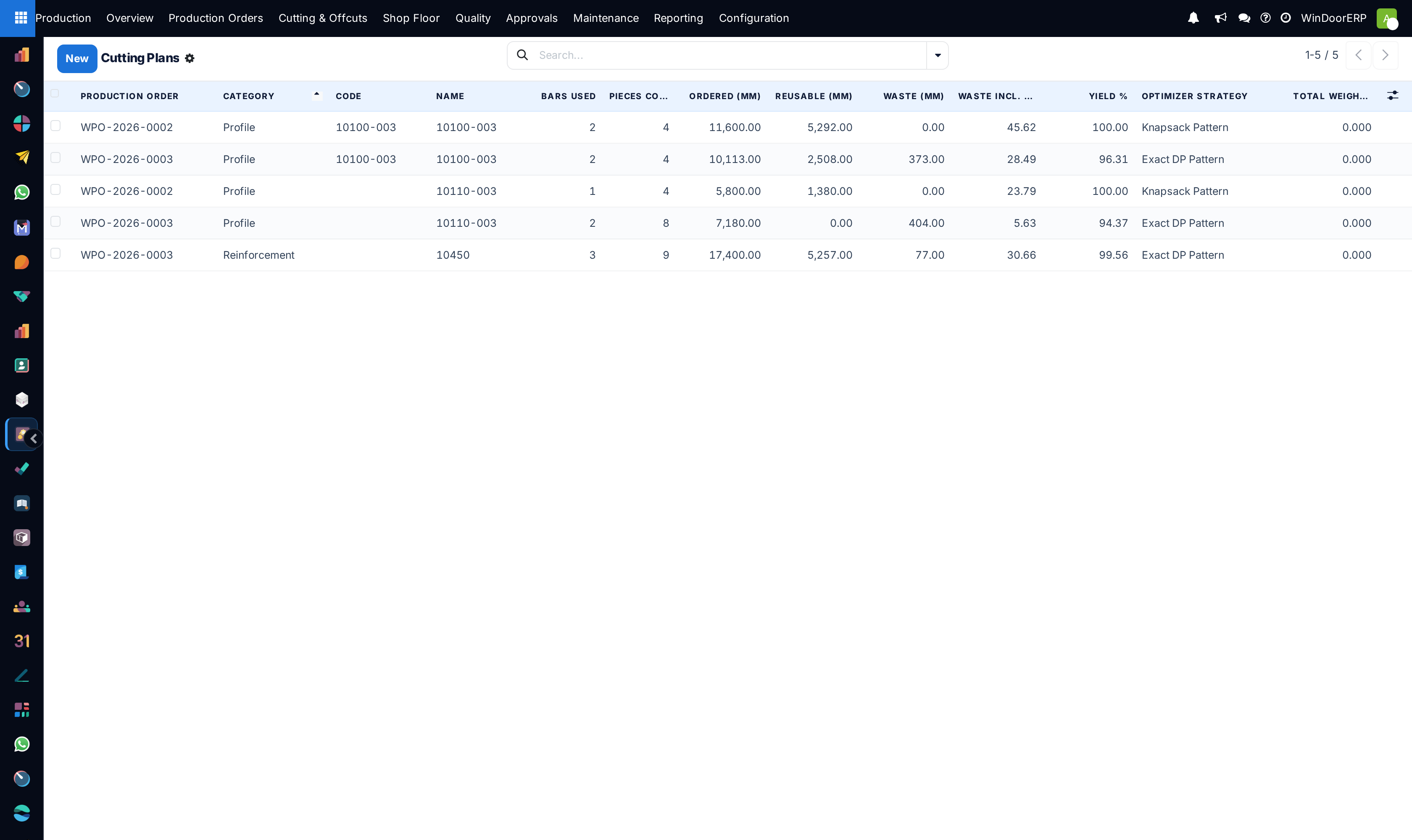
Production › Cutting & Offcuts › Cutting Plans is where the bar-nesting results live: one plan per profile or reinforcement product on an order, holding the pattern the saw should follow, how many bars it needs, what each bar's rest is, and the yield achieved. Plans are generated by Optimize Bars on the production order (and automatically at Confirm when none exist) — this screen is where the shop floor reads them and where the CNC exports come from.
Before you start
- A production role; the menu sits under Cutting & Offcuts, open to production users.
- A production order with its material list generated and its bar products configured — each needs Optimize Bar Cutting enabled and a valid Standard Bar Length.
Steps
-
01
Open Production › Cutting & Offcuts › Cutting Plans, or jump from the order's Cut Plans smart button.
-
02
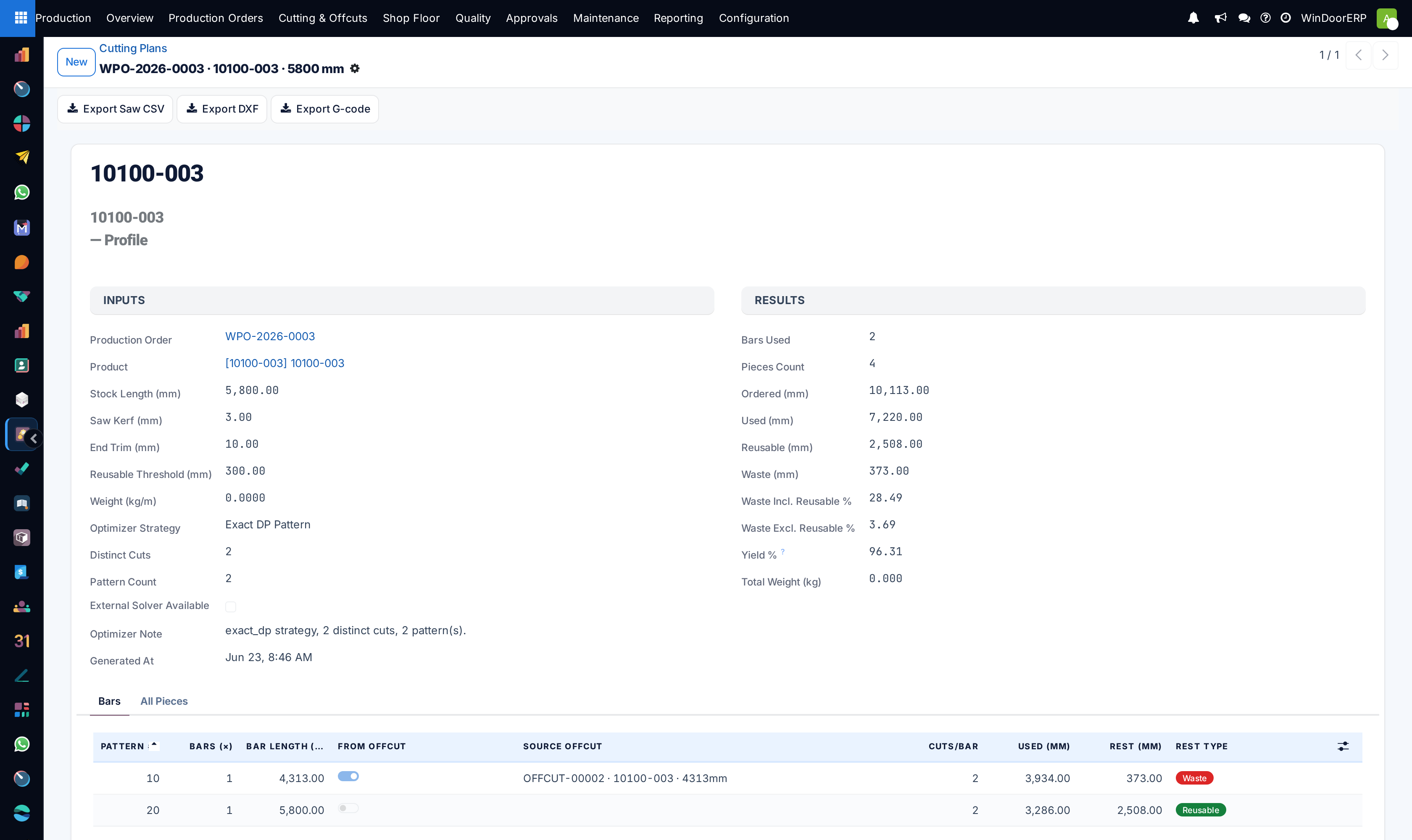
Read the header: the product, the stock length, and the inputs the plan was computed with — saw kerf, end trim, reusable-rest threshold and the optimizer strategy that ran.
-
03
Read the results: Bars Used, Fresh Bars (drawn new from stock) versus Offcut Bars (nested on remnants), pieces, used and rest millimetres, the two waste percentages and the Yield %.
-
04
Work the Bars tab: one row per cutting pattern, with Bars (×) for how many identical bars follow it, whether it sits on an offcut, and the rest flagged Reusable or Waste. Open a row for its piece list.
-
05
Issue it to the floor from the order's Material tab — Profile Cut, RI Cut and the Wastage Summary reports.
-
06
For saw controllers, use the plan's export buttons: Export Saw CSV is the usable format (DXF and G-code are placeholders in this release). A successful export saves the file on the plan as an attachment named
CNC-<plan>-<format>and hands it straight to you as a download.
Reading a plan honestly
| Field | Meaning |
|---|---|
| Bars (×) on a pattern row | How many physical bars are cut to that identical pattern. Piece counts inside the row are per bar — multiply. |
| Rest Type | Reusable when the leftover reaches the threshold (300 mm by default, overridable per product) and the bar was not itself an offcut; otherwise Waste. |
| Waste Incl. / Excl. Reusable, Yield % | Two honest views of the same cut: everything left over, versus only what is genuinely scrap. Yield is the complement of the second. |
| Billed Length / Weight | Computed from fresh bars — the procurable, chargeable quantity, not the total including remnants. |
| Optimizer Strategy | Which algorithm ran, picked from the problem size (exact for small jobs, hybrid, then a fast heuristic; an external solver if an administrator enabled one). |
Important
Plans have no state and no confirm step: re-running Optimize Bars deletes and rebuilds every plan on the order, and releases and re-takes its offcut reservations. That rollback is not always possible: remnants this order produced that a downstream order has since reserved or consumed stay where they are, and the only report of it is the chatter line "Optimize Bars: … offcut(s) previously produced by this order are now reserved or consumed by downstream orders and cannot be rolled back: …". A printed plan is a snapshot of the moment it was printed — reprint after any re-optimisation, and never let the saw work from yesterday's paper.
Troubleshooting
| The order has no cutting plans | Optimization has not run, or no material line is eligible — the product needs Optimize Bar Cutting enabled and a bar length. |
|---|---|
| "Product … has optimization enabled but no valid Standard Bar Length." | One flagged product lacks its bar length; the whole run aborts until it is set. |
| The "All Pieces" tab shows patterns, not pieces | Known display quirk — the per-piece detail is inside each bar row on the Bars tab. |
| The Saw CSV counts look short | The export writes one row per distinct cut of a pattern without the cuts-per-bar and bars-per-pattern multipliers. Cross-check against the Bars tab before feeding a controller. |
| "Saw — XML" produced a CSV | That format has no generator in this release: it emits saw-CSV content with an .xml extension. Use Export Saw CSV. |
| A profile is missing from the production transfer | Its whole demand came from offcut stock, so nothing fresh was issued. |
| "This production order has about … distinct cut sizes to optimize, above the current limit of … . Split the order into smaller batches and try again." | The optimizer has a hard ceiling — 20 000 distinct cut sizes by default — and refuses rather than running for hours. Split the order and optimise the halves. |
| Optimize Bars finished but no plans appeared | Below the hard ceiling but above the background threshold (8000 distinct cuts by default), the run is quietly queued instead of executed. The plans arrive on their own; failures are reported only in the order's chatter. |
| "This cutting plan has no pieces to export." | The plan holds no piece rows, so there is nothing for a controller to read. Re-run Optimize Bars on the order. |
Common mistakes
- Cutting from a plan printed before the last Optimize Bars run.
- Reading the piece counts inside a pattern as the job total — they are per bar.
- Substituting bars on the floor: following the lengths but not the pattern changes which rests come off which bars, and the booked offcuts stop matching reality.
- Judging performance by Waste Incl. Reusable. Reusable rests are stock, not loss — the honest scrap number is the excluding figure.
Was this article helpful?
Thanks — your feedback helps.
Running a window or door factory?
Ask for a demo