Resolve non-conformances with the right disposition
What this does
A Non-Conformance Report is the record of something built wrong and the decision about what to do with it. NCRs arrive automatically from failed quality inspections and from the shop floor's Report Problem and Scrap actions, and they are closed by choosing a disposition — the choice that actually moves work orders, orders parts, raises scrap or releases the item.
The disposition is the point of the screen: each one does real work to the item and its operations, and each is restricted to a role that may take that decision.
Before you start
- The Quality Control Gates feature on, and the Production Quality Inspector role for the Quality menu.
- Know which disposition your role may apply — the list below names them.
Steps
-
01
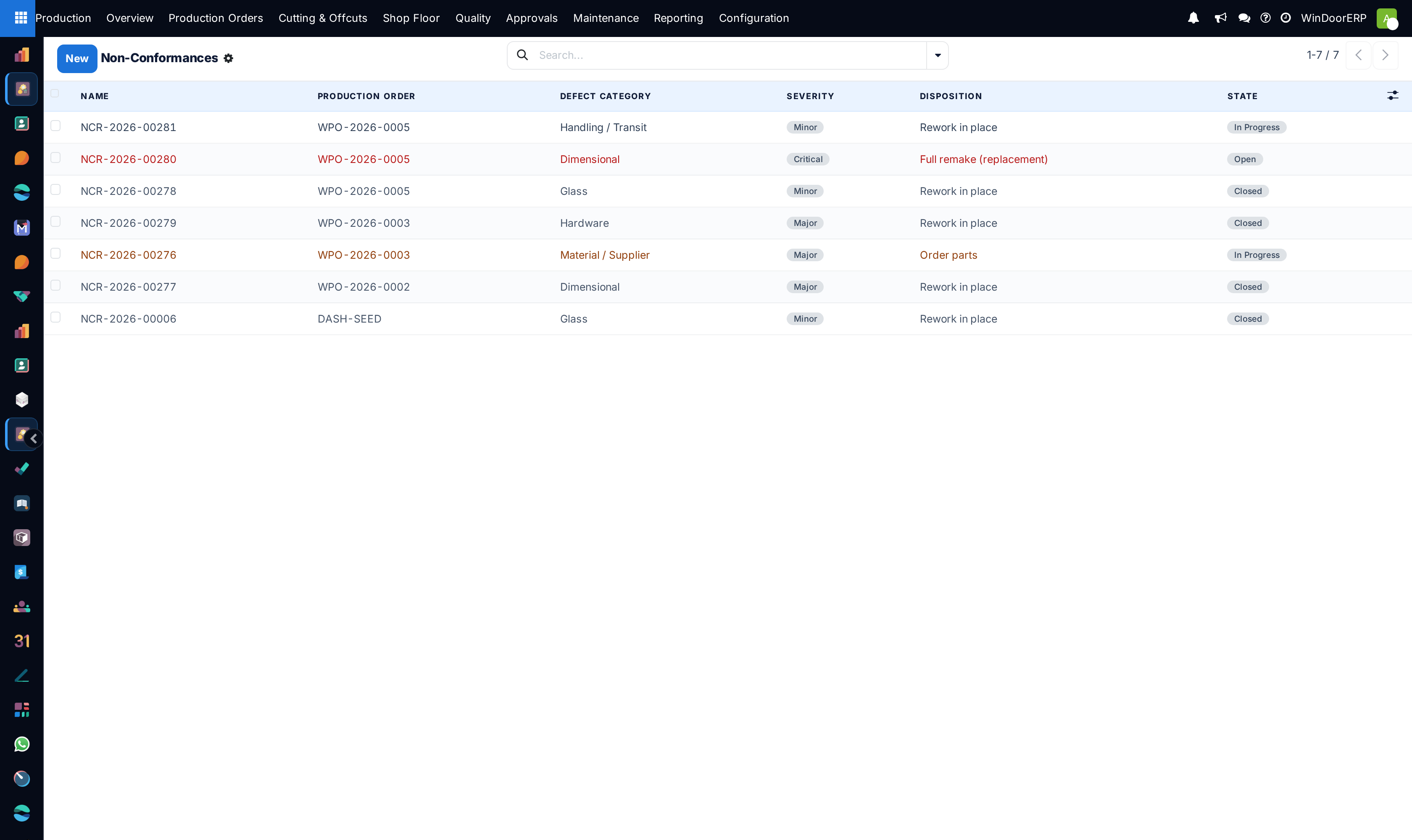
Open Production › Quality › Non-Conformances. Rows are coloured by severity: critical in red, major in amber, closed ones muted.
-
02
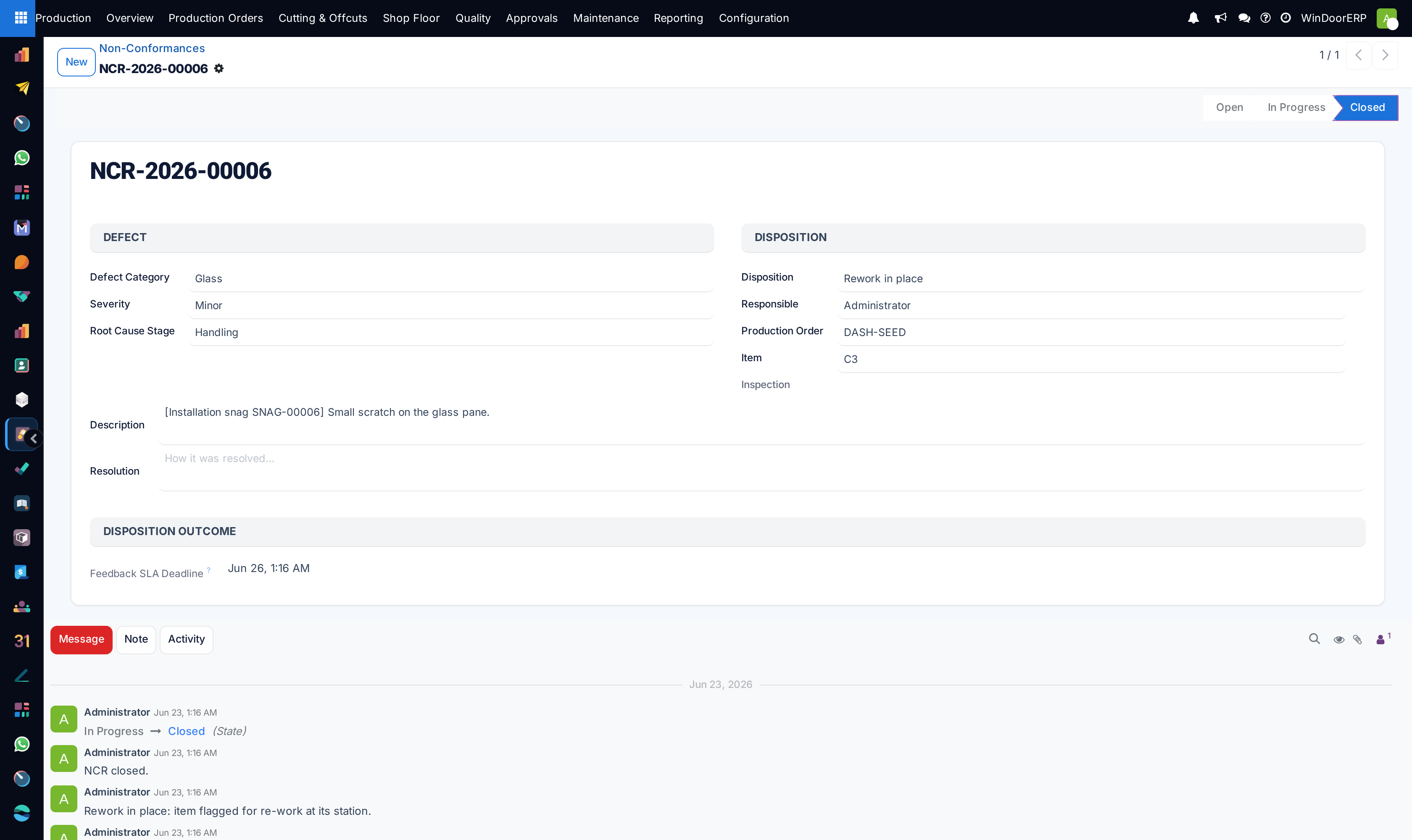
Open the report and read what came with it: the inspection or floor action that raised it, the production order and item, and the description of what failed.
-
03
Classify it: Defect Category (dimensional, weld, glass, hardware, finish, material, handling, other), Severity (minor, major, critical) and Root Cause Stage — design, cutting, welding, glazing, hardware, supplier or handling.
-
04
Assign a Responsible person and write the Resolution as the investigation proceeds. On the Hold — wait for feedback and Order parts dispositions that person is also given a to-do activity, "Resolve NCR …", so a parked report has an owner rather than a deadline alone.
-
05
Choose the Disposition and press Apply Disposition. Read the table below first — this button changes the factory, not just the record.
-
06
Press Close when the story is finished (scrap and use-as-is close the report themselves). Unlike Apply Disposition, Close carries no role restriction whatsoever: anyone who can see the report can close it, including someone who was not authorised to take the decision recorded on it.
What each disposition really does
| Disposition | Effect | Who may apply it |
|---|---|---|
| Rework in place | Flags the item for rework and re-opens its most recently completed work order so the station can redo it. | Supervisor |
| Return to previous operation | Sends active work orders back to pending and re-opens their completed predecessors — the item walks back up the routing. | Supervisor |
| Reroute to another machine | Moves the item's open work orders to their work center's first configured alternative and clears the machine. With no alternative configured it only flags the item for manual reassignment. | Supervisor |
| Order parts | Marks the item as awaiting parts and opens the ordering wizard — the glass purchase wizard for glass defects, the extra-material wizard otherwise. | Planner |
| Full remake (replacement) | Scraps the item's received serials and creates a replacement item line suffixed -R, ready to rebuild. | Manager |
| Scrap | Raises draft scrap orders for the received serials and closes the report. | Manager |
| Use as is (concession) | Releases the item and closes the report, recording you and the date as the concession signer. | Manager |
| Hold — wait for feedback | Parks the item awaiting an answer and sets a feedback deadline (three days by default). | Quality inspector |
Two of them do the opposite of what their names suggest to most readers. Rework in place and Return to previous operation do not stop the station: they re-open work orders precisely so the work can be run again. Only four item states block Mark Ready and Start — quality hold, awaiting parts, awaiting feedback and scrapped — and neither rework nor reroute is among them.
Important
Scrap orders are raised in draft — when they are raised at all. Scrap and full-remake create the scrap documents but do not validate them; the warehouse still has to. Until then the stock is untouched, so an NCR that says "scrapped" and a store that still holds the material are both telling the truth. And there may be no document at all: scrap is raised only against serials that were actually received into stock, so on an item that never reached stock the disposition closes the report and creates nothing, without a word on screen. And a held report does not sleep forever: an hourly job escalates any hold past its deadline to management, once, with a to-do and a chatter note.
Troubleshooting
| "Choose a disposition first." | Apply Disposition was pressed with the field empty. |
|---|---|
| "Your role is not authorized to apply the '…' disposition." | Each disposition is restricted — see the table. Ask someone with the role, rather than choosing a weaker disposition you can apply. |
| Reroute did nothing visible | The work center has no alternative configured; the item is flagged rerouted for manual reassignment. Configure alternatives on the work center. |
| Scrap disposition left stock unchanged | Expected — the scrap orders are drafts awaiting warehouse validation. If there are no scrap orders either, the item had no serials received into stock to scrap. |
| The work order will not start | The item is on quality hold, awaiting parts, awaiting feedback or scrapped — those four states block readying and starting until they are resolved. A rework or reroute disposition is not one of them; it re-opens the operation rather than holding it. |
| A held NCR sat past its deadline | It escalates once, to the first production manager, with a to-do. Check the chatter for the escalation note. |
Common mistakes
- Treating disposition as a label. It re-opens work orders, moves them between stations, raises scrap and creates replacement lines — pick it after deciding, not while thinking aloud.
- Using Use as is to clear a backlog: it releases the item and records your name as the concession signer, permanently.
- Leaving defect category and root-cause stage empty and then wondering why the quality Pareto says nothing.
- Forgetting that full remake scraps the old serials and creates a new item line — the order's item count changes.
- Closing a report while its scrap orders are still draft, and never validating them.
Was this article helpful?
Thanks — your feedback helps.
Running a window or door factory?
Ask for a demo