Keep track of glass remnants
What this does
Production › Cutting & Offcuts › Glass Offcut Inventory is the register of sheet remnants worth keeping: every leftover rectangle a glass nesting run left behind that measures at least the minimum on both sides, listed with its width, height, area and how many identical pieces there are. It tells the glass table what is on the rack.
Read the next paragraph before you plan anything around it. Glass offcuts are harvested but never re-used automatically: nesting does not offer them back to the packer, nothing in the software reserves or consumes them, and no button does either. This list is a picking aid for a human, not a supply the optimizer draws on.
Before you start
- A production role; the menu sits under Cutting & Offcuts, open to production users.
- At least one order that has run Nest Glass — that is the only thing that is meant to create rows here. Production users can add one by hand, but a typed-in row has no plan behind it and nothing will ever reconcile it.
- A rack convention of your own, because using a remnant is a manual decision that the software will not record.
Steps
-
01
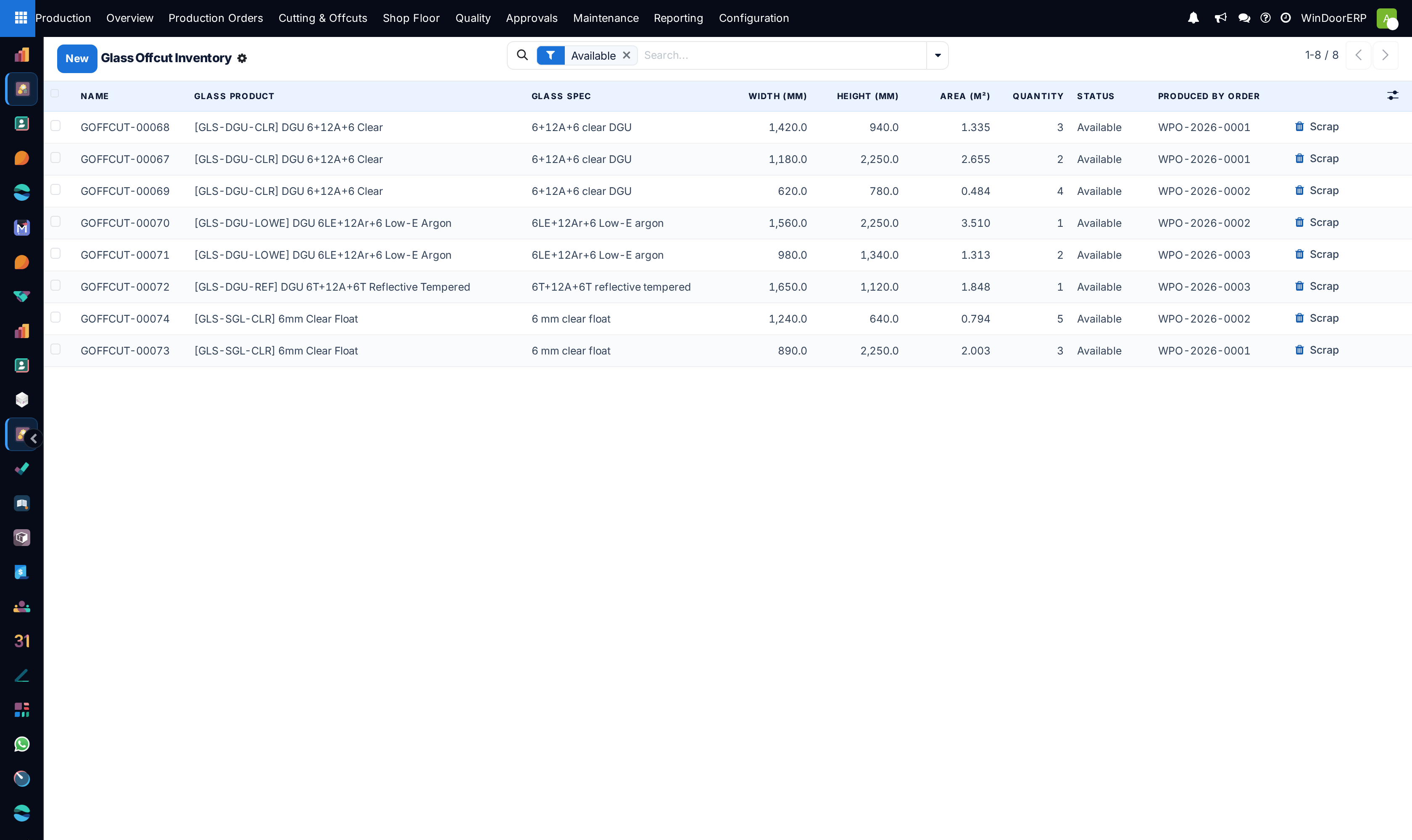
Open Production › Cutting & Offcuts › Glass Offcut Inventory. It opens with the Available filter pre-applied, so you see free glass; clear it to see scrapped rows too.
-
02
Find a remnant that fits the panel you need: the list carries the glass product, the width and height in millimetres, the area in m² and the quantity.
-
03
Confirm the piece is really on the rack. The display name reads
GOFFCUT-##### · CODE · 800×600mm ×N, and the×Nis how many identical pieces the row stands for. -
04
Follow Produced By Order and Produced By Plan if you need to know which job left the remnant and from which sheet.
-
05
Cut it at the table as a manual substitution. Nothing in the software will notice, so tell the person nesting the next order what you took.
-
06
When a piece is used up, broken or written off, press Scrap — from the list row or from the form header. That is the only state change a user can make on this screen.
The fields
| Field | What it is |
|---|---|
| Reference | Read-only, allocated as GOFFCUT-#####. |
| Display name | Computed as REFERENCE · CODE · WIDTH×HEIGHTmm ×N. |
| Glass Product / Glass Spec | What the remnant is, down to the specification — a remnant of a different build-up is a different piece of glass. |
| Width (mm) / Height (mm) | Both required. The usable rectangle of one piece. |
| Area (m²) | Computed and stored from the two dimensions. |
| Quantity | How many identical remnants the row stands for; defaults to 1. Unlike profile offcuts, this figure is shown as a column here. |
| Storage Location | Informational only, exactly as for profile offcuts — no stock move, no quant. |
| Status | Available, Reserved, Consumed, Scrapped. In practice only available and scrapped occur — see the callout. |
| Produced By Order / Produced By Plan | The order and the glass plan whose sheet left the remnant. |
| Reserved For Order | Present on the record, never filled by anything in this release. |
| Notes | Free text — the sensible place to record that a piece was taken for another job. |
Where the rows come from
Rows are created at the end of a Nest Glass run, when each plan harvests its sheets' leftover rectangles. A remnant is kept only if it reaches the minimum size — 300 mm by default — on both sides; anything narrower in either direction is cullet and is not recorded. That minimum is a system parameter with no field in Settings, so it is not something a user can raise or lower: only an administrator can change it. Identical rectangles are grouped onto one row with a quantity rather than listed separately.
The same run also clears up: before packing, it deletes the still-available glass offcuts that that order previously produced, so re-nesting a job does not leave the rack list claiming remnants that were never cut. Scrapped rows and rows produced by other orders survive.
Important
Nothing consumes glass offcuts. A nesting run is given no offcut supply, so it always packs onto fresh sheets; no code anywhere reserves a glass remnant. Methods to consume and release a piece exist in the model but have no button and no caller, which also means the Reserved status is unreachable. Treat this screen as a printed rack list: if you want a remnant used, someone has to walk to the table and use it, and then scrap the row by hand.
Note
This is the one place where the glass register is more informative than the profile one: Quantity is a real column here, so a row of six identical remnants reads as six. On the profile Offcut Inventory the same figure is hidden and survives only inside the display name.
Troubleshooting
| The list is empty after a big glass job | Either no sheet left a rectangle reaching 300 mm on both sides, or the default Available filter is hiding scrapped rows. Remnants below the minimum are never recorded. |
|---|---|
| Remnants recorded yesterday have vanished | The order that produced them was re-nested. Nest Glass deletes that order's still-available glass offcuts before packing, so the rack list cannot outlive the plan it came from. |
| Nesting bought new sheets while the rack was full | Expected behaviour, not a fault: the packer is never offered the offcut stock. Substitute at the table and scrap the row. |
| No status ever reads Reserved | Correct. Nothing reserves glass offcuts in this release, so the state cannot be reached. |
| The Scrap button is missing on a row | It is hidden once a row is consumed or scrapped. Consumed rows should not occur here, since nothing consumes them. |
| The remnant on the rack is smaller than the row says | The rectangle is what the nesting arithmetic left over, not a measured piece. Measure the physical remnant before cutting, then adjust the row or scrap it. |
| Storage Location does not match warehouse stock | It never will — the field is informational and this register creates no stock records. |
Common mistakes
- Planning purchases on the assumption that the next nesting run will eat the rack. It will not.
- Using a remnant at the table and leaving its row Available, so the list slowly fills with glass nobody has.
- Ignoring Glass Spec and picking a remnant of the right size but the wrong build-up.
- Re-nesting an order to "refresh" it and being surprised that its free remnants were deleted.
- Counting rows rather than reading the Quantity column, and then scrapping a whole row to write off one broken pane.
Was this article helpful?
Thanks — your feedback helps.
Running a window or door factory?
Ask for a demo