Plan machine maintenance and log repairs
What this does
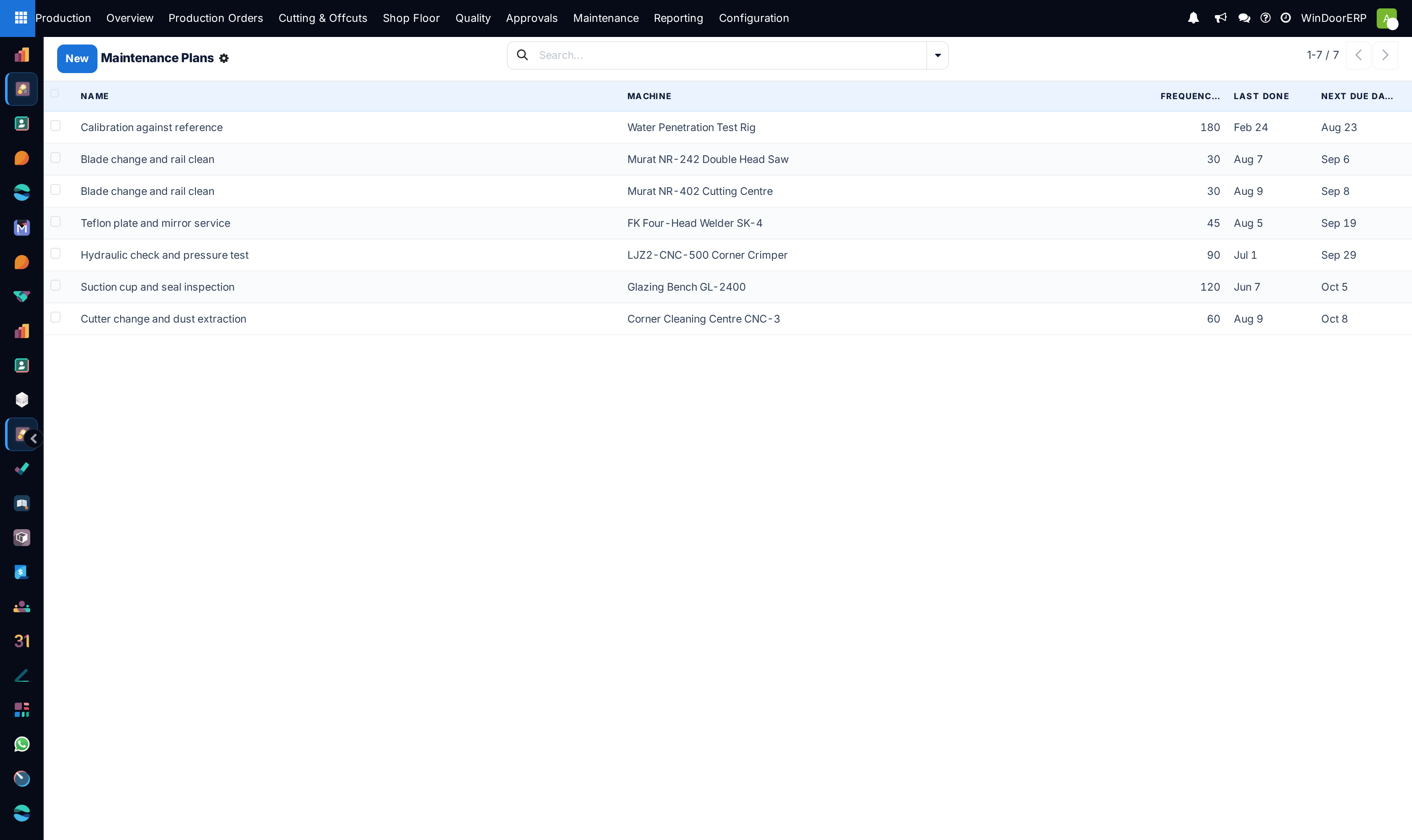
Machine care runs on two screens under Production › Maintenance. A Maintenance Plan is a recurring service definition — one machine, a frequency in days, a responsible person and a procedure note. A Maintenance Request is one job: preventive when generated from a plan, corrective when someone logs a breakdown. Starting a request takes the machine Down on the live dashboards; finishing it brings the machine back and, if you record the downtime and a loss reason, charges those minutes against the affected work order's OEE.
One thing this module deliberately does not do: fire on its own. There is no scheduler behind the plans — requests are generated with a button. The Next Due date orders the plan list so the person doing the generating can see what is due; nothing acts on it automatically.
Before you start
- Machines registered in Production › Configuration › Machines — every plan and request points at one.
- Downtime codes of type Availability (downtime) in Configuration › Productivity Loss Reasons, if you want maintenance minutes to reach OEE.
- Requests are open to every production user; the Maintenance Plans menu is manager-only.
Steps
-
01
Open Production › Maintenance › Maintenance Plans and create one per recurring service: name, Machine, Frequency (days), the Responsible person, and the procedure in the note.
-
02
When a service is due (the list is sorted by Next Due), open the plan and press Generate Request — one plan at a time; the button lives on the plan's form. It produces one Preventive request scheduled now, linked back to its plan.
-
03
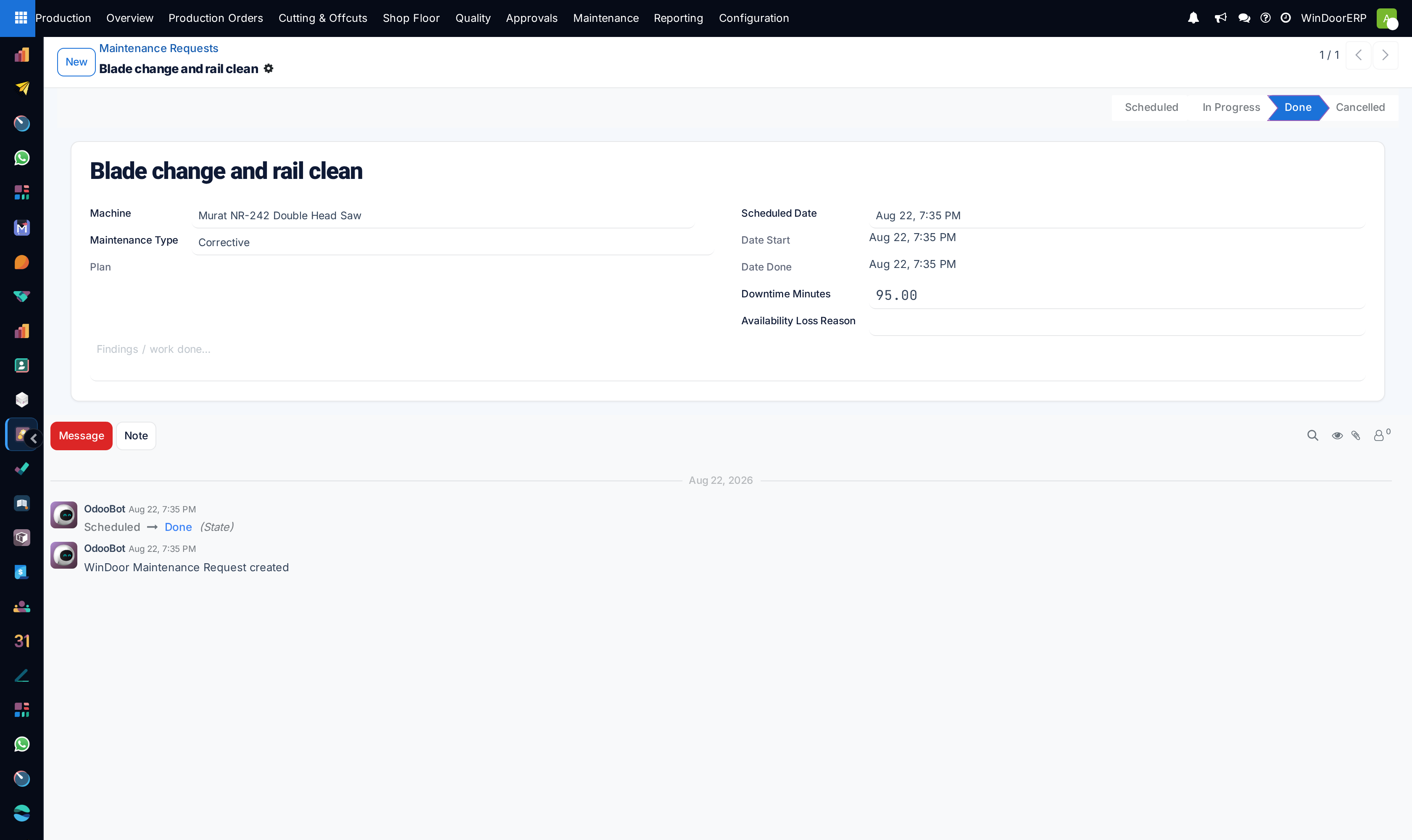
For a breakdown, go to Maintenance Requests and create one directly — the type defaults to Corrective.
-
04
When the technician begins, press Start: the request goes In Progress and the machine's Live State flips to Down, which the dashboards and the machine list show immediately.
-
05
Record what happened: Downtime Minutes, the Availability Loss Reason, and the findings note.
-
06
Press Done: the machine returns to Idle, the plan's Last Done becomes today (recomputing Next Due), and the recorded downtime is charged to the machine's current work order as an availability loss.
The request form
| Field | What it does |
|---|---|
| Machine | The asset being serviced. Required. |
| Maintenance Type | Preventive (from a plan) or Corrective (the default for hand-raised breakdown jobs). There is no separate "breakdown" type — corrective is it. |
| Plan | Back-link to the generating plan; empty on corrective requests. Read-only. |
| Scheduled Date, Date Start, Date Done | When it should happen, and the actual timestamps stamped by Start and Done. |
| Downtime Minutes | How long the machine was out. Typed by hand — it is not measured. |
| Availability Loss Reason | The downtime code; the dropdown offers only Availability-type reasons. |
| Note | Findings / work done. |
How downtime reaches OEE
On Done, if — and only if — both Downtime Minutes and the Availability Loss Reason are filled, the request writes a labour log carrying those minutes onto the machine's work order (the one in progress on that machine, else its most recent) and posts "Availability loss of … min charged from maintenance …" there. That log is what drags the work order's OEE availability down and what the overview's downtime chart aggregates. Leave either field empty and the request completes silently with no OEE effect at all; a machine that has never had a work order also absorbs nothing, silently.
Warning
Down is a signal, not a lock. A machine marked Down does not block work orders — starting one on it flips the machine straight back to Running. And Cancel on an in-progress request does not reset the machine: it stays Down until a request completes on it, a work order starts, or someone edits the Live State by hand.
Troubleshooting
| No request appeared although a plan is overdue | Nothing fires automatically. Select the plan and press Generate Request. |
|---|---|
| Completed maintenance shows no effect on OEE | Downtime Minutes or the Availability Loss Reason was empty at Done — the charge is skipped silently. It also needs the machine to have a work order to charge. |
| The Availability Loss Reason dropdown is empty | No Availability (downtime)-type reasons exist yet. Create them under Configuration › Productivity Loss Reasons. |
| A machine is stuck on Down | An in-progress request was cancelled, which leaves the state as it was. Set the machine's Live State back by hand, or complete a fresh request on it. |
| Next Due looks wrong on a new plan | Until Last Done is set, Next Due falls back to today. It becomes meaningful after the first completed request (or after typing Last Done yourself — the field is editable). |
Common mistakes
- Trusting the plan list to run itself. Someone must open it and press Generate Request — build that into a routine.
- Closing requests without minutes and a loss reason, then wondering why availability always reads 100%.
- Cancelling instead of completing an in-progress job — the machine stays Down on every dashboard.
- Recording the repair on a new request while the original sits In Progress forever — the machine's state then depends on which one touches it last.
- Expecting usage-based scheduling. Plans are calendar-only — there are no meters or cycle counters to trigger from.
Was this article helpful?
Thanks — your feedback helps.
Running a window or door factory?
Ask for a demo