Release contract retention and invoice it
What this does
Sales › Retention Releases is where money held back on a contract is given back and invoiced. Retention on this fleet is not a note in a file: it is an amount deducted on approved bill-of-quantities claims, tracked separately for the main contract and for its variation orders, and released through a numbered record that raises and posts the invoices itself.
The menu sits at the top level of the Sales app — beside Orders, To Invoice and Products, not inside To Invoice — and it is added by the bill-of-quantities module, so it is visible only to people in the BOQ Invoice User group.
One thing this screen does not do: it does not track a defects liability period. There is no expiry date, no timer, no certificate and no reminder anywhere in the release record. The waiting period is a commercial fact you manage outside the system and record in the release's own notes; the section on it below says what you actually get.
Before you start
- You need the BOQ Invoice User group. Without it the menu, the button on the sales order and the records themselves are invisible.
- Retention must actually have been held. It is created by the Less: Deduct Retention deduction on an approved bill-of-quantities claim — see Bill contract progress with a BOQ invoice. A contract billed by standard invoices holds no retention and will never appear here.
- Releases are raised from the main contract only. Variation orders are covered by the parent's release, and asking a variation directly is refused.
- The sales journal for the company must have a default account, or the release will fail at the last step.
Steps
-
01
Open the main contract and press Release Retention in its header. The button only appears once there is a balance to release.
-
02
A draft release record opens in a dialog, already numbered
RET-REL-00001and already attached to the contract. It was saved the instant you pressed the button — closing the dialog does not undo it. -
03
Set the Release Date and pick a Release Type. Choosing Full Release fills both amount fields with the whole available balance; Partial Release resets them to zero for you to type.
-
04
Check the two Available Balance figures and enter what you are releasing against the main contract and against the variation orders. The Total Release Amount adds up as you type.
-
05
Write the Release Notes. This is the only place the reason lives — the maintenance visit, the signed warranty pack, the end of the agreed defects period.
-
06
Press Release Retention on the record. It creates the invoices, posts them immediately, moves the record to Released and logs the amounts in the chatter.
Where the retention comes from
Every approved bill-of-quantities claim on a contract carries the retention held cumulatively to date, split into a main-contract share and a variation-orders share. Because each claim restates the running total rather than adding to it, the amount currently held is the highest figure across the approved claims — not their sum. A contract whose three claims recorded 0, 200 and 460 is holding 460, and the system reads it that way.
From there the arithmetic is simple, and it is kept separately for the two halves of the project:
| Figure | How it is worked out |
|---|---|
| Held | The main and variation retention on the approved claim holding the most. |
| Released | The sum of the amounts on this contract's releases that reached Released. Drafts and cancelled records count for nothing. |
| Balance | Held minus released. This is what the release form offers you. |
A variation order does not hold retention of its own — claims live on the main contract. Its share of the project's variation retention is its share of the certified progress recorded against it, and the same proportions are used again when the release is split into invoices. The contract's BOQ Inv Options tab shows the whole summary: held, released and balance for the main contract, for the variations, and for the two together.
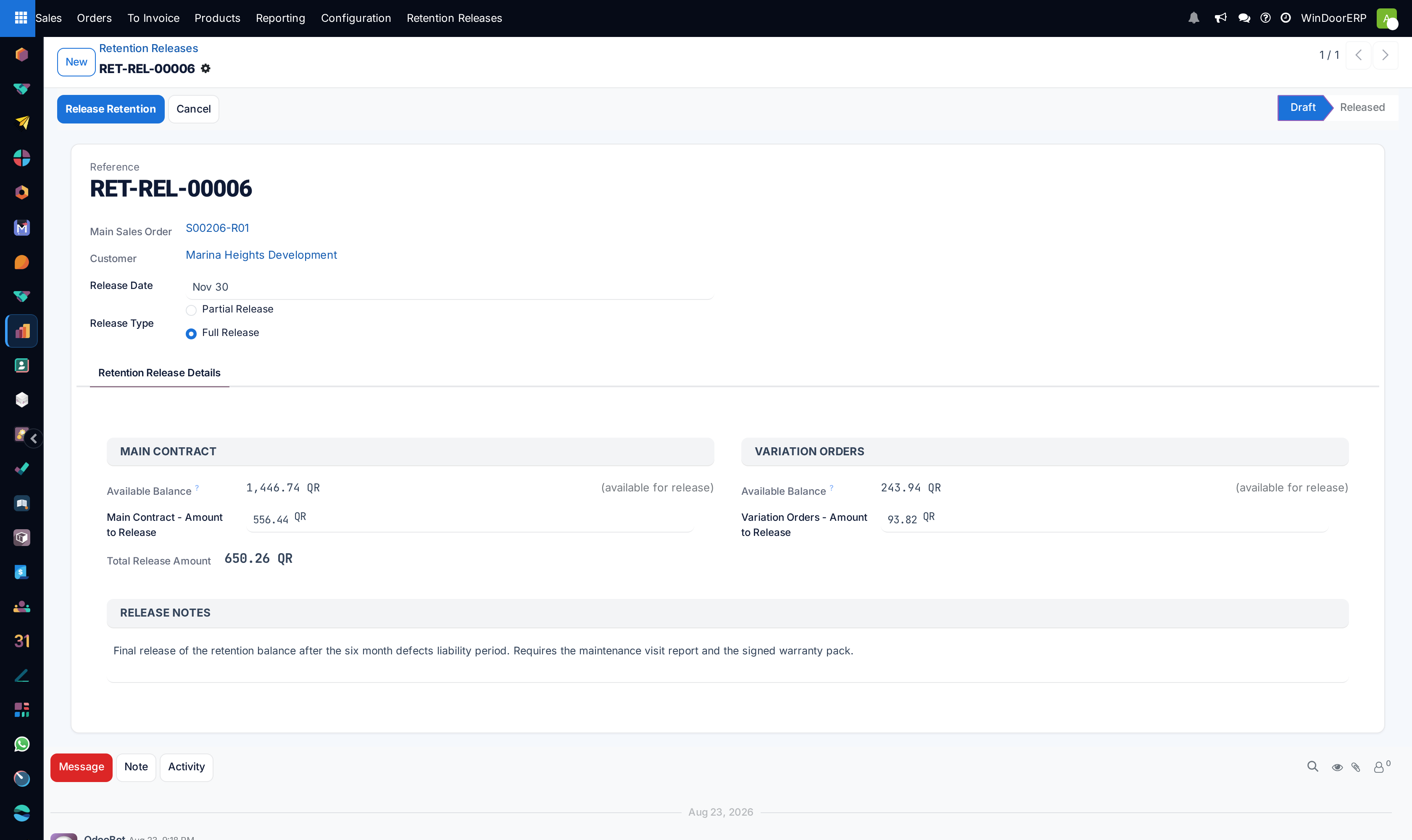
The release record, field by field
| Field | What it does |
|---|---|
| Reference | Read-only, from a sequence: RET-REL-00001, RET-REL-00002 and so on. |
| Main Sales Order | Read-only and required. It is set when the record is created from the contract, and there is no way to set it afterwards. |
| Customer | Read-only, from the contract. |
| Release Date | Required, defaults to today. It becomes the invoice date on every invoice this release raises, so back-dating here back-dates the accounting. |
| Release Type | A radio: Partial Release or Full Release. It is a convenience, not a constraint — see the warning below. |
| Main Contract — Available Balance | Computed, with the hint (available for release). Not editable. |
| Main Contract — Amount to Release | Required. What you are actually releasing against the parent contract. |
| Variation Orders — Available Balance | Computed across every variation on the project. |
| Variation Orders — Amount to Release | Required. Released as one figure and split across the variations for you. |
| Total Release Amount | The two added together, computed and stored. |
| Release Notes | Free text, placeholder "Enter reason or justification for releasing retention…". The only record of why. |
| Invoices smart button | Appears once invoices exist, and opens them. |
| Status | Draft → Released, with Cancelled off to the side. |
Full Release fills the amounts once — it does not keep them in step
Choosing Full Release copies both available balances into the amount fields at that moment. It does not lock them, and if the balance changes afterwards the typed amounts stay as they were: a record can sit marked Full Release with amounts well below the balance it now offers. The amounts are what get released, so read them, not the radio.
What Release Retention actually does
The button is not a state change with paperwork to follow. In one press it:
- checks the record is still in Draft, that the total is above zero, and that neither amount exceeds its available balance;
- creates a customer invoice for the main-contract amount, dated the release date, referencing the contract, with a single line named Main Contract - Retention Release - RET-REL-000nn;
- splits the variation amount across the variation orders in proportion to the progress certified on each — the last one absorbing the rounding — and creates one invoice per variation, named the same way;
- posts every one of those invoices immediately, with no draft stage to review;
- moves the record to Released, links the invoices to it, and posts the three amounts to the chatter.
The invoice line uses a retention-release product when one has been configured in the bill-of-quantities settings; otherwise it is a plain text line posted to the sales journal's default account. Either way the amount is exactly what you typed.
Two traps around creating a release
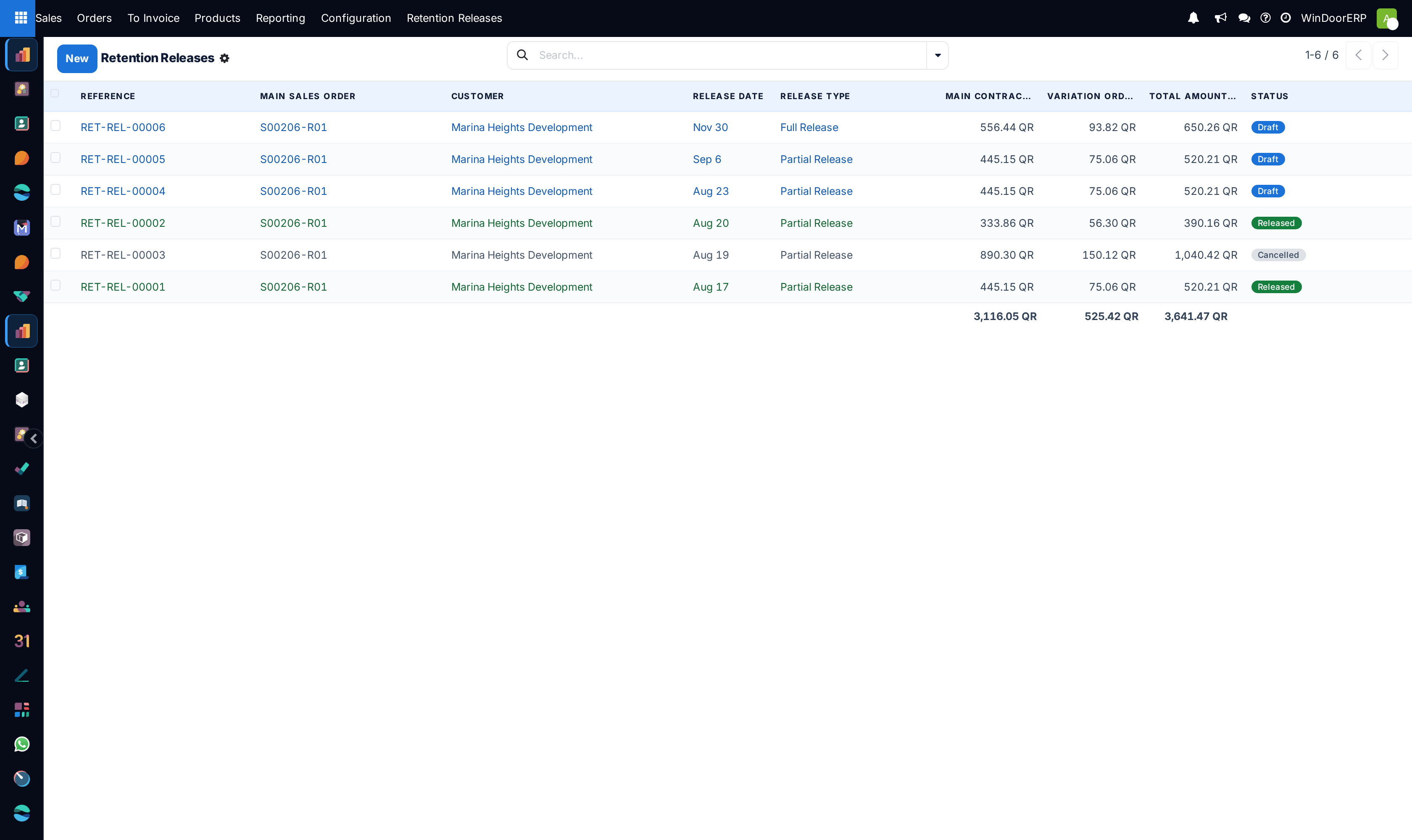
The New button on this list is a dead end. The list has one, but Main Sales Order is required and read-only, so a record started here can never be given a contract and never saved. Always start from the contract's Release Retention button.
That button creates the record before you have decided anything. It saves a draft and then opens it, so pressing it to "have a look" leaves a numbered draft behind. That is why a healthy list carries drafts nobody meant to keep — cancel them rather than leaving them to be mistaken for pending work.
The list, and the filter that is not applied
The list shows Reference, Main Sales Order, Customer, Release Date, Release Type, the two amounts and the total — each of the three amount columns summed at the foot — and a Status badge, with draft rows in blue, released in green and cancelled greyed out.
The menu asks for the list to arrive filtered to drafts, but the screen's search view defines no such filter, so the request is silently ignored and you get every record, in every state. Two consequences: there is no chip in the search bar to tell you a filter is on, and the column sums include drafts and cancelled records. Never read the Grand Total as money released. The search panel here is bare — it offers only Reference and Main Sales Order to search on, with no ready-made filters or groupings — so to separate the states you have to add Status yourself as a custom group.
Cancelling a draft — and why a release cannot be undone
The header buttons appear in strict alternation, and between them they make a released record terminal. Cancel is offered only while the record is Draft; it simply marks it Cancelled, and because nothing has been created yet nothing else happens. Reset to Draft is offered only on a Cancelled record, and only to the BOQ Invoice Administrator group.
A record in Released therefore shows no buttons at all. There is no undo, no reversal and no way back to draft from the interface. If a release was wrong, the remedy is entirely in Accounting: raise credit notes against the invoices it posted. Do that and the ledger is right, but be aware of the consequence — the release record stays Released, so the contract still counts those amounts as released and offers a smaller balance than it should. Someone has to reconcile the two by hand.
Cancelling a draft, by contrast, costs nothing: a draft's amounts were never counted as released in the first place.
There is no defects liability period in the system
Retention is normally released at the end of a defects liability or maintenance period, and contracts on this fleet are written that way — the release notes on real records say so in as many words. But the period itself is nowhere in the software. There is no field for it, no expiry date on the retention, no countdown, no reminder and no certificate document.
What you can do instead, entirely with what exists:
- Schedule an activity on the contract for the date the period ends. It will then show up in the order calendar and activity board — see Track order deadlines and fulfilment status.
- Record the period, its end date and the evidence you relied on in the release's Release Notes, which is stored and visible on the record for good.
- Use the chatter on the release and on the contract for the correspondence.
Troubleshooting
| What you see | Why, and what to do |
|---|---|
| No Retention Releases menu | You are not in the BOQ Invoice User group. |
| No Release Retention button on the contract | There is no retention balance. Either no approved claim deducted any, or it has all been released. |
| "Please release retention from the main contract: …" | You pressed it on a variation order. Open the contract it names. |
| "No retention balance available to release." with the held and released figures | Everything held has already been released. The figures in the message tell you the whole story. |
| "Please specify an amount to release." | Both amount fields are still zero. |
| "Main contract release amount (…) exceeds available balance (…)" | You typed more than is held. The message gives both numbers. |
| A released record has no buttons in its header | Correct and final. Releases cannot be reversed from the interface; correct one with credit notes in Accounting. |
| "No sales journal found for company …" or "No default account configured on the sales journal '…'" | An accounting setup gap. Nothing was created; fix the journal and press again. |
| "The configured retention release product no longer exists. Please update the BOQ settings." | The product named in the bill-of-quantities settings has been deleted. Point the setting at a live product. |
| A record cannot be saved and complains about the sales order | You started it with New. Discard it and use the contract's button. |
| The list totals look far too high | They include drafts and cancelled records. Add Status as a custom group to separate them. |
Common mistakes
- Starting a release with the New button. It cannot be completed.
- Pressing Release Retention on a contract to see the numbers, then closing the dialog — the draft is already saved.
- Reading the list's Grand Total as retention released. Drafts and cancelled records are in it.
- Expecting a draft stage on the invoices. They are posted the moment you release.
- Releasing to "see the invoice", expecting to cancel it afterwards. A released record has no buttons left; only a credit note in Accounting can correct it.
- Trusting the Full Release label instead of reading the amounts beneath it.
- Waiting for the system to prompt you when a defects period ends. It never will — schedule an activity.
Was this article helpful?
Thanks — your feedback helps.
Running a window or door factory?
Ask for a demo