Audit database models, custom fields, decimal accuracy, system parameters, and sequences
What this does
The Database Structure, Parameters and Sequences & Identifiers menus under Settings › Technical show you the database as the software defines it: every model and field, the decimal precision rules, the key–value system parameters, the document-numbering sequences, and the external identifiers that tie records to the modules that shipped them. Almost all of it is a read-only reflection of code — this is an audit surface, and the few things you can genuinely change here are called out below.
Before you start
- Administrator access plus developer mode — the Technical menu does not exist without it.
- These screens show internals by their technical names. Nothing here is needed for daily work; come here to verify, diagnose, or make one of the few deliberate changes described below.
Steps
-
01
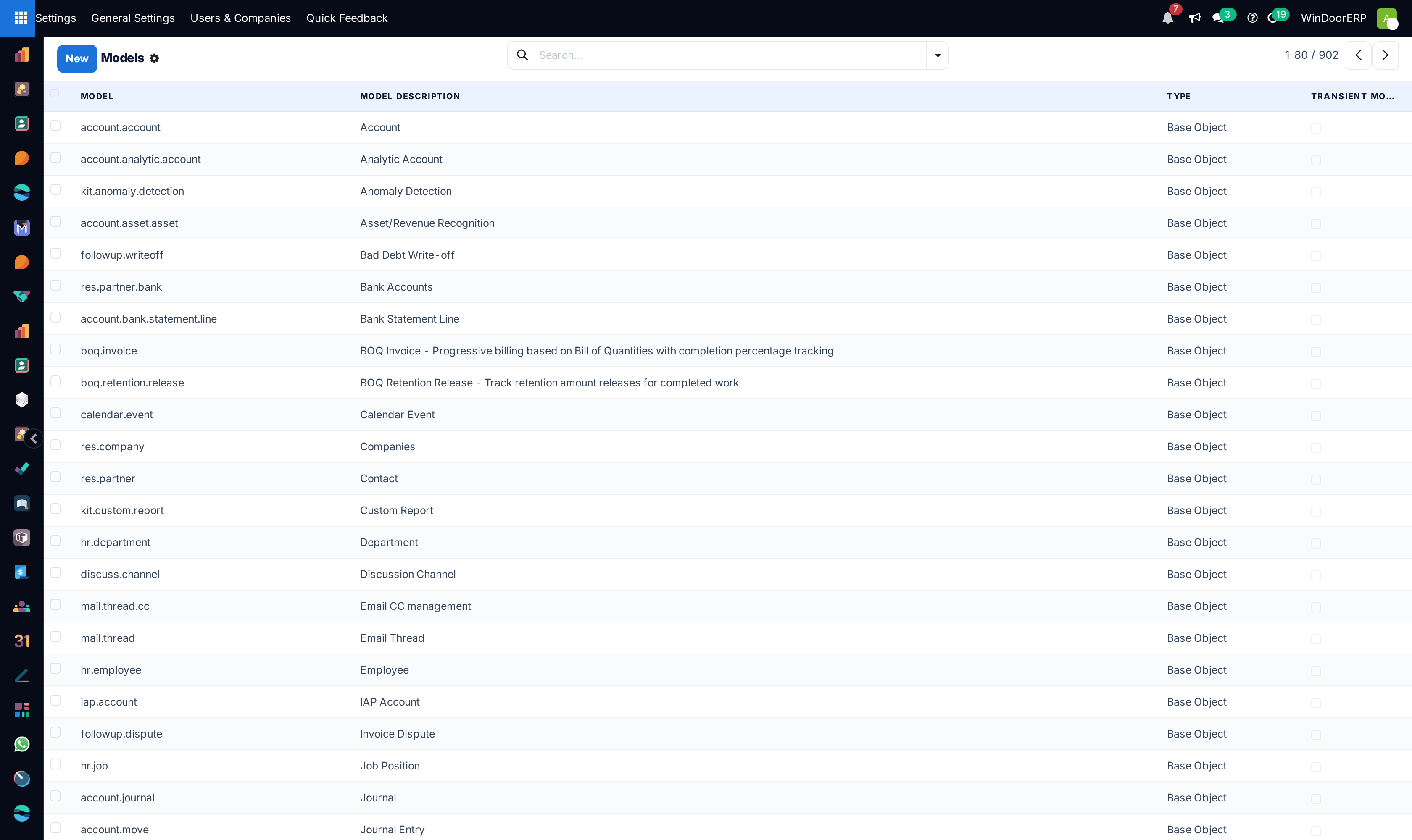
Open Settings › Technical › Database Structure › Models to see every model; open one for its fields, access rules and record count.
-
02
Open Database Structure › Decimal Accuracy to read — and only deliberately change — the rounding precision per usage.
-
03
Open Parameters › System Parameters to audit the database's key–value settings. Treat the values as sensitive.
-
04
Open Sequences & Identifiers › Sequences to adjust document numbering — prefixes, padding and next numbers.
-
05
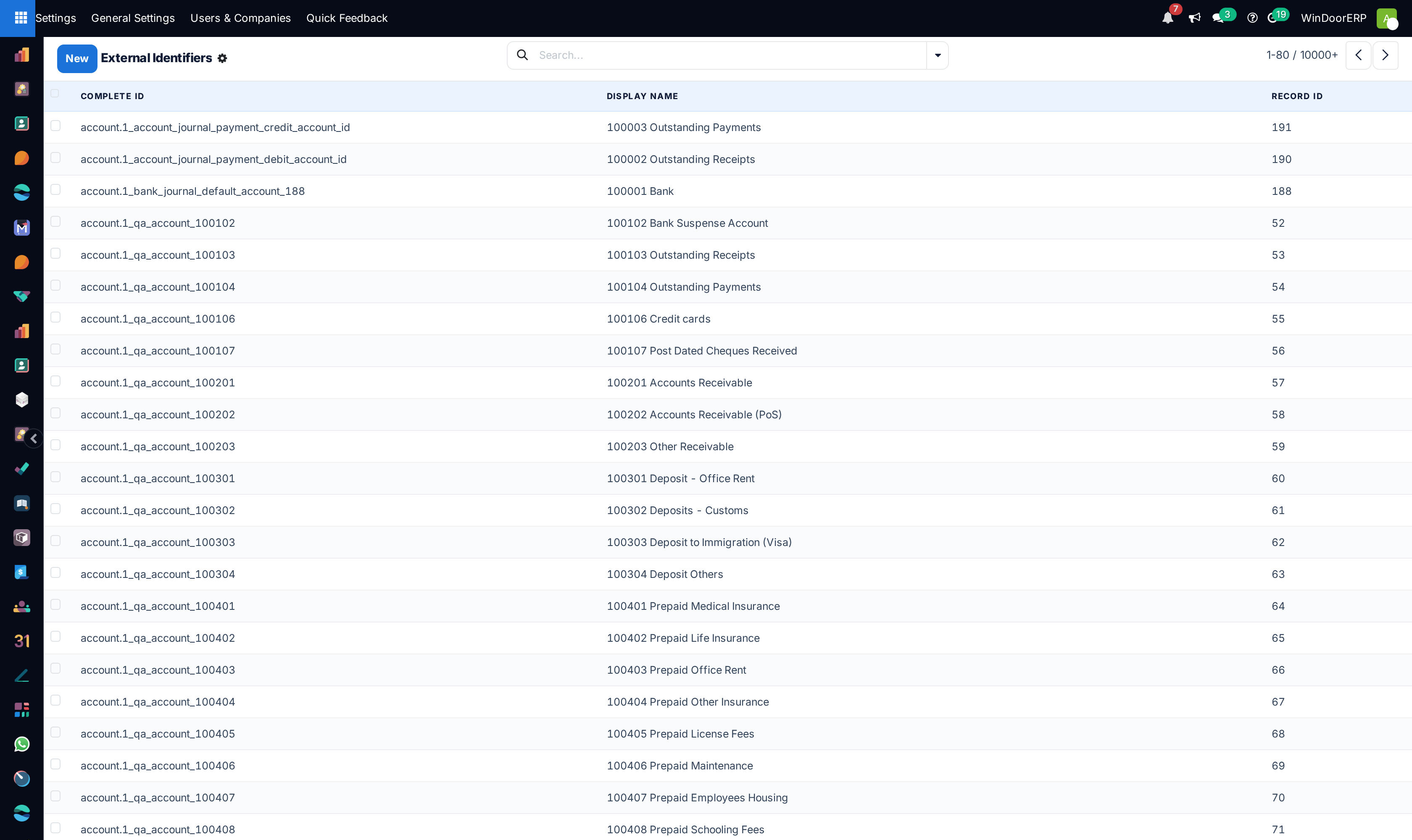
Open Sequences & Identifiers › External Identifiers only to look: these rows are how upgrades find their records.
Models and fields — the read-only mirror
Models lists every model with its technical name, description, Type and transient flag. Base Object means defined by module code: the ORM rewrites its definition on every upgrade, and the delete guard is absolute — "Model '…' contains module data and cannot be removed." A form shows the model's fields, its access rights and record rules inline, which apps define it, and a live record count.
The one creative act this screen allows is a Custom Object: its technical name must start with x_, it gets a real database table and an automatic x_name field, and its type, model name and transient flag are frozen forever after. The same rule governs Fields: custom fields start with x_ and are fully editable except their model and type ("Changing the type of a field is not yet supported. Please drop it and create it again!"), while on a base field the only thing an administrator may edit is what is translatable — the Field Label and Field Help. Everything else answers with "Properties of base fields cannot be altered in this manner! Please modify them through Python code, preferably through a custom addon!". A standard WindoorERP database contains essentially no custom models or fields — if you see x_ entries, someone made them deliberately.
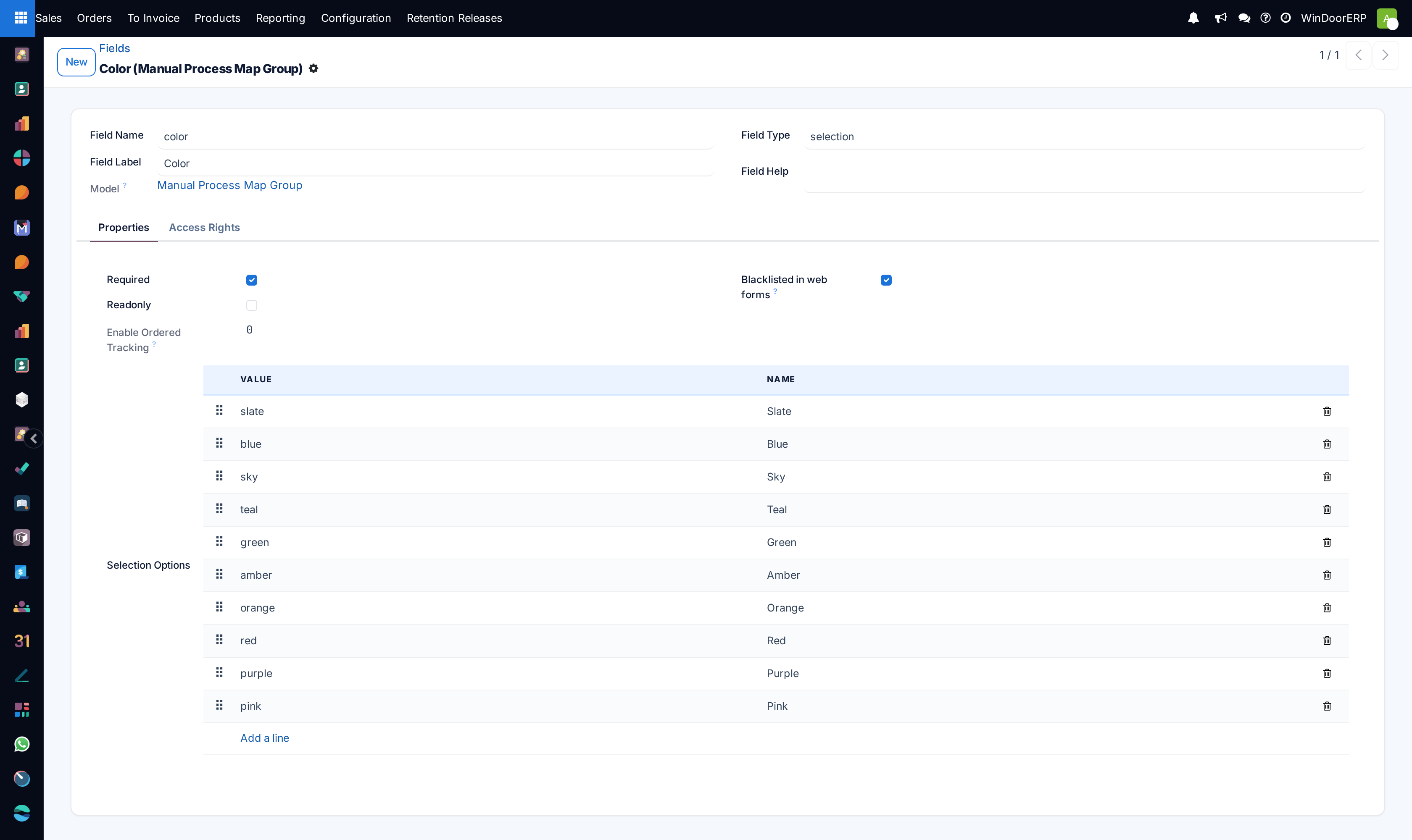
Fields Selection lists the choice values of every selection field. Admins may edit a value's label; adding or deleting values on base fields is blocked, and editing the stored value rewrites that column in every existing record — label edits only, unless you know exactly what you are doing.
Model Constraints and ManyToMany Relations are bookkeeping for the upgrade machinery — every column read-only, nothing to configure. Attachments lists every stored file with its owning record, type (File or URL), size and checksum; the file content itself lives in the server's filestore, not in the database table. Logging shows only entries written through the logging model (a server action's log(), for instance) — it is not the server log file. Profiling holds performance traces: an administrator first allows profiling for a limited period through the “Enable profiling for some time” prompt, records a trace from the developer tools, and opens it here as a flame graph; without that step a normal user is told profiling is not enabled on this database.
Decimal accuracy
One row per usage, one Digits value each — this is what rounds quantities and unit prices across the system:
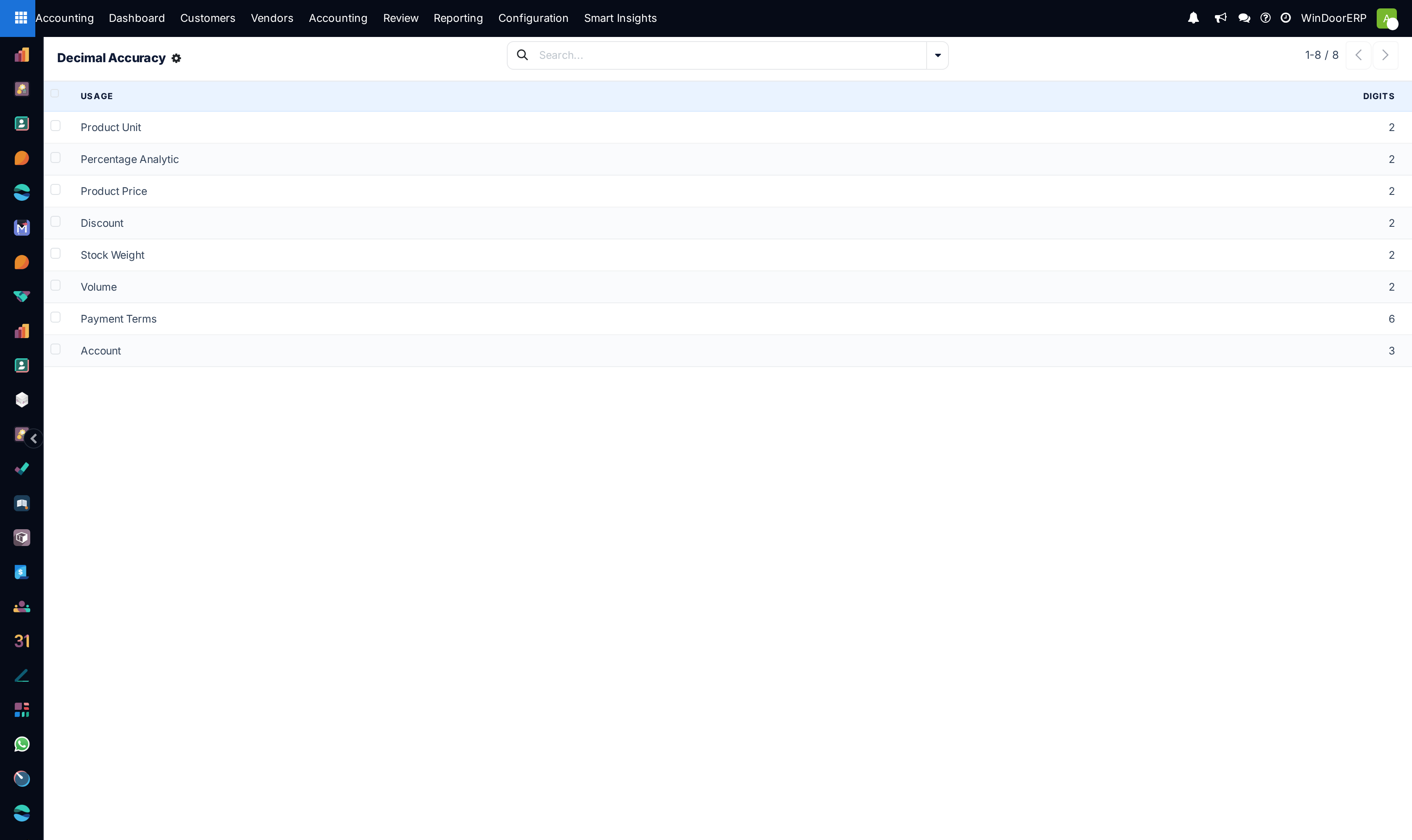
On a WindoorERP database the list reads: Product Unit, Product Price, Discount, Stock Weight, Volume and Percentage Analytic at 2 digits, Payment Terms at 6, and Account at 3. Two things to understand before touching it: monetary amounts round by the currency's rounding, not by this screen; and changing a precision never rewrites existing data — which is exactly why lowering one warns you at length that "changing decimal precisions in a running database is not recommended".
System parameters
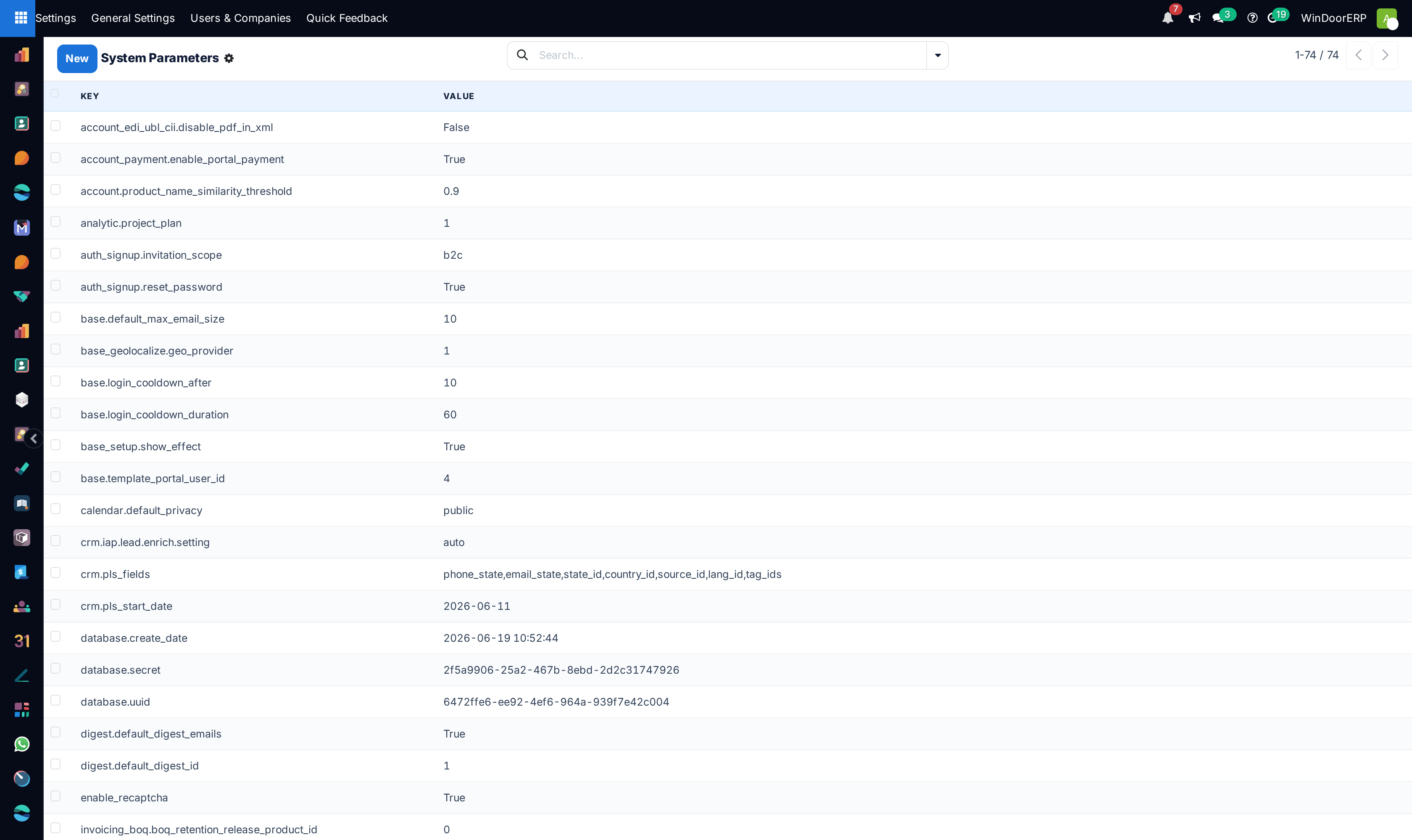
A flat key–value store the whole system reads. Changes take effect on the next request — no restart. A handful worth recognising: web.base.url is the address used in emailed links (it follows the last administrator login unless web.base.url.freeze is set to True); base.login_cooldown_after and base.login_cooldown_duration are the brute-force lockout (after 10 failed logins, block for 60 seconds, by default); database.uuid and database.secret identify and secure the instance — the protected keys can be neither renamed nor deleted.
Warning
This list contains secrets in plain text — integration tokens and the database's signing secret among them. Anything pasted from this screen into a ticket, a chat or a screenshot is a credential leak. Audit it, don't broadcast it, and never edit or delete a key you did not create.
Sequences — document numbering
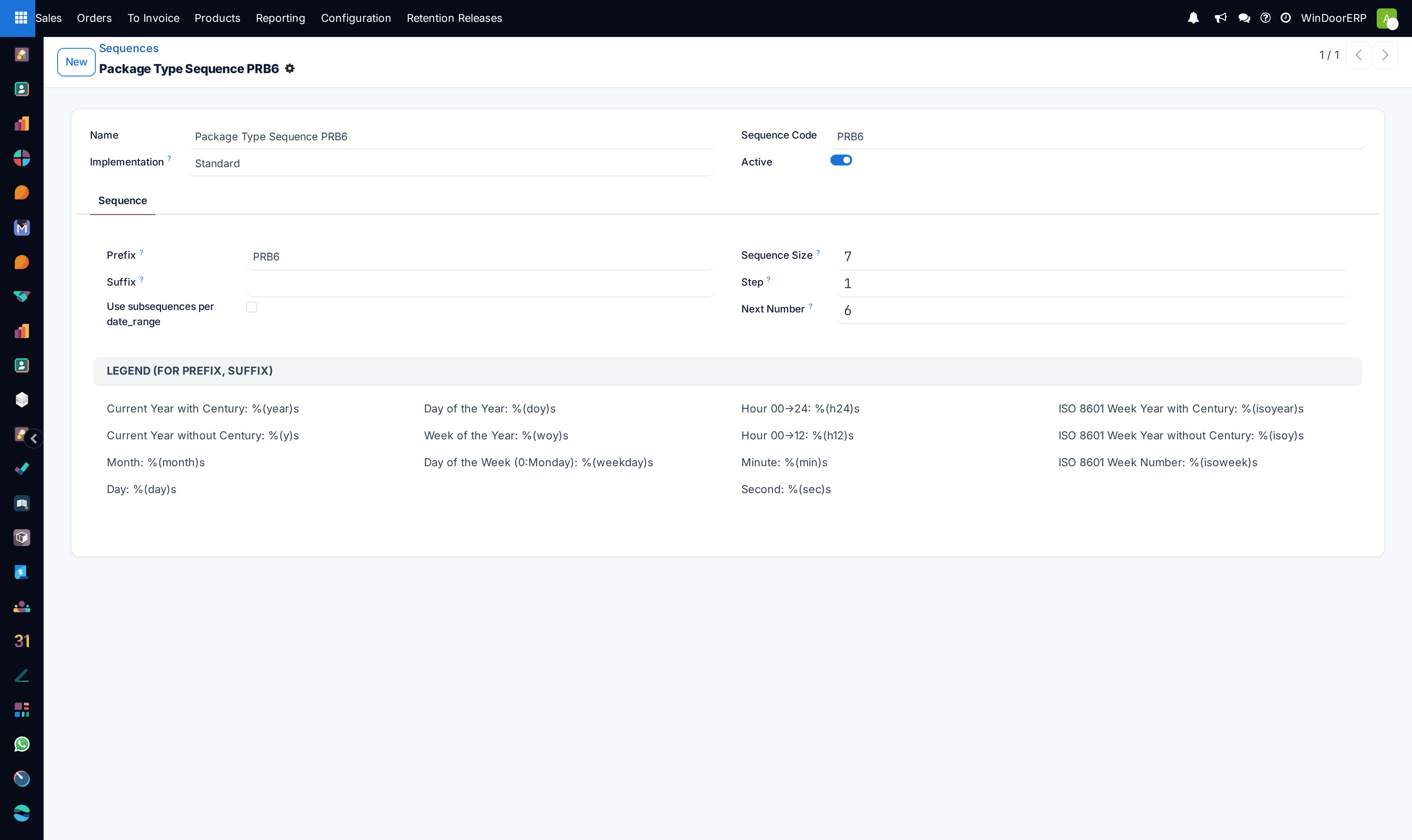
Every numbered document — quotations, purchase orders, transfers, invoices — draws its number from a sequence here. The form is self-documenting, legend included:
| Field | What it does |
|---|---|
| Sequence Code | How the software finds the sequence — never change it on a shipped sequence. |
| Prefix / Suffix | Fixed text around the number, with date placeholders from the on-form legend: %(year)s, %(month)s, %(day)s and the rest. A WindoorERP example: production orders use WPO-%(year)s-, giving WPO-2026-0031. |
| Sequence Size | Zero-padding: size 5 turns 42 into 00042. Sales orders ship as S + 5 digits (S00042), purchase orders as P + 5 digits. |
| Step / Next Number | The increment and the next value handed out. The displayed next number can lag slightly behind reality on a busy system. |
| Implementation | Standard uses a fast database counter — a cancelled document still consumes its number, so gaps happen. No gap locks the row per number: gapless, slower, and two users numbering at the same instant briefly queue. The accounting sequences that must be gapless already are. |
| Use subsequences per date_range | Restarts numbering per period (typically per year), with range_-prefixed placeholders (%(range_year)s) using the period start. |
Renumbering rules of thumb: adjust prefixes before go-live; never wind Next Number backwards over numbers already used — the next document collides with an existing one.
External identifiers
Every record a module ships carries an External Identifier (module.name). It is how an upgrade finds "its" record to update. Deleting an identifier does not delete the record — worse, the next upgrade cannot find the record and creates a duplicate, or aborts on a uniqueness rule. Deleting the identifier of a view or menu is the classic way a well-meaning admin breaks an instance. Look, filter, export — do not delete.
Troubleshooting
| Symptom | Cause and fix |
|---|---|
| "Properties of base fields cannot be altered in this manner!" | You edited a non-translatable property of a shipped field. Only Field Label and Field Help are editable on base fields; anything more belongs in a custom addon. |
| "Model '…' contains module data and cannot be removed." | Base models cannot be deleted from the UI, ever. Removing a feature means uninstalling its module from Apps. |
| "Cannot rename/delete fields that are still present in views:" | The message names the field and view — remove the field from that view first. |
| Totals look "wrong by a fraction" after a precision change | Existing records keep their old rounding; only new computations use the new digits. This is the warned-about interplay — precision changes belong before go-live. |
| Emailed links point at the wrong address | web.base.url was rewritten by an administrator logging in from another address. Set it correctly and add web.base.url.freeze = True. |
| "Invalid prefix or suffix for sequence" | A typo in a placeholder — check the spelling against the legend on the sequence form. |
| A document number was skipped | Normal on Standard sequences: a cancelled or failed document consumes its number. Only No gap sequences guarantee continuity, at a concurrency cost. |
| Duplicate records appeared after an upgrade | Someone deleted External Identifiers — the upgrade re-created the records it could no longer find. Restore from backup or deduplicate by hand, and stop deleting identifiers. |
Common mistakes
- Treating this area as a configuration surface — it is a mirror of code, and the guards exist because editing the mirror fixes nothing.
- Changing decimal precision on a live database to "fix" one document's rounding.
- Pasting a System Parameters screenshot into a support ticket with token values showing.
- Editing a selection value's stored value instead of its label — that rewrites the column across every record of the model.
- Deleting an External Identifier to "clean up" — the cost arrives at the next upgrade, as duplicates.
Was this article helpful?
Thanks — your feedback helps.
Running a window or door factory?
Ask for a demo