Log, fix, and close site snags
What this does
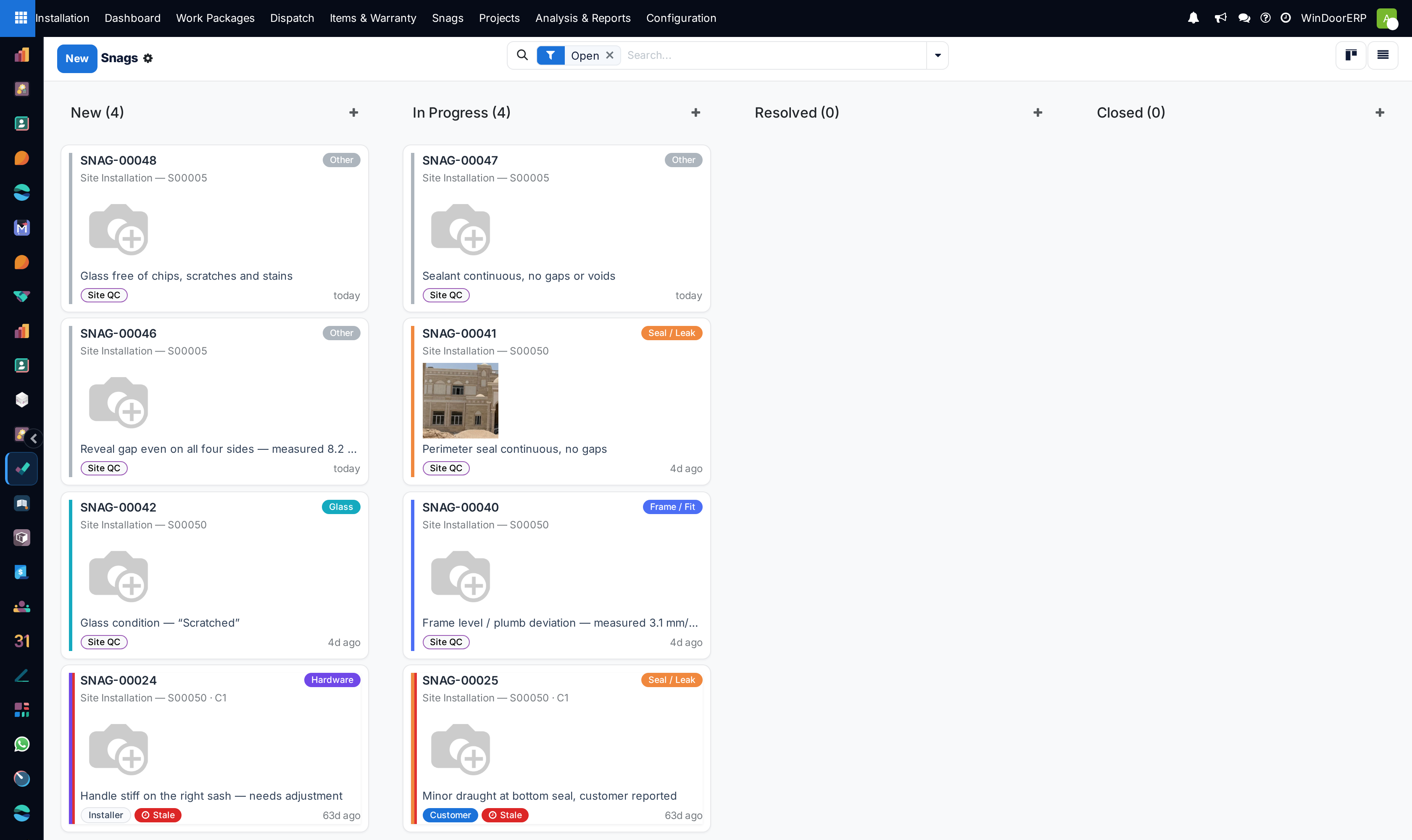
A snag is one recorded defect on one opening — logged with a photo, fixed with evidence, and closed by the office. Snags matter beyond tidiness: a work package cannot be handed over while any of its snags is still open, so the snag board is literally the list of what stands between the job and its signature.
Before you start
- Know which opening it concerns — a snag is raised against a work package and, ideally, the specific installation item.
Steps
-
01
Open Installation › Snags and click New — or better, raise it from the work package's own snag list so the job link is filled for you.
-
02
Pick the Work Package, the Opening, and a category: Frame / Fit, Glass, Hardware, Seal / Leak, Finish / Cosmetic or Other.
-
03
Describe the defect and attach the photo.
-
04
The crew works it: New → In Progress when someone starts, then Resolved with a fix note and fix photo.
-
05
The office verifies and drags the card to Closed — closing is deliberately a human decision, not a button.
How snags arrive
- Staff — logged in the backend, as above.
- Installer — the crew raises and fixes snags from their portal job page; marking one fixed there requires a photo or a note of what was done.
- Customer — the customer's installation tracker page has a "raise a snag" form; a description is required, and the snag arrives tagged Customer.
- Site QC — a failed quality check raises its snag automatically, tagged Site QC, and re-fails re-open the same snag rather than duplicating it.
The states, and who moves them
| State | Meaning |
|---|---|
| New | Logged, nobody on it yet. |
| In Progress | Someone pressed Start (portal or backend). |
| Resolved | The fixer says it is done — fix note, fix photo, stamped with who and when. Deliberately not the end state: the office confirms. |
| Closed | Verified and archived from the working board. Reached only by moving the card or statusbar by hand. |
Handover is blocked by open snags only — New and In Progress. A Resolved snag no longer blocks, so the crew can sign off a job the same day they clear the last defect, and the office closes at its own pace.
A snag still open after seven days is Stale: a red badge on the card, and a Stale filter to sweep them up in the morning review.
Routing a defect to the factory
When the defect is really a production problem — a mis-milled profile, a wrong glass unit — press Route to NCR on the snag. It opens a non-conformance in the Production app's quality loop, stamps the reference into NCR Reference, and sets the snag In Progress. The button hides once a reference exists; without the Production app it refuses with "The Production module (NCR) is not installed; the snag is tracked here only."
Troubleshooting
| Message or symptom | Cause and fix |
|---|---|
| "Resolve the N open snag(s) before handover." | The work package still has snags in New or In Progress. Resolve them — or cancel the ones raised in error — and hand over again. |
| "Add a photo or a short note saying what you fixed." | The portal's Mark fixed form refuses an empty fix — evidence is the point. |
| A Site QC snag reopened by itself | The re-check failed again; the QC engine re-opens its own snag with a chatter note instead of raising a duplicate. |
| Snag deleted by mistake? | It cannot have been by a normal user — only Installation Managers can delete snags. Check with them, or search with the filters cleared. |
Common mistakes
- Raising the snag on the project or work package with no Opening — two years later nobody knows which of forty windows leaked.
- Closing straight from New to keep the board tidy, which erases the fix evidence the next warranty claim needs.
- Letting the customer report defects by phone instead of the portal form — a snag that is not on the board does not block handover and does not get fixed.
Was this article helpful?
Thanks — your feedback helps.
Running a window or door factory?
Ask for a demo