Link a product to the FrameStudio designer or a design template
What this does
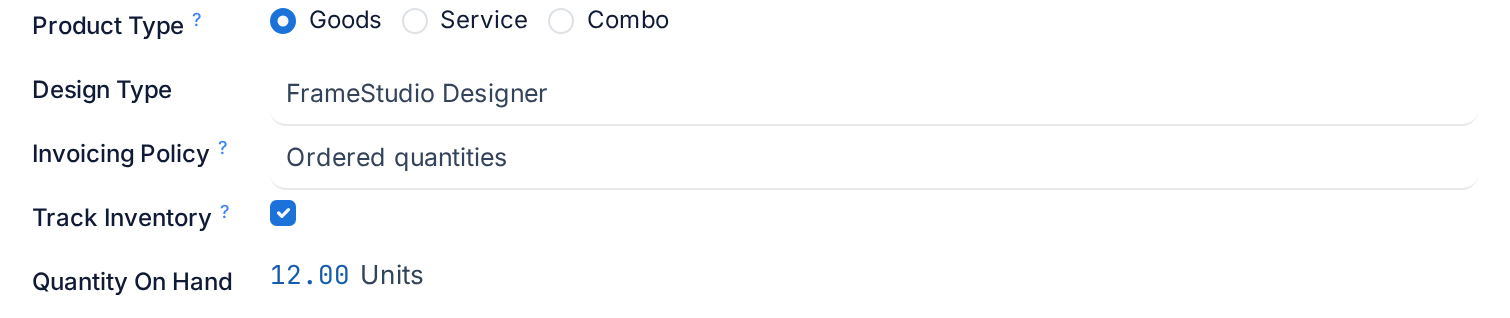
Design Type is the field that makes WindoorERP a fenestration system rather than a stock system. It sits directly under the product type and tells the sales order whether a line for this product is a plain quantity, a window to be drawn and priced in the FrameStudio designer, or a saved design that arrives on the line already drawn.
Three values, three behaviours. None is an ordinary product. FrameStudio Designer opens the visual designer on the order line, where the estimator draws the frame, sashes, glass and hardware and the design analysis prices it. Template Design is a design that has been saved as a reusable product: the line inherits the drawing the moment the product is chosen.
Before you start
- Decide the design type before the product is used. It is tracked in the chatter, so a change is visible, but existing order lines keep whatever they were drawn with.
- A product meant for the designer needs at least one system profile configured, or the designer has nothing to draw with. See the article on choosing a profile series.
- Templates are created from the sales order, not from this form. You only tidy them up here.
Steps
-
01
On the General Information tab, set Design Type.
-
02
Choose None for anything that is not designed: profiles, glass, hardware, services, consumables.
-
03
Choose FrameStudio Designer for a product the estimator will draw: aluminium or uPVC windows, doors, sliding units, curtain-wall panels. When such a product is put on a quotation the line shows a Design button; once a drawing exists the button reads Edit Design.
-
04
Leave Template Design to WindoorERP. When someone clicks Save as Template on a designed order line, a new product is created with this value, the drawing attached, the line's unit price as Sales Price, Sales on and Purchase off, and the form opens for you to name it.
-
05
On a template, give the product a proper Name and put it in the right Category, for example the category that groups your standard window designs, so the design catalogue stays organised and the estimator finds the template where they expect it.
-
06
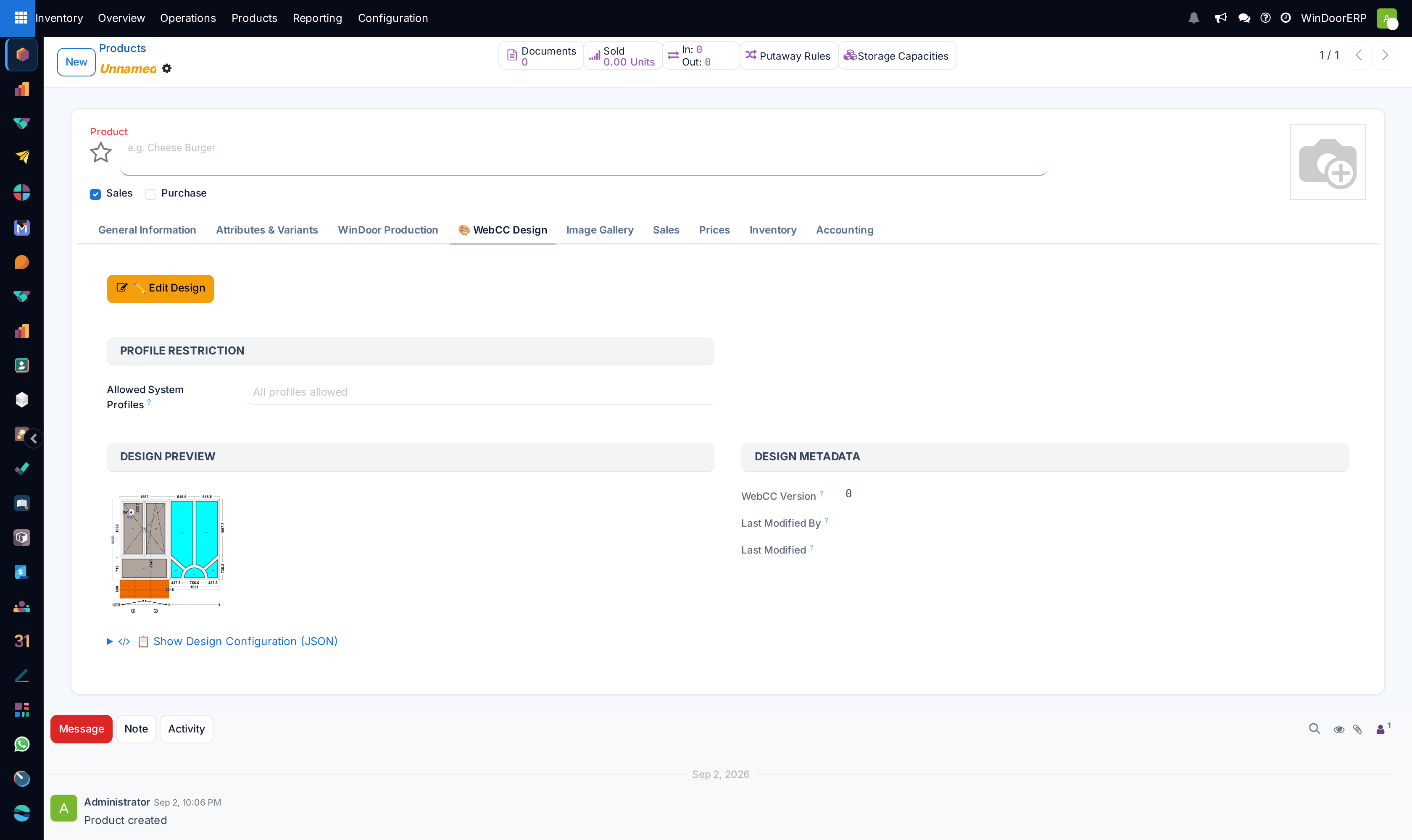
Open the WebCC Design tab, which only exists on templates, to restrict the system profiles the designer may use with it and to see the drawing preview.
The three values on the order
| Design Type | On the sales order line | Use it for |
|---|---|---|
| None | A quantity, a unit price and a description. No design buttons; the printed quotation shows a compact line. | Everything that is picked rather than drawn. |
| FrameStudio Designer | The line has design capability: Design opens the designer to create the drawing, Edit Design reopens it, and Save as Template appears once a drawing exists. The design analysis fills dimensions, area, profile, glass and hardware on the line, and the printed quotation switches to the full specification card. | Windows, doors, sliding and folding units, any product whose price depends on how it is drawn. |
| Template Design | Same buttons as the designer, but the line starts with the template's drawing already copied in. The estimator adjusts sizes rather than drawing from scratch. | Standard designs you quote repeatedly: the 1200 × 1200 tilt-and-turn, the standard bathroom window, the showroom door. |
A template is a product like any other. It can be sold, priced through a price engine, given a photo and a warranty, and archived when the design is retired.
The WebCC Design tab
This tab appears only when Design Type is Template Design. It is the product-side view of the saved drawing.
| Element | What it does |
|---|---|
| Create New Design / Edit Design | Opens the designer on the product itself. The first label shows while the template has no drawing yet, the second once it has. |
| Allowed System Profiles | The profile systems the designer offers when this template is edited, from the product form or from an order line. Empty means every profile is allowed; the placeholder says so. |
| Design Preview | The rendered drawing of the template. |
| WebCC Version, Last Modified By, Last Modified | Read-only. The version number goes up by one on every save, so you can tell whether a quotation was drawn from the current template. |
| Show Design Configuration (JSON) | A collapsed, read-only dump of the drawing data, for support questions. |
Until a drawing exists the tab shows the message No design has been created yet and invites you to click Create New Design.
Troubleshooting
No Design button on the order line: the product's Design Type is None. Change it on the product and add the line again.
Save as Template is missing on the line: the line has no drawing yet. The button only appears once a design has been saved on the line.
The template opened with an empty name: that is intended. Save as Template leaves the name blank so you name the design deliberately instead of inheriting the customer's line description.
The WebCC Design tab is not there: the product is not a Template Design. A FrameStudio Designer product carries no drawing of its own; the drawings live on the order lines.
The designer offers profiles you did not expect on a template: Allowed System Profiles is empty, which means all of them.
Common mistakes
- Setting FrameStudio Designer on profiles and glass. Materials are picked by the design analysis; they are not designed themselves.
- Leaving templates in whatever category the first product had. Put each template in the category that groups its family of designs, or the catalogue becomes a flat list of unnamed drawings.
- Saving a template from a line drawn with a customer-specific size and then never resizing it. A template should be the standard design, not one job's dimensions.
- Changing a template's drawing and expecting open quotations to follow. Lines keep the drawing they were created with; the version number on the tab tells you which one that was.
Was this article helpful?
Thanks — your feedback helps.
Running a window or door factory?
Ask for a demo