Decide what happens when a transfer moves less than was ordered
What this does
Sooner or later a supplier sends twelve of the twenty bars you ordered, or the van leaves with ten of the fifteen windows the site can take today. The backorder policy decides what WindoorERP does with the part that did not move: keep it as a second transfer, or drop it.
It is one field on the operation type, it is set once, and it explains most of the reports that begin "the rest of the order disappeared".
Before you start
- Administrator rights on Inventory ▸ Configuration ▸ Operations Types. The people validating transfers cannot change this, which is rather the point of it.
- A decision per operation type. Receipts and deliveries do not have to answer the same way.
- Note that the setting drives the prompt at validation. It does not rewrite transfers that already exist, and it never amends the purchase or sales order behind them.
Steps
-
01
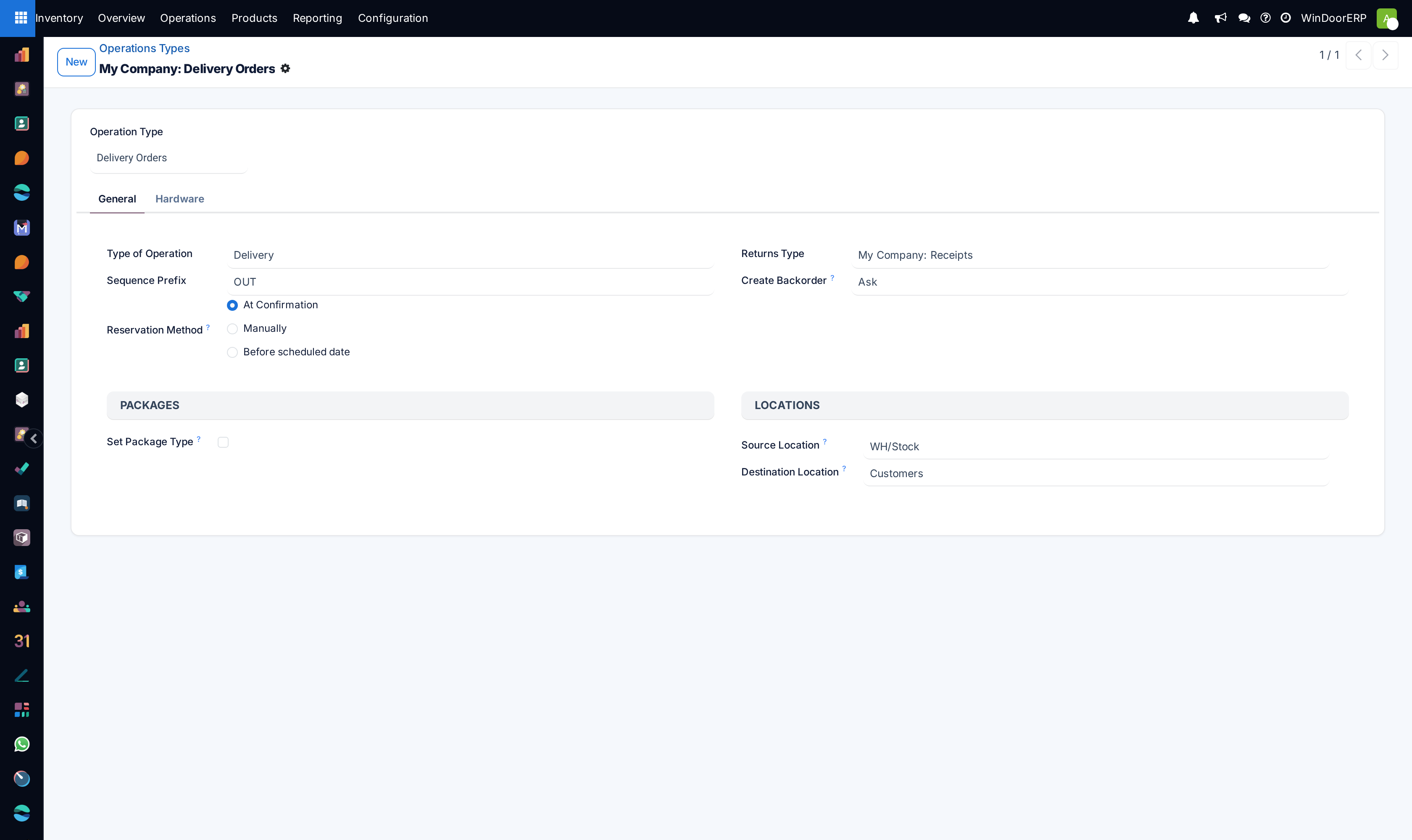
Open Inventory ▸ Configuration ▸ Operations Types and open the type — Receipts, Delivery Orders, an internal transfer.
-
02
Set Create Backorder to Ask, Always or Never.
-
03
Save, then validate one short transfer of that type and watch what the person on the floor is now asked.
-
04
Look at the operation type's card on the Inventory overview: a Back Orders line appears there as soon as one exists.
The three policies
| Ask | The default. Whoever validates is asked each time and decides. Right where the person on the floor knows whether the rest is following. |
|---|---|
| Always | A backorder is created every time, with no prompt. Nothing is ever lost; the cost is a tail of small open transfers that somebody in the office cancels. This is the safe answer for a busy goods-in bay. |
| Never | The remaining quantity is cancelled. No prompt, no second transfer, no record of what did not move — the transfer simply closes at the quantity that did. Choose it only where a partial movement genuinely completes the job. |
The field's own help puts it in one line each: Ask — users are asked to choose if they want to make a backorder for remaining products; Always — a backorder is automatically created for the remaining products; Never — remaining products are cancelled.
The prompt, and what each button does
On Ask, validating a transfer where a line moved less than its demand opens a dialog headed Create Backorder?. It says You have processed less products than the initial demand, and offers three answers.
| Create Backorder | Validates what moved, and opens a second transfer carrying the remainder. |
|---|---|
| No Backorder | Validates what moved and cancels the rest — the Never behaviour, for this transfer only. |
| Discard | Closes the dialog and validates nothing. This is the answer when the quantities on screen are simply wrong. |
Validating several transfers in one go changes the dialog: instead of the two buttons it lists every transfer with a To Backorder toggle, so the remainder of one can be kept and another dropped in the same pass.
What a backorder actually is
A backorder is an ordinary transfer. It is a copy of the original with its own reference, carrying the lines that were not completed, and its Back Order of field points back at the transfer it came from. The original gets a note in its chatter — The backorder … has been created — so the chain reads from either end.
Two details worth knowing. The backorder starts with no responsible user, whoever validated the first part. And if its operation type reserves At Confirmation, it reserves whatever stock it can the moment it is created; on Manually, it sits unreserved until somebody presses Check Availability.
Where backorders show up
| The overview card | A Back Orders line with a count on the operation type's card, shown only while at least one is open. |
|---|---|
| The Backorders filter | On any transfer list: everything that came out of a partial validation and is not finished — described in the search panel as remaining parts of picking partially processed. |
| Back Order of | A field on the transfer form, and a hidden-by-default column you can add to the list from the ⚙ column picker. |
What it means for the order behind the transfer
Declining a backorder does not tell the purchase order or the sales order that a quantity has gone away. The transfer closes short, the document behind it still shows what was ordered, and the difference between the two is what the office has to notice. Where the shortfall would starve a later step — a delivery waiting on that receipt — WindoorERP logs an activity on the documents it affects rather than letting it pass in silence.
Returns are the exception to all of this. A transfer created as a return of another ignores the operation type's policy and never asks.
Choosing well
For receipts, Always is usually right: goods-in is busy, the supplier's shortfall is somebody else's problem to chase, and a purchasing clerk can cancel the remainder in ten seconds when the invoice arrives short.
For deliveries, Ask is usually right: the driver and the site know whether the balance is going out tomorrow, and that is a judgement worth capturing at the moment it is made.
Never is for the rare flow where a partial movement is the whole movement — an internal top-up of a shop-floor rack, where the remainder is simply not wanted.
Troubleshooting
| No prompt appeared and the remainder is gone | The operation type is on Never. Nothing was recorded; compare the transfer with the order behind it. |
|---|---|
| The prompt appears on a type that should not ask | It is on Ask. Set it to Always or Never and it will stop. |
| Transfer trouble alert! Validating a zero quantity transfer? | The transfer has no quantities entered at all. Enter what actually moved; validation refuses an empty transfer rather than creating a backorder for everything. |
| A tail of tiny open transfers | The Always policy working as designed. Cancel them in the office, or move that type to Ask. |
| The backorder is not reserved | Its operation type reserves manually. Press Check Availability. |
| A return did not ask about a backorder | By design — returns ignore the policy. |
| The purchase order still shows the full quantity | Expected. Declining a backorder closes the transfer, not the order. |
Common mistakes
- Setting Never to stop the prompt annoying the storeman, and losing every shortfall from that day on.
- Leaving Ask on a receipts type where nobody at the gate knows what the supplier still owes.
- Assuming a declined backorder cancels the outstanding purchase order line. It does not.
- Cancelling a backorder to tidy the list, when the goods really are coming next week.
- Changing the policy and expecting transfers created yesterday to behave differently today.
Was this article helpful?
Thanks — your feedback helps.
Running a window or door factory?
Ask for a demo