Read the financial statements: P&L, balance sheet, executive summary and the planning reports
What this does
Accounting › Reporting renders the company's statements live from the ledger: Profit and Loss, Balance Sheet, and Cash Flow Statement under Financial Statements, the Executive Summary and its planning siblings under Planning & Analysis, and Scheduled Reports that email a chosen report on a calendar. All of them share one interactive report screen — this article explains that screen once, then what each statement actually contains, including the places where the shipped reports are simpler than their names suggest.
Before you start
- Posted journal entries — the reports read the live ledger, and by default only posted entries.
- Accounting access; report definitions are edited under Configuration and are administrator territory.
The report screen
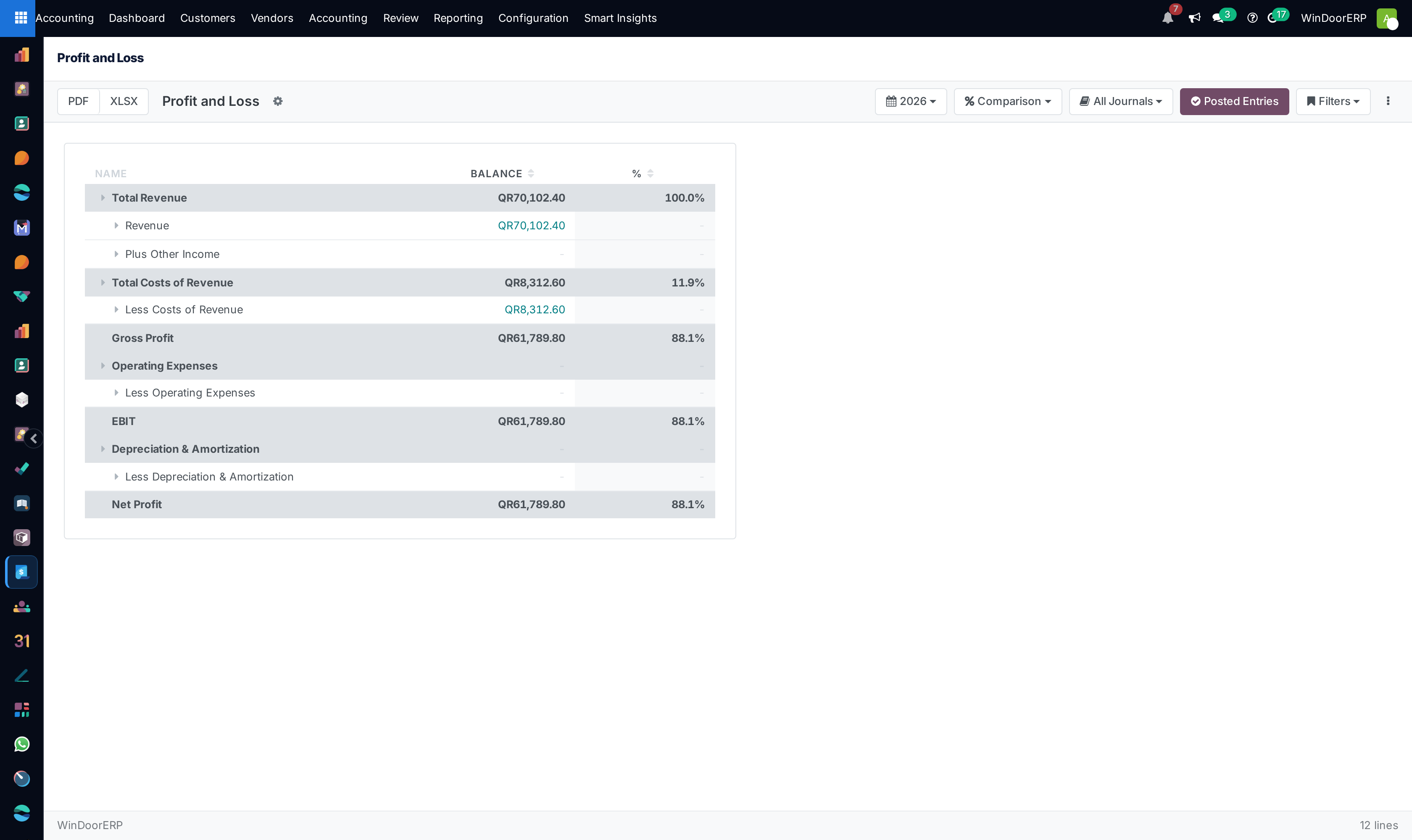
| Control | What it does |
|---|---|
| PDF / XLSX | Exports the report — the spreadsheet comes with live sum formulas and formatting; the PDF is single-language English. |
| Date | Preset periods only — Today, This/Last Month, Quarter, Year. A free date range cannot be picked on screen in this release. |
| Comparison | Previous period or same period last year, over 1-4 periods; with Growth % where the report allows it. |
| Journals | Tick journals to include. Use the individual checkboxes: in this release the Select All entry actually clears the selection, exactly like Deselect All. |
| Posted Entries | On (highlighted) = drafts excluded. Turn it off deliberately, and only to preview. |
| Filters | Save the current date/comparison/journal setup by name, mark a default, share it with other users. |
| ⋮ | Hide zero lines, expand/collapse all, refresh, print view. |
Every monetary cell drills down: click it for a journal-items preview, View All for the full list grouped by entry, and any row to open the entry itself. That drill-down is the fastest audit path in the system — the number on the statement to the postings behind it in two clicks.
Producing the statements
Important
Two structural simplifications to know before you hand these to a bank or auditor. The Balance Sheet presents all loan-type liabilities inside "Current Liabilities" — there is no separate long-term liabilities section. And the Cash Flow Statement is a three-bucket classification of account balances (operating = the P&L accounts, investing = fixed assets, financing = equity and long-term liabilities), not a reconciliation of profit to cash movement — no depreciation add-back, no working-capital deltas. Both are useful management views; neither is a statutory statement as shipped.
-
01
Open Reporting › Financial Statements › Profit and Loss: Revenue and Other Income roll into Total Revenue, costs of revenue take it to Gross Profit, operating expenses to EBIT, depreciation to Net Profit, each with its percentage of revenue.
-
02
Set the period, and add a Comparison with Growth % for the month-on-month story.
-
03
Open Balance Sheet — a single-date snapshot of assets, liabilities, and equity as of the chosen date.
-
04
Drill into anything that looks off before exporting; fix at the source, refresh, and only then PDF or XLSX.
-
05
Finish with Planning & Analysis › Executive Summary — cash in and out, profitability, receivables and payables, margins, and debtor/creditor days on one page.
The planning reports, honestly
| Report | What it really shows |
|---|---|
| Executive Summary | The strongest of the set: cash received/spent and closing bank balance, revenue through net profit, receivables/payables and net assets, margins, and average debtor/creditor days for the period. |
| Cash Flow Forecast | Opening cash, receivables and payables due in the period, projected closing balance. Only the 0-30-day buckets carry values in this release — the overdue-receivables row renders blank and there is no overdue-payables row, so long-overdue amounts are absent from the projection. |
| Ratio Analysis | Liquidity (current/quick/cash ratio), profitability (margins, ROA, ROE), efficiency (DSO, DPO, asset turnover) and leverage (debt ratios) over the year's balances. Known defect: Gross Profit Margin % displays the same figure as Net Profit Margin % — read gross margin off the P&L instead. |
| Segmented P&L | Revenue, cost, and profit split by journal — useful only if your journals represent business segments. It does not segment by product line or analytic account; for per-project profitability use Analytic Items and its pivot. |
| Budget vs Actual | As shipped, an actuals-only view (revenue, expenses, net result) — no budget or variance columns, because no budget module is installed to feed it. Treat it as a compact actuals summary until budgeting is deployed. |
Scheduled Reports
Reporting › Scheduled Reports emails a report on a rhythm: pick the report, frequency (daily to yearly, sent at 06:00), the period it should cover (previous month/quarter/year or year-to-date), recipients, and PDF, Excel, or both. Run Now sends immediately. A failed send does not announce itself — the error is stored on the schedule record, so if a report stops arriving, open the schedule and check its status block first.
Troubleshooting
"Please install xlsxwriter or openpyxl to export to Excel." — the server lacks a spreadsheet library; ask your administrator, and use PDF meanwhile.
"Failed to generate PDF: …" — the PDF renderer choked; the message carries the cause. Retry after collapsing very large expanded sections.
Every journal disappeared from the report — the Journals menu's Select All currently clears the selection; re-tick the journals individually.
Statement Reports / Taxes & Fiscal menus are empty — those are placeholder headings in this edition; the live statements are the ones documented here.
Figures differ from yesterday's export — the reports are live: newly posted (or un-drafted) entries change them. Compare with the Posted Entries toggle on and the same period.
Common mistakes
- Reading the "Cash Flow Statement" as cash movement — check the Executive Summary's cash section or the bank journals for actual cash.
- Sending the shipped Balance Sheet to a lender without reclassifying long-term debt out of current liabilities.
- Quoting gross margin from Ratio Analysis — the P&L's Gross Profit line is the correct source.
- Expecting the Segmented P&L to show product-line profitability — it segments by journal.
- Trusting a scheduled report is being delivered without ever checking the schedule's error status.
- Exporting with drafts included because the Posted Entries toggle was off from a previous session's saved filter.
Was this article helpful?
Thanks — your feedback helps.
Running a window or door factory?
Ask for a demo