Run the website: pages, visitors, menus and redirects
What this does
Once the pages exist, someone has to run the site: keep the page list tidy, watch who visits, maintain the menu, and — the part that quietly earns its keep — redirect renamed addresses so links that were earning enquiries keep working.
Before you start
- The Pages and Visitors screens need the Editor and Designer role; the Configuration submenu needs an administrator, and some entries appear only with developer mode on.
Steps
-
01
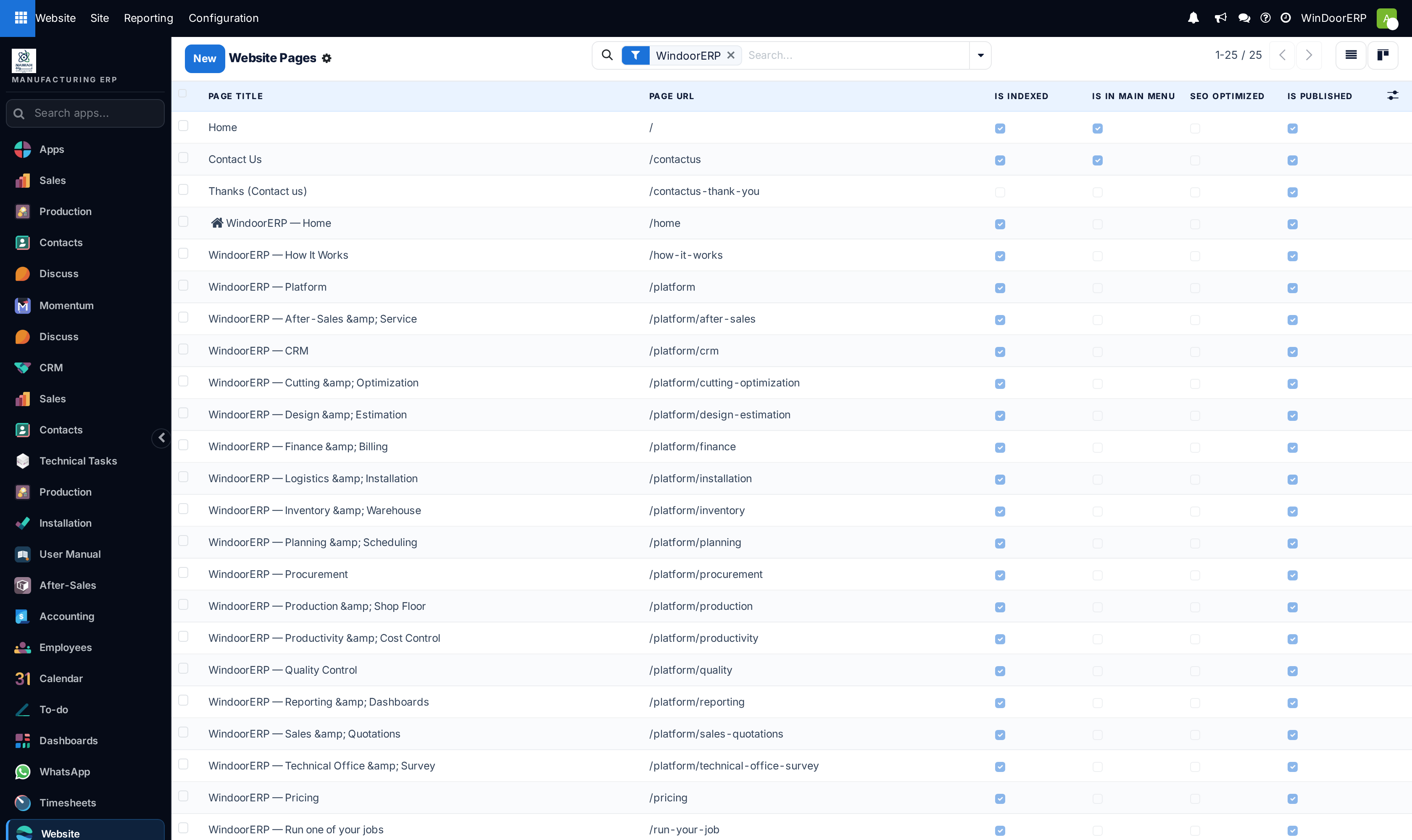
Open Website › Site › Content › Pages — every page with its URL and its Is Indexed, Is In Main Menu and Is Published flags, editable in place. Clicking a row opens the page itself.
-
02
To rename or tune one page, browse to it and use Site › This page › Properties: title, URL, homepage flag, menu presence, publish date, indexing and visibility — including password-protected or signed-in-only pages.
-
03
When you change a URL, the dialog offers Redirect Old URL — accept, choosing 301 Moved permanently for a rename you mean to keep.
-
04
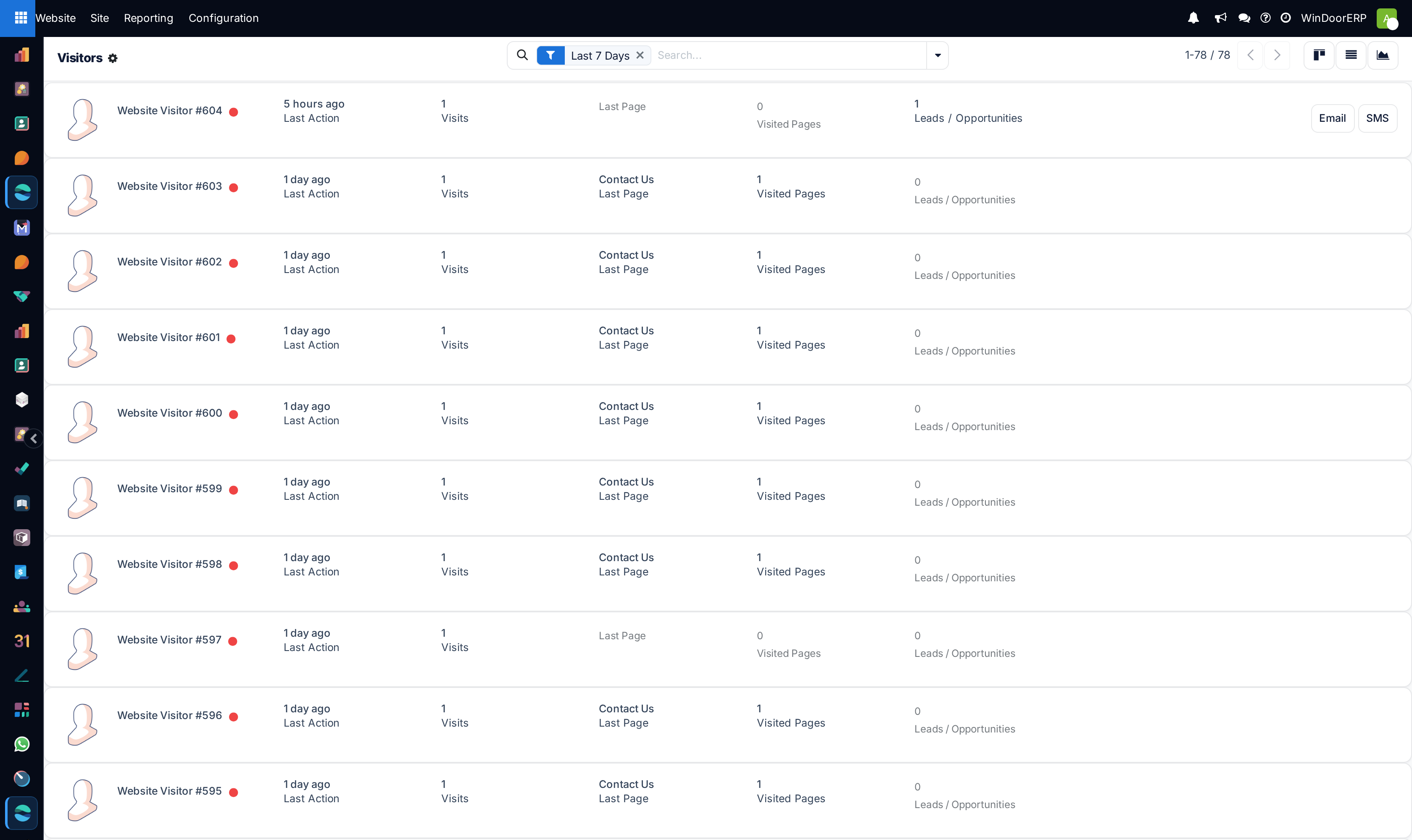
Watch traffic under Reporting › Visitors: one card per visitor with country, visit count and last page; press Email on a visitor with a known contact. Page Views lists the individual tracked hits.
-
05
Curate navigation with the frontend Menu Editor (Site › Menu Editor): drag to reorder, nest one level of submenus, or promote an entry to a mega menu.
-
06
Configure identity under Configuration › Settings: domain, languages, favicon, sign-up policy, cookies bar, and the analytics keys.
What visitor tracking actually records
A visitor record is created only when someone opens a tracked page — and out of the box only the homepage and the contact page are tracked. Tracking is the Track flag on each page (an optional column in the Pages list): turn it on for the pages you care about, or the visitor screens will stay near-empty while your site is busy.
What is stored is modest and privacy-friendly: pages seen, visit count, country, language. A repeat hit on the same page within half an hour is not recounted, and anonymous visitors with no linked contact are deleted after 60 days. Visitors who submit the enquiry form gain a Leads button linking straight to their lead.
Analytics — what the menu really shows
Reporting › Analytics is an embedded Plausible dashboard: it shows data only after you connect a Plausible account in Settings (site name plus shared-link key). Unconfigured, the screen shows only the "Easily track your visitor with Plausible" placeholder — that is normal, not a fault.
The Google Analytics key in Settings does something different: it injects Google's tag into the public site so the data appears in Google's own console. It never renders a report inside WindoorERP.
Menus
Menus go two levels deep at most — "Menus cannot have more than two levels of hierarchy." — and a mega menu can have neither parent nor children. An entry can be limited to certain user groups; note that saving any group on a menu silently adds the website editors to it, so editors never lock themselves out. Deleting a page silently deletes its menu entries with it.
Redirects
Renaming from the Properties dialog creates redirects for you; the full list lives under Configuration › Redirects (visible with developer mode). Four types: 301 Moved permanently (browsers cache the new address — the right choice for a permanent rename), 302 Moved temporarily, 404 Not Found (deliberately retire an address), and 308 Redirect / Rewrite (rename a technical route so both addresses work). Guards refuse an empty target — «"URL to" can not be empty.» — and a 308 pointing at "/" or an existing page.
Troubleshooting
| Symptom | Cause and fix |
|---|---|
| Visitors screen nearly empty on a busy site | Only tracked pages record visits, and only the homepage and contact page ship tracked. Enable Track on the pages that matter. |
| Analytics shows only a Plausible advert | Nothing is connected. Add the Plausible shared link in Settings, or accept that GA data lives in Google's console. |
| Old links 404 after a renaming spree | The rename dialog's redirect was declined. Create the 301s under Configuration › Redirects. |
| "Menus cannot have more than two levels of hierarchy." | Flatten: the third level has to become a page section or a mega menu. |
| A menu entry vanished for normal visitors | Its page is unpublished, or the entry has visibility groups. Internal users still see it — check in a private window. |
| Old visitors disappear | Anonymous visitors are deleted after 60 days by design; only visitors linked to contacts persist. |
Common mistakes
- Judging the site by the Visitors list without enabling tracking on the pages first.
- Pasting a Google Analytics key and waiting for charts inside WindoorERP — they appear in Google's console only.
- Deleting a page that still has inbound links instead of retiring it with a redirect.
- Unindexing a page to "hide" it — unindexed pages still load for anyone with the link; use visibility or unpublish.
Was this article helpful?
Thanks — your feedback helps.
Running a window or door factory?
Ask for a demo