Set the price, cost, taxes, invoicing policy and price engine
What this does
The right-hand column of the General Information tab, with the Invoicing Policy field beside it, is where the money side of a product is decided: what it sells for, what it costs, which taxes apply, which category values it and books it, and which price engine calculates a designed price on the quotation. None of these fields is hard to fill; all of them are inherited by every document that mentions the product, which is why they are worth doing deliberately.
Before you start
- Product categories should exist first, with their costing method and accounts set. The category is picked here but configured in its own article.
- Know whether the product will be priced by a formula. Price engines are approved records under Sales; only approved engines can be chosen on a product.
- Prices are per Unit. A profile priced per bar and stocked per metre needs the unit settled before the price means anything.
Steps
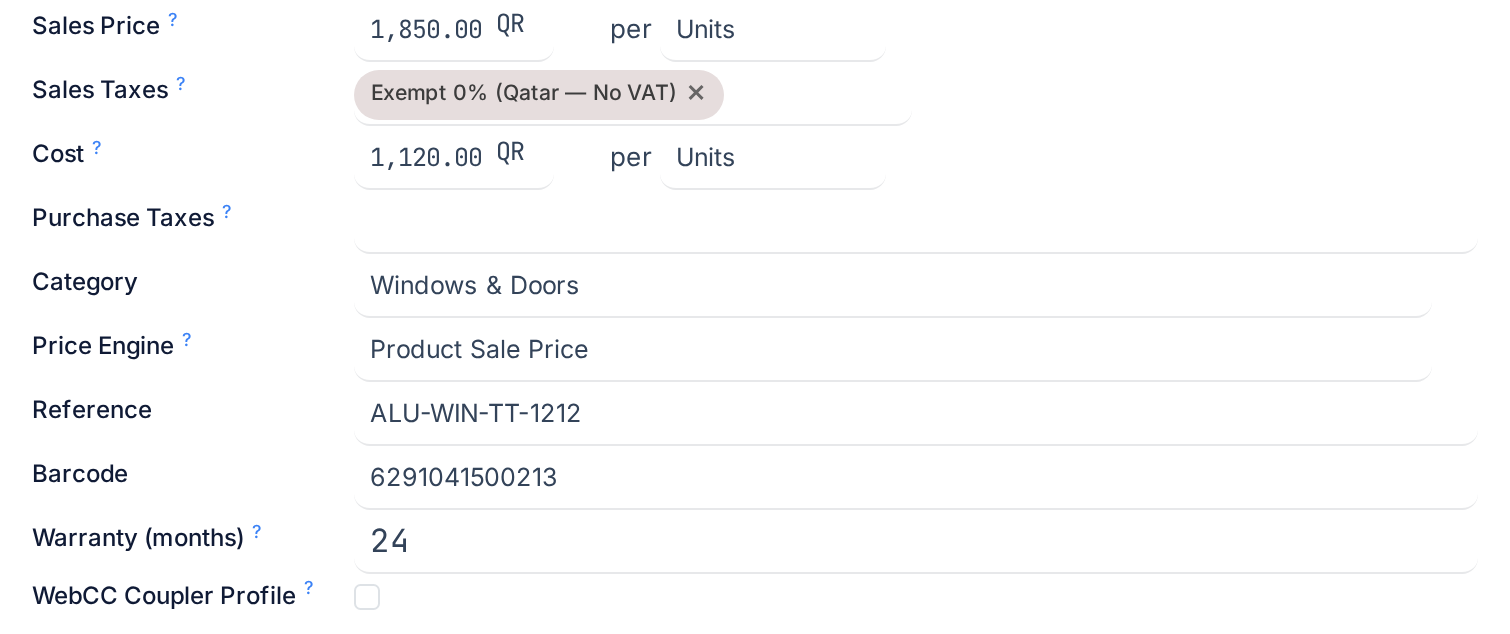
-
01
Set the Invoicing Policy: Ordered quantities invoices what was confirmed on the quotation; Delivered quantities invoices only what has been delivered. Window and door factories should use Ordered quantities: a made-to-measure unit is committed at confirmation, the deposit is billed before anything is fabricated, and progress billing works from the order, not from deliveries.
-
02
Enter the Sales Price and check the Unit next to it. This is the list price before any pricelist or price engine acts on it.
-
03
Pick the Sales Taxes. The company default is filled in for you; change it only for products taxed differently.
-
04
Enter the Cost. For a purchased material this is what you pay per unit; it is used for margins on quotations and to value stock adjustments when no purchase cost is known.
-
05
Pick the Purchase Taxes if the product is purchased.
-
06
Choose the Category. It decides the costing method, the valuation and the income and expense accounts for sales, purchases and stock movements, so every product of a kind should share one.
-
07
Choose the Price Engine if the product's price should be calculated from its design rather than read from the list price. Leave the default if the standard engine already does what you need.
Invoicing Policy
The field shows for goods that are sold; services have their own service invoicing policy, and combos take theirs from the options. It controls one number on each order line: the quantity to invoice.
| Value | Quantity to invoice | When to use it |
|---|---|---|
| Ordered quantities | Ordered minus already invoiced. Invoicing is possible the moment the order is confirmed. | Made-to-measure fenestration, deposits and progress certificates, anything billed against the contract. |
| Delivered quantities | Delivered minus already invoiced. Nothing can be invoiced until a delivery is validated. | Traded goods shipped from stock where the customer pays for what arrived. |
The default for goods is Ordered quantities. Progressive invoicing of a project follows the ordered policy; it is described in the article on invoicing a project progressively.
Prices, taxes and cost
| Field | What it does |
|---|---|
| Sales Price | The price at which the product is sold, per unit, before pricelists and engines. Shown in the company currency. |
| Unit | The default unit for every stock operation and for both prices. It is shared between the two price lines and cannot be changed once stock moves exist in it. |
| Sales Taxes | Default taxes applied when the product is sold; the tax string beside the price shows the effect. |
| Cost | The value of one unit. Per company. Used to value the product when no purchase cost is known, such as an inventory adjustment, and to compute margins on sales orders. A negative cost is refused. |
| Purchase Taxes | Default taxes when the product is bought. Hidden when Purchase is off or the product is a combo. |
Whether the cost updates on its own depends on the category's Costing Method, which is an Accounting setting on the category. Under Average Cost (AVCO) or First In First Out (FIFO) every receipt recomputes the cost automatically from what was paid; under Standard Price, the default on every category of this installation, the cost is whatever you type, and stays there until you change it. The article on choosing a costing method explains the three.
Category and Price Engine
The Category carries what a product should not repeat: the costing method and valuation mode, the income and expense accounts used when the product is sold and purchased, the stock accounts and journal used for inventory movements when valuation is automated, the routes it inherits, the removal strategy and any putaway rule written against the category. A product with no category has none of that, so the field should never be left empty on a real product. It also supplies the Properties definition: any custom fields defined on the category appear on the tab under the price block.
The Price Engine is WindoorERP's formula pricing. An engine calculates the line price from the design analysis, using criteria such as glazed area, frame dimensions, colour, glass type and selected options, through the formulas and conditional rules configured on the engine. The field offers only engines in the Approved state and cannot create one. When a product is created without one, WindoorERP assigns the shipped Product Sale Price engine automatically, so a product is never engine-less; choose a different engine only when the product needs one. Building and approving engines is the subject of the price engines article.
Troubleshooting
The invoice is empty, or the order says nothing to invoice, although it is confirmed: the product uses Delivered quantities and no delivery has been validated.
Purchase Taxes is not on the form: the Purchase box is off, or the product is a combo.
The cost does not follow purchase prices: the category's costing method is Standard Price. That is by design on this installation; switch the category to AVCO or FIFO only with the accountant.
The engine you built is not in the list: it is not Approved. Approve it under Sales first.
The cost of a product can't be negative: enter zero or a positive value.
Common mistakes
- Choosing Delivered quantities for windows and then being unable to invoice the deposit.
- Pricing a bar product per metre while stocking it per bar, or the other way round. The unit is shared; set it first.
- Leaving the category empty, so sales and purchases post to whatever the company defaults are and putaway and routes never apply.
- Assuming the list price is what the quotation will show. A pricelist rule or a price engine on the line takes precedence.
Was this article helpful?
Thanks — your feedback helps.
Running a window or door factory?
Ask for a demo