Trigger and resolve visual shop floor Andon alerts for shortages and breakdowns
What this does
Implements lean manufacturing Andon alerting, allowing operators to trigger color-coded help requests (Material Shortage, Tool Breakdown, Quality Stop) from their screens.
Before you start
- Andon alert categories and notification recipient teams configured.
Steps

Important
Fast response to Andon calls keeps assembly lines running continuously and prevents minor tool issues from escalating into major multi-hour factory shutdowns.
-
01
From any terminal, tap Andon Alert and select the issue category (Missing Hardware, Saw Blade Blunted, Drawing Ambiguity).
-
02
The central production dashboard and supervisor smartwatch immediately receive acoustic and visual alerts.
-
03
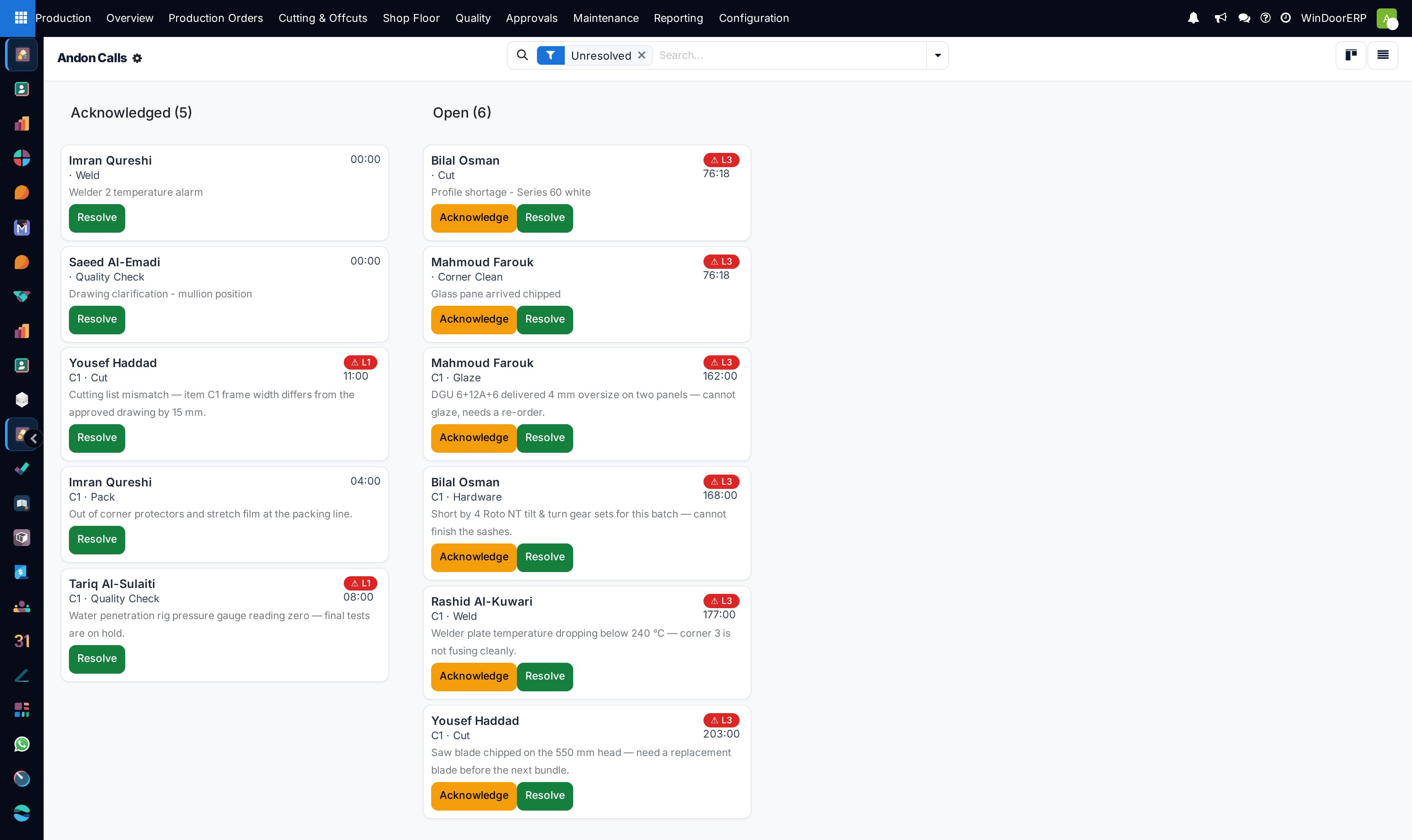
Open Production › Shop Floor › Andon Calls to view active alerts on the Kanban board.
-
04
Drag calls from New to In Progress as the support technician attends the station, then mark Resolved.
Common mistakes
- Leaving resolved Andon calls open on the board after the workstation has resumed fabrication.
- Using verbal shouting across the shop floor instead of logging structured digital Andon calls.
Was this article helpful?
Thanks — your feedback helps.
Running a window or door factory?
Ask for a demo