Track, barcode, and reuse aluminium profile offcuts to minimize scrap
What this does
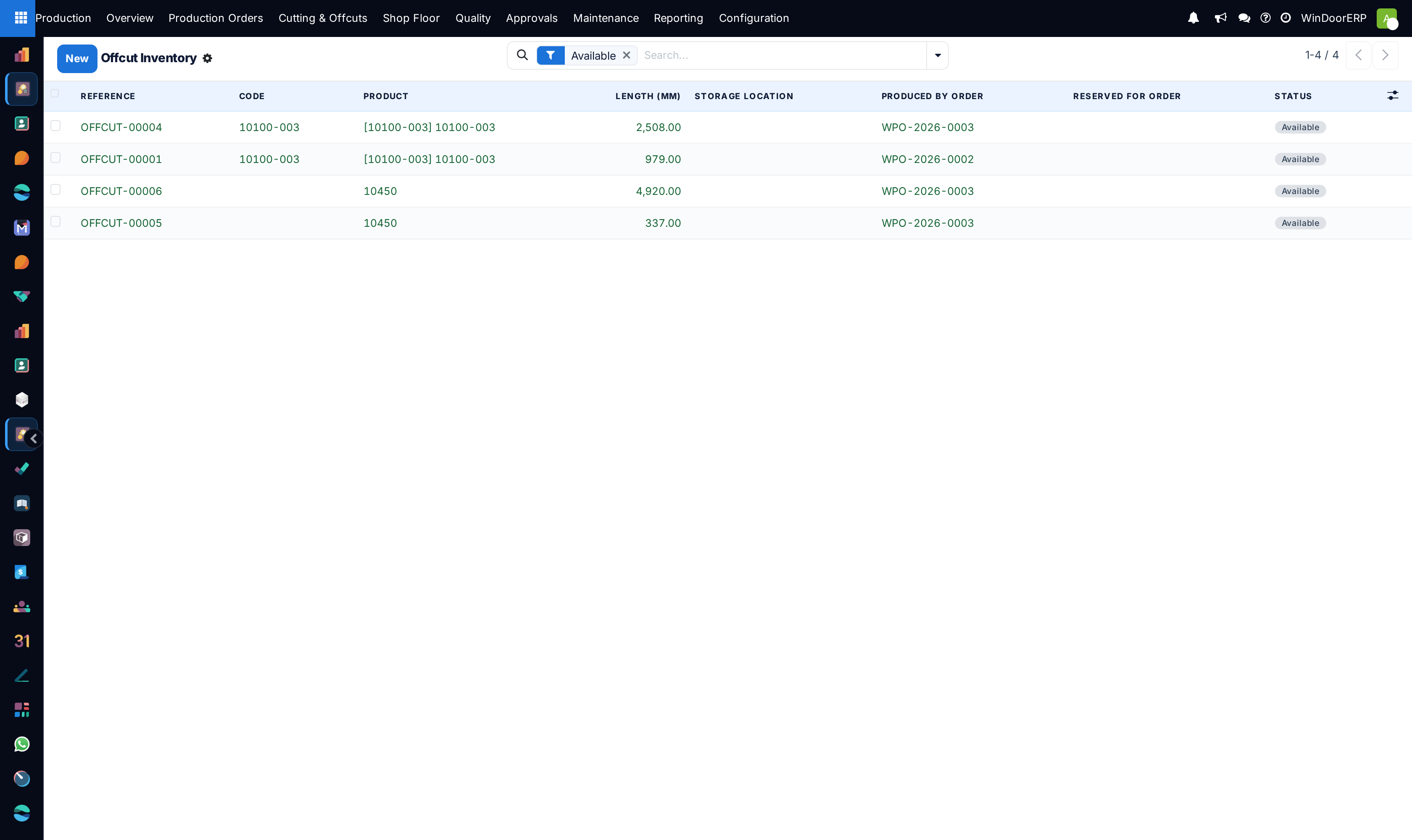
Catalogs usable aluminium profile remnants above minimum usable threshold (e.g. > 800mm), ensuring cutting algorithms consume offcuts before full bars.
Before you start
- Define minimum offcut length thresholds in cutting configuration settings.
Steps
Important
Offcuts without barcode labels must never be placed back into general racks, as unindexed remnants cause stock inaccuracies and saw operator confusion.
-
01
Open Production › Cutting & Offcuts › Offcut Inventory.
-
02
View available profile offcuts categorized by profile system, RAL color code, exact length, and rack location.
-
03
Scan or print the offcut barcode label immediately upon saw cutting completion.
-
04
Store offcuts in designated vertical cantilever racks labeled by section code.
-
05
When running new cutting plans, enable Use Offcuts First to auto-assign stored remnants.
Common mistakes
- Saving micro-offcuts below minimum clampable saw lengths (< 500mm) that cannot be safely re-cut.
- Failing to mark damaged or scratched remnants as scrap.
Was this article helpful?
Thanks — your feedback helps.
Running a window or door factory?
Ask for a demo