Schedule cycle counts by location
What this does
Replaces one enormous yearly count with small, regular ones: the hardware store every month, the profile racks every quarter. Errors are found while they are still small, and nothing has to stop.
Before you start
- Cycle counts are organised by location, so Storage Locations must be enabled in Inventory › Configuration › Settings.
Steps
For most companies, warehouse stock only needs to be counted once a year. To comply with that standard, the Inventory app defaults to the scheduled date of the 31st of December of the current year.
However, for some businesses, maintaining an accurate inventory count is crucial. These companies use cycle counts to maintain accurate stock levels. Cycle counting is a method by which companies count their inventory more often in certain locations to ensure that their physical inventory counts match their inventory records.
-
01
Go to Inventory › Configuration › Locations and open a location.
-
02
In Cyclic Counting, set Inventory Frequency to the number of days between counts —
30for monthly. -
03
Save, and repeat for the locations that deserve their own rhythm.
-
04
Perform the first count from Inventory › Operations › Physical Inventory; from then on the next date is set automatically.
Configuration
In WindoorERP, cycle counts are performed by location. Therefore, the Storage Locations feature needs to be enabled before performing a cycle count.
To enable this feature, navigate to Inventory app › Configuration › Settings and scroll down to the Warehouse section. Then, select the checkbox next to Storage Locations and click Save.
Counting inventory at a set frequency
Once the Storage Locations feature is enabled and locations are created in the warehouse, the inventory count frequency can be changed for specific locations, and counts can be conducted on those locations.
Setting a cycle count frequency
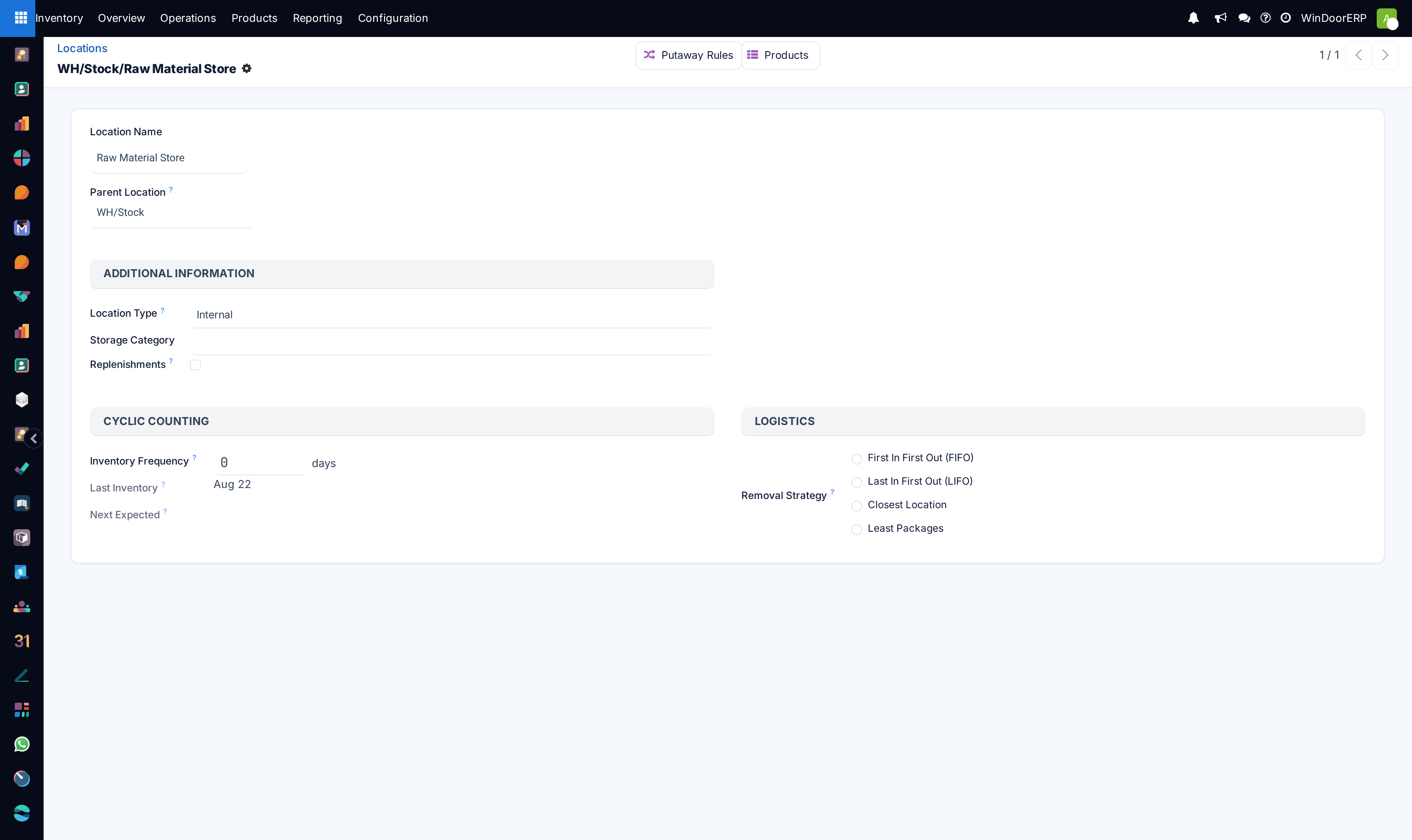
To view and edit locations, navigate to Inventory app › Configuration › Locations. This opens a Locations page containing every location currently created in the warehouse.
From this page, click a location to open its form.
Under the Cyclic Counting section, locate the Inventory Frequency field, which is set to 0 by default (if this location has not been edited previously). In this field, change the value to any number of days desired for the frequency of counts.
Example
A location that needs an inventory count every 30 days should have the Inventory Frequency value set to 30.
Now, to ensure the scheduled cycle count appears as expected, perform the first cycle count. After inventory adjustments have been applied to products in this location, the next scheduled count date is automatically set based on the value entered in the Inventory Frequency field.
Performing a cycle count
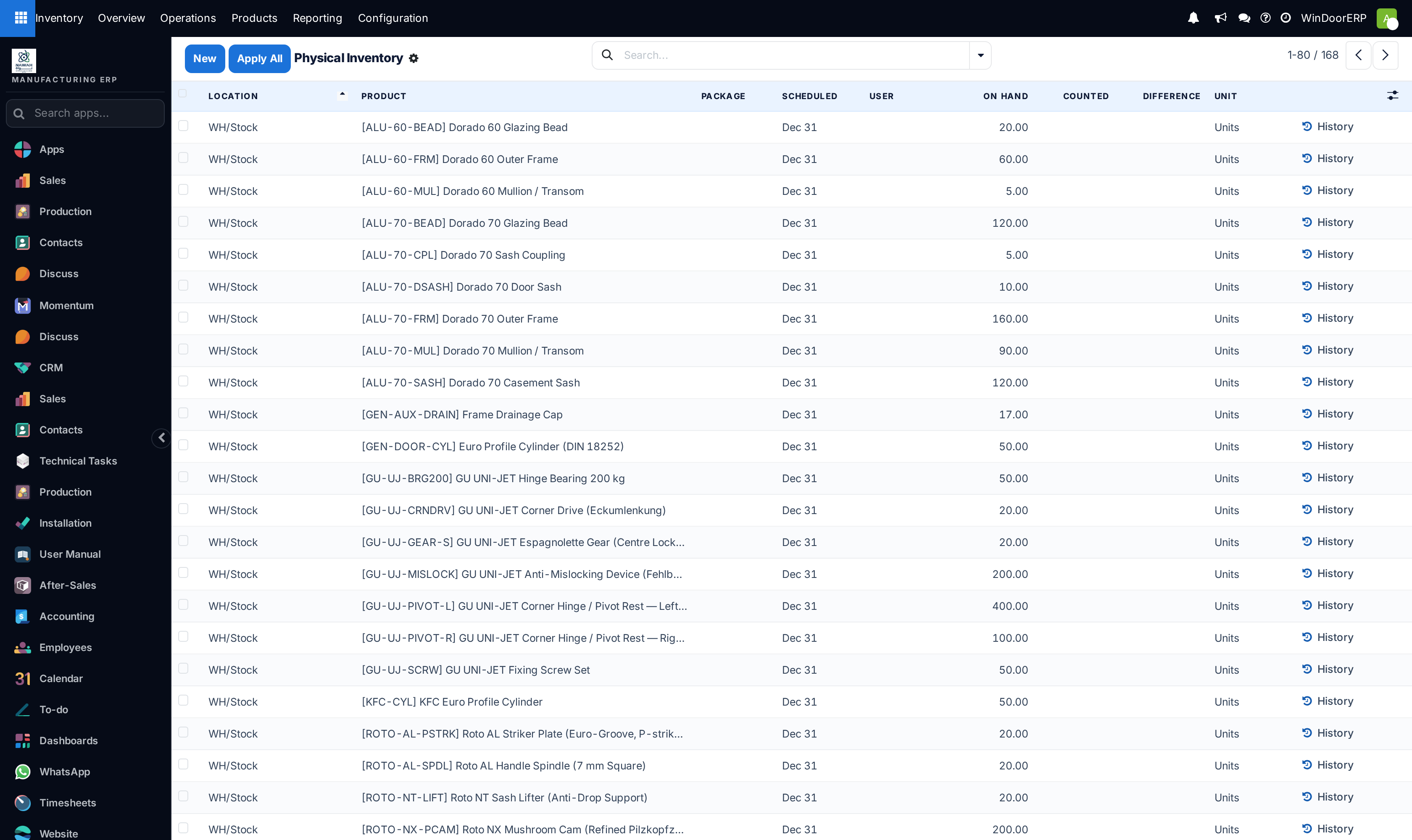
To perform a cycle count for a specific location in the warehouse, navigate to the Inventory app › Operations › Physical Inventory. This opens a Physical Inventory page that lists all products currently in stock, with each product on its own line. Use this page to perform inventory adjustments.
From this page, the Filters and Group By options (accessible by clicking into the Search bar) can be used to select specific locations and perform inventory counts.
To select a specific location and view all products within it, click into the Search bar. Then, in the Group By column, select Location.
All products are sorted by storage location on the Physical Inventory page, and a cycle count can be performed for all products in that location.
Tip
In large warehouses with multiple locations and a high volume of products, it might be easier to search for the desired location. To do this, from the Physical Inventory page, click into the Search bar.
Then, in the Filters column, click Custom Filter to open a Custom Filter pop-up window.
In the first field, click the value and select Location from the list of options. Select contains in the second field. In the third field, type in the name of the location being searched for.
Click Search for that location to appear on the page.
Note
When performing counts in the Barcode app, inventory adjustments are grouped by location by default.
Change full inventory count date
While cycle counts are typically performed at the location level, companies should conduct a full inventory count once per year. In addition to keeping stock counts accurate, full inventory counts ensure that accounting earnings and costs are recorded accurately. The scheduled date for full inventory counts of all in-stock products in the warehouse can be manually changed to an earlier date than the listed date.
To modify the default scheduled date, go to the Inventory app › Configuration › Settings. Then, in the Operations section, locate the Annual Inventory Day and Month setting, which defaults to 31 December.
To change the day, click the 31 and select a day within the range 1-31, depending on the desired month of the year.
Then, to change the month, click December to open the drop-down menu and select the desired month.
Important
Confirm the date entry reflects a valid calendar date.
After all necessary changes have been made, click Save.
Count one location at a time
On the Physical Inventory page, open the search panel and choose Group By › Location: the list splits by location and each group can be counted on its own. In a big warehouse, a custom filter on Location contains … is quicker.
Still do the annual count
Cycle counts keep the shelves honest; the yearly count keeps the accounts honest. Set its date under Inventory › Configuration › Settings › Annual Inventory Day and Month.
Common mistakes
- Setting a frequency and never doing the first count — the schedule only starts once one adjustment has been applied.
- Counting every location at the same interval. Fast-moving hardware and slow-moving glass do not need the same attention.
- Treating cycle counts as a replacement for the annual count.
Was this article helpful?
Thanks — your feedback helps.
Running a window or door factory?
Ask for a demo