Understand warehouses, locations, and stock
What this does
Explains the two words everything in Inventory is built on. A warehouse is a physical site with an address. A location is a place inside it — a rack of profiles, a glass stillage, the loading bay.
Steps
In the WindoorERP Inventory app, warehouses handle the broader organization and distribution of stock across different physical sites, while locations provide a more detailed breakdown within each warehouse for efficient item management.
This document serves as an introduction to the terminology and concepts necessary to master Inventory. For specific instructions and examples of how things work, refer to individual documentation pages.
-
01
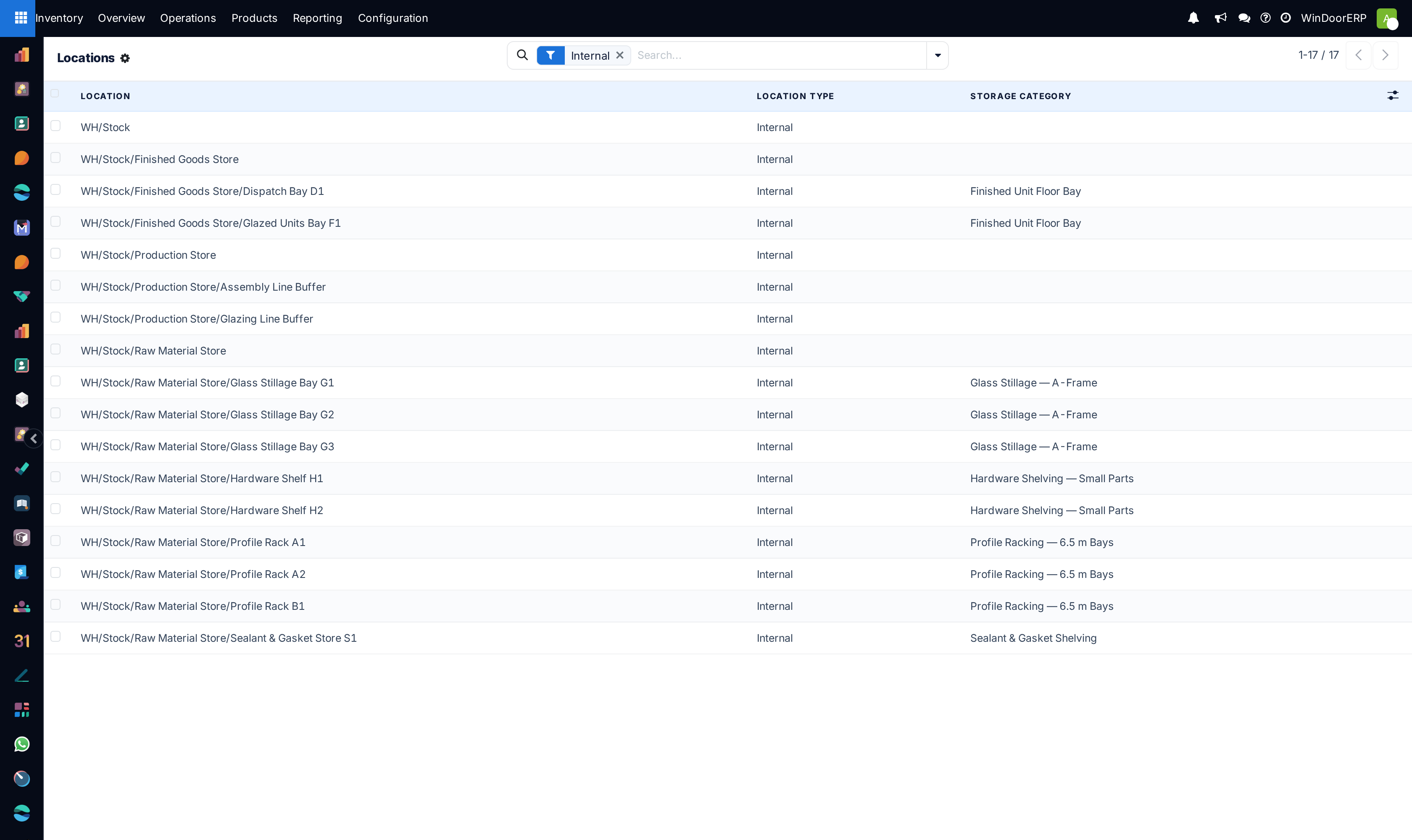
Open Inventory › Configuration › Locations — by default it shows internal locations only.
-
02
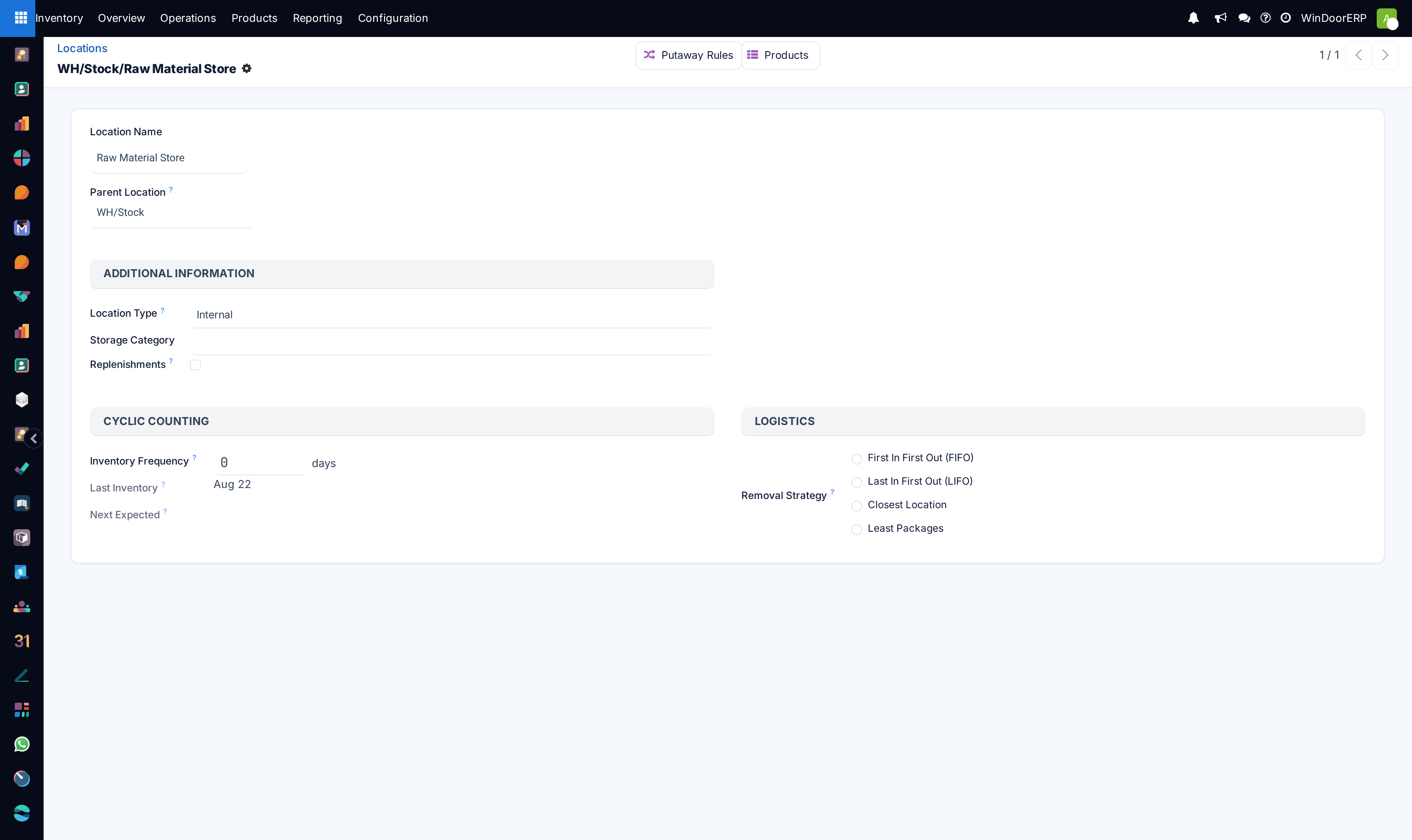
Open any location and look at its Location Type: that field is what decides whether the goods there count as your stock.
-
03
Read the hierarchy in the name:
WH/Stock/Zone A/Rack
        3
is rack 3, in zone A, in the stock of warehouse WH. -
04
Clear the Internal filter to see the rest — the virtual locations the system moves goods to when they leave your hands.
Warehouses
Warehouses represent a physical place, with a physical address, where a company's items are stored.
Configure routes in a warehouse to control how products move to customers, from vendors, within the warehouse, or between warehouses.
Locations
Locations refer to specific areas within a warehouse, such as shelves, floors, or aisles. These are sub-divisions within a warehouse, and are unique to that warehouse. Users can create and manage numerous locations within a single warehouse to organize inventory more precisely.
Location types
Location types in WindoorERP help categorize and manage where products are, and what actions need to be taken with them. By default, on the Inventory app › Configuration › Locations page, only internal locations are displayed.
To view the seven location types in WindoorERP, select any location, and in the Location Type field, there are:
- Vendor: defines an area where products purchased from vendors originate. Items here are not in stock.
- Virtual: used to organize and structure the warehouse hierarchy. For example, the virtual location
WH(short for warehouse) groups all internal locations, such asStock, receiving docks, quality checkpoints, and packing areas to show they all belong to the same warehouse.Important
Virtual locations should not contain products, but it is possible to move them there.
- Internal: storage locations within the warehouse. Items stored in these locations are accounted for in inventory valuation.
- Customer: where sold products are tracked; items here are no longer in stock.
- Inventory Loss: counterpart location to consume missing items or create stock, accounting for discrepancies. In WindoorERP, examples of inventory loss locations are Inventory adjustment, used to account for discrepancies during an inventory count, and Scrap, which is where damaged goods are sent to account for inventory losses.
Example
Inventory adjustmentis a location with the Inventory Loss type. The database shows8units inWH/Stock, but an inventory check reveals4. To correct the quantity, four units are moved fromWH/StocktoInventory adjustment. - Production: where raw materials are consumed, and manufactured products are created.
- Transit: used for inter-company or inter-warehouse operations to track products shipped between different addresses, such as Physical Locations/Inter-warehouse transit.
Note
In WindoorERP, location types are color-coded: - Blue: virtual locations - Black: internal and external locations (including inventory loss, vendor, and customer locations).
View locations in WindoorERP
WindoorERP databases include preconfigured virtual locations to organize the hierarchy of locations. These provide helpful context, and distinguish between internal and external locations.
- Physical locations group internal locations—such as secondary warehouses and subcontractor sites. Because inventory valuation changes only when goods move from internal to external locations, WindoorERP uses physical locations to track stock that is off-site or in transit without affecting valuation.
Example
When moving products in warehouses WH and WH2, the items are not in either warehouse, but still belong to the company. While in transit, they are placed in the Inter-warehouse transit location, a Transit type.
This location is under the view location, Physical Locations, indicating that Inter-warehouse transit is outside of a warehouse, but still part of the company. Doing so does not affect the inventory valuation of the products.
- Partner locations group customer and vendor locations (external locations) together. Transfers to these locations affect inventory valuation.
- Virtual locations are locations that do not exist physically, but it is where items that are not in inventory can be placed. These can be items that are no longer in inventory due to loss, or other factors.
The seven location types
- Internal — real storage inside the warehouse. Only these count in your inventory valuation.
- Vendor — where purchased goods come from. Not your stock yet.
- Customer — where sold goods go. No longer your stock.
- Virtual — structure, not space.
WHgroups the stock, the receiving dock and the packing area to show they are one site. - Inventory Loss — the counterpart for stock that vanished or was scrapped, so the books still balance.
- Production — where components are consumed and finished units appear.
- Transit — goods on the road between two of your own sites: gone from one warehouse, not yet in the other, still yours.
In the list, virtual locations are blue and physical ones are black. Physical Locations groups your own sites, Partner Locations groups customers and vendors, and Virtual Locations holds the rest.
Common mistakes
- Storing goods in a virtual location. It is allowed and it is almost always a mistake — the stock disappears from every count that matters.
- Building a location tree that mirrors the org chart instead of the building. If a picker cannot find the place from its name, the name is wrong.
- Creating a second warehouse for a second room. A warehouse has its own address; a room is a location.
Was this article helpful?
Thanks — your feedback helps.
Running a window or door factory?
Ask for a demo