Define a frame colour: solid shades, textures and canvas colours
What this does
A frame colour is one finish you offer for profiles. WindoorERP uses the record to draw frames in the designer, to describe the finish on quotations and to key the colour rules on each profile system. A solid colour is one flat shade drawn from a hex code; a texture is an image, a wood grain for instance, repeated across every profile in the drawing.
Defining the colour is half the job. A colour is offered on a system only once it has a row on that system's Colors and Materials tab, where it is tied to products and a price.
Before you start
- Administrator access to the System app.
- The hex code of each solid finish, for example
#FFFFFFor a RAL reference translated to hex. - A square sample image of each textured finish, PNG or JPG, 256×256 pixels is enough, under 2 MB, in RGB.
Steps
-
01
Open System › Profiles & Glass › Frame Colours. Drag rows by their handle to set the order the designer's colour picker uses.
-
02
Click New and type the Name.
-
03
Choose the Color Type: Solid Color or Texture / Pattern.
-
04
For a solid colour, set the Main Color. For a texture, upload the Color Image, or give an External Texture URL (fallback) and still set a Main Color as the fallback swatch.
-
05
Set the Glass Overlay Color and the Frame/Header Color so the drawing looks like the product.
-
06
Save. Then add the colour to the Colors and Materials tab of every profile system that offers it.
The colour list
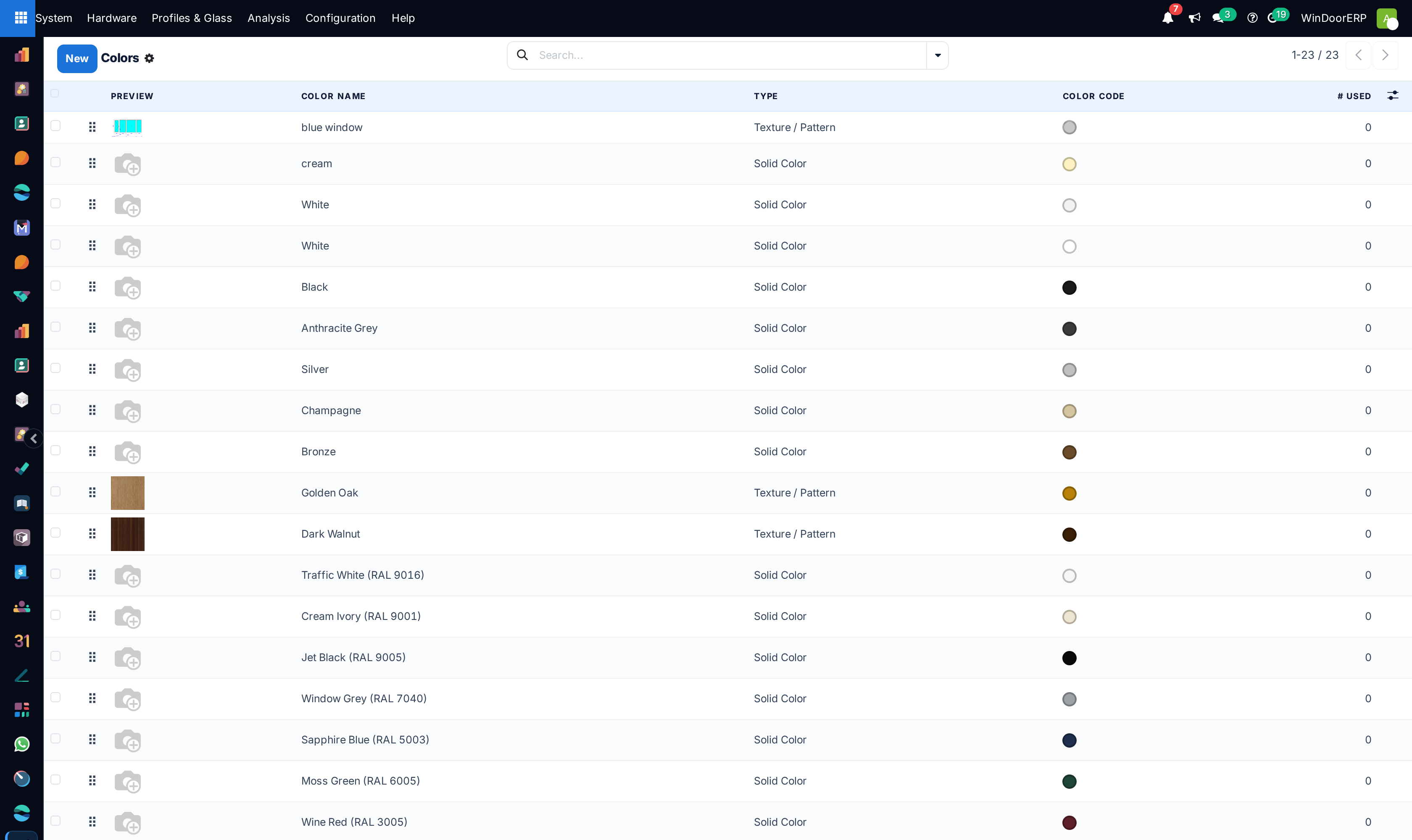
| Column | What it shows |
|---|---|
| Drag handle | Reorders the list; the order is the Sequence, lower first, and it is the order of the designer's colour picker. |
| Preview | The texture thumbnail; a solid colour shows a placeholder. |
| Color Name, Type | The name and Solid Color or Texture / Pattern. |
| Color Code | The main colour as a swatch. |
| Texture URL | Hidden by default. The URL the designer receives for the texture. |
| # Used | How many sale order line designs use the colour. |
The search box looks in the name only, and the list has no Archived filter: a colour switched off with its Status toggle disappears from here and stays out of sight. Prefer keeping a finish active and simply not mapping it on any system.
The colour record

| Field | What it does |
|---|---|
| Name | Required. The name shown on the designer's picker card and in every colour selector. |
| Color Type | Required. Texture / Pattern needs an image and is shown as a pattern card in the designer; Solid Color needs only a hex code and is shown as a flat swatch. |
| Status toggle | Off hides the colour from the designer without deleting it. |
| Main Color | Under Canvas Display Colors. A hex code, required for a solid colour; for a texture it is the fallback swatch whenever the image is unavailable. |
| Glass Overlay Color | The tint applied to the glass layer in the drawing when this frame colour is used, so the item looks almost like the real product. Hex or rgba, for example rgba(200,220,255,0.4); keep the transparency light so the glass still reads as glass. |
| Frame/Header Color | A hex code for the frame border and the header strip in the drawing, for example #3A3A3A. |
| Used in # Designs | Read-only. The number of sale order line designs using the colour. |
| Sequence | The display order in the colour picker; lower appears first. |
Textures
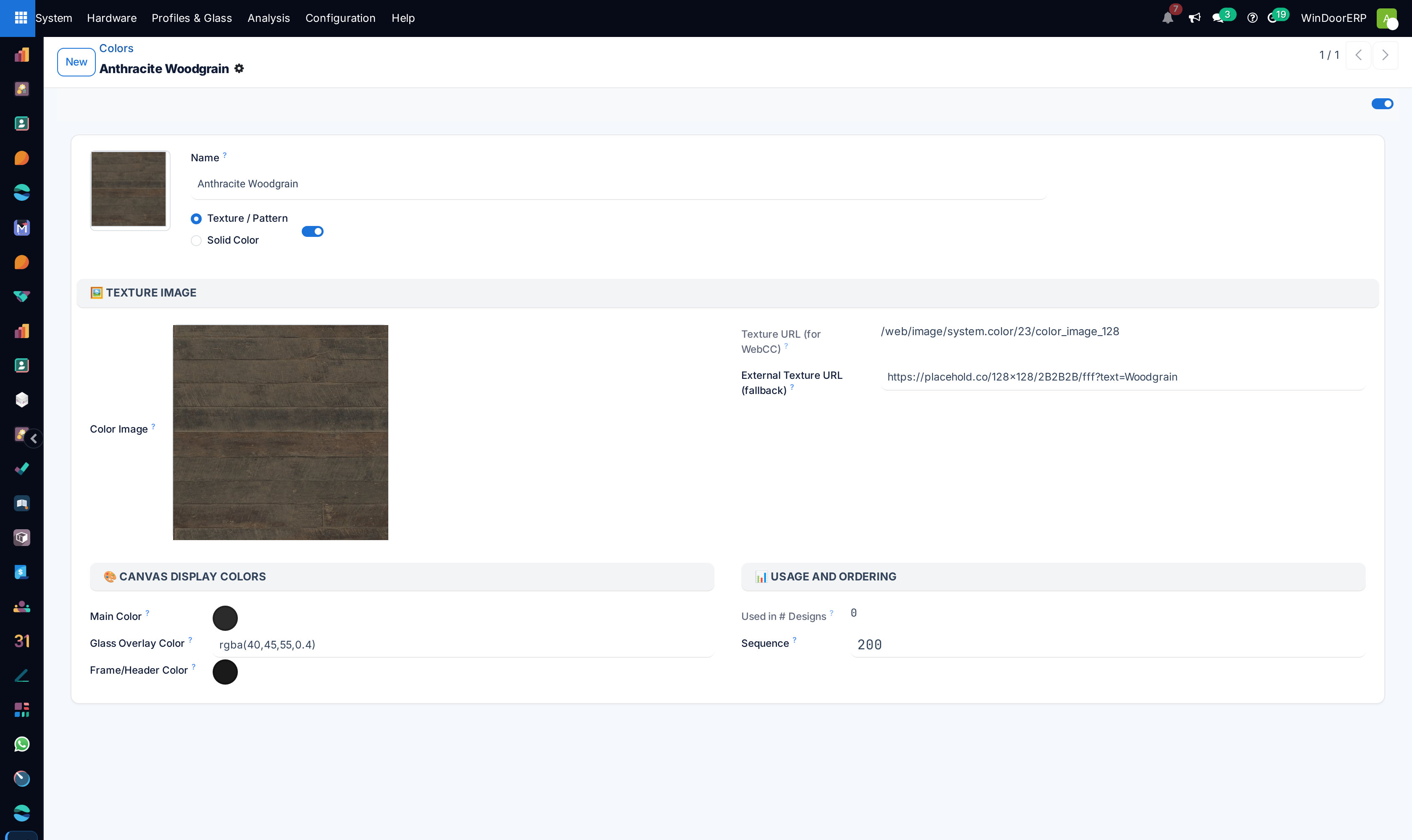
Choosing Texture / Pattern reveals the Texture Image group. The designer repeats the image across every profile, so a clean, well-lit, square sample keeps the drawing sharp and loads quickly.
| Field | What it does |
|---|---|
| Color Image | The texture swatch. PNG or JPG, square, at least 150×150 pixels; anything above 512×512 is resized on save; under 2 MB; RGB, not CMYK. |
| Texture URL (for WebCC) | Read-only. The address the designer receives for this colour: the stored image, or the external URL when nothing is uploaded. Empty for a solid colour. |
| External Texture URL (fallback) | Optional. Used only when no image is uploaded. WindoorERP copies the image from this link into your database. It must be a publicly reachable URL that allows cross-origin requests. |
What the record refuses
Four checks run on save. A texture with neither an image nor an external URL is refused with 'Golden Oak' is a Texture color but has no image uploaded and no External Image URL set. Please upload an image or provide an external URL. A solid colour without a main colour is refused with 'White' is a Solid color but has no Color Code set. Please enter a hex code, e.g. #FFFFFF. A main colour or header colour that is not a hex value is refused with Color Code must be a valid hex value like #FFF, #F0540B, or #F0540BFF or Header Color must be a valid hex value like #3A3A3A. A glass overlay that is neither hex nor rgba is refused with Glass Color must be a hex value (e.g. #AACCFF) or an rgba value (e.g. rgba(200,220,255,0.4)). The name in each message is the record's own.
Where the colour is used
The designer offers a frame colour for a system only when that system's Colors and Materials tab has a row with it as the Outside Color; the row is also where the finish gets its products and its rate. Golden oak or mahogany may exist here and still be unavailable on a system that has no row for them. The finish of handles, hinge covers and caps is a separate list under System › Hardware › Hardware Colours, not this one.
Troubleshooting
The colour is not offered in the designer for a system: add a row for it on that system's Colors and Materials tab, or check that the colour is not archived.
The texture shows as a flat swatch: the image is missing or unreachable, so the Main Color fallback is drawn. Upload the image, or check that the external URL is public.
The glass looks opaque or coloured in the drawing: the Glass Overlay Color is too strong. Lower the alpha in the rgba value.
The record will not save: read the message. It names the record and the field that is missing or badly formed.
Common mistakes
- Uploading a rectangular or very large photo of a profile as the texture, instead of a small square sample of the finish.
- Leaving Main Color empty on a texture, so nothing is drawn when the image fails to load.
- Creating the colour and forgetting the row on the profile system, then wondering why the designer never offers it.
- Entering a hardware finish here. Hardware colours have their own list.
Was this article helpful?
Thanks — your feedback helps.
Running a window or door factory?
Ask for a demo