Get in and find your way
Know how to reach us before you need to
Why this step
Learn how to report a problem before you hit one. A screenshot and one clear sentence beat a phone call you have to repeat.
What this does
Sends a private message — with screenshots, files or a voice note — straight to the WindoorERP team, without leaving the screen you are on and without opening an email program.
Before you start
- Look for the (megaphone) icon at the top right, beside the messages icon. If it is not there, Quick Feedback is not enabled on your database — write to info@windoorerp.com instead.
- What you send goes to the WindoorERP team, not to your colleagues. To reach your own people, use the chatter on the record you are discussing.
- Open the screen that shows the problem before you click. The screenshot and the technical details are taken from the page you are on.
Steps
-
01
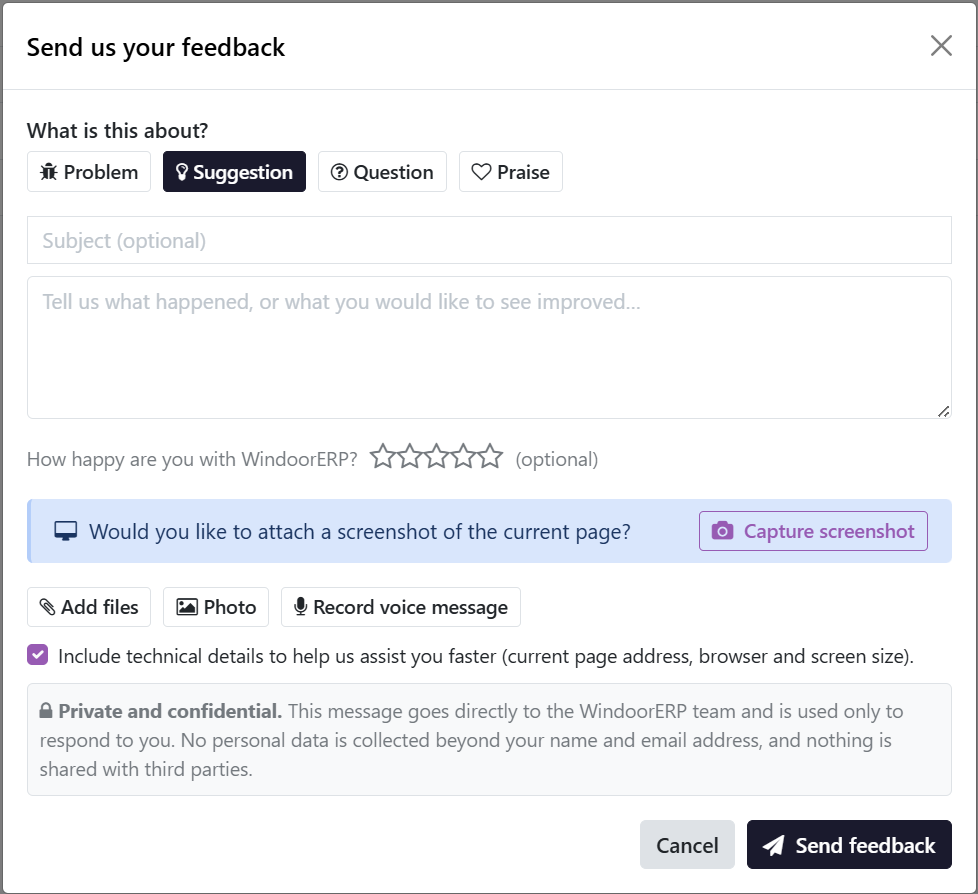
Click the (megaphone) icon. Send us your feedback opens.
-
02
Choose what it is about: Problem, Suggestion, Question or Praise. Suggestion is picked by default.
-
03
Add a Subject if it helps, then describe what happened in the message box. What you expected, and what you got instead, is worth more than a paragraph of apology.
-
04
Rate your satisfaction with the stars if you want to — it is optional, and clicking the same star again clears it.
-
05
Attach whatever shows the problem: Capture screenshot, Add files, Photo or Record voice message.
-
06
Leave Include technical details ticked unless you have a reason not to. It sends the page address, the browser and the screen size — often the very thing that identifies the fault.
-
07
Click Send feedback. A reference such as FB00042 appears; quote it if you follow up.
What you can attach
- Capture screenshot — takes a picture of the current page. The browser asks which surface to share; choose this tab. The dialog hides itself while the shot is taken, so you get your screen and not the feedback form.
- Add files and Photo — any file from the computer, or a picture from a phone.
- Record voice message — records from the microphone in the browser; click Stop recording when you are done. Quicker than typing when a fault is awkward to describe, and it works just as well in Arabic.
- Up to 10 files and 25 MB in total. Drop anything you change your mind about with the (remove) button before sending.
Note
Screenshot capture and voice recording depend on the browser, and each button only appears when the browser supports it. A phone usually offers Photo but not Capture screenshot.
What happens next
- The message is saved on your own database first, then forwarded to the WindoorERP team. If the connection fails it retries by itself every fifteen minutes, so nothing is lost.
- The team receives it by email with your attachments, and a copy is archived centrally — which is why feedback survives even on a trial database that resets overnight.
- You get a short acknowledgement email. Any real reply goes to the address on your user account, so keep that address correct.
Important
Feedback is private: it reaches the WindoorERP team only, is used to answer you, and is shared with nobody else. Even so, never paste a password into it — no one from the team will ever ask you for one.
Where your submissions are kept
An administrator can review everything sent from the database under Settings › Quick Feedback: reference, category, message, attachments, and whether it reached the team — Sent, Pending or Failed. Ordinary users have no such screen; each person can only ever see their own submissions.
The manual has its own feedback button
The Was this helpful? thumbs at the end of a manual article rate the article, and they tell the documentation team what to rewrite. Use the megaphone for the product, and the thumbs for the manual.
Common mistakes
- "It does not work" with no screen, no step and no screenshot. Nobody can fix what nobody can reproduce.
- Unticking the technical details, then reporting a fault that happens on one page only — the page address was the clue.
- Sending ten separate messages about one incident. One message with attachments keeps the answer in one place, and more than ten in an hour are refused anyway.
- Using feedback for a production stoppage that cannot wait. It is a queue, not an alarm — phone it in.
Checkpoint
You have sent a test message and received its FB reference.