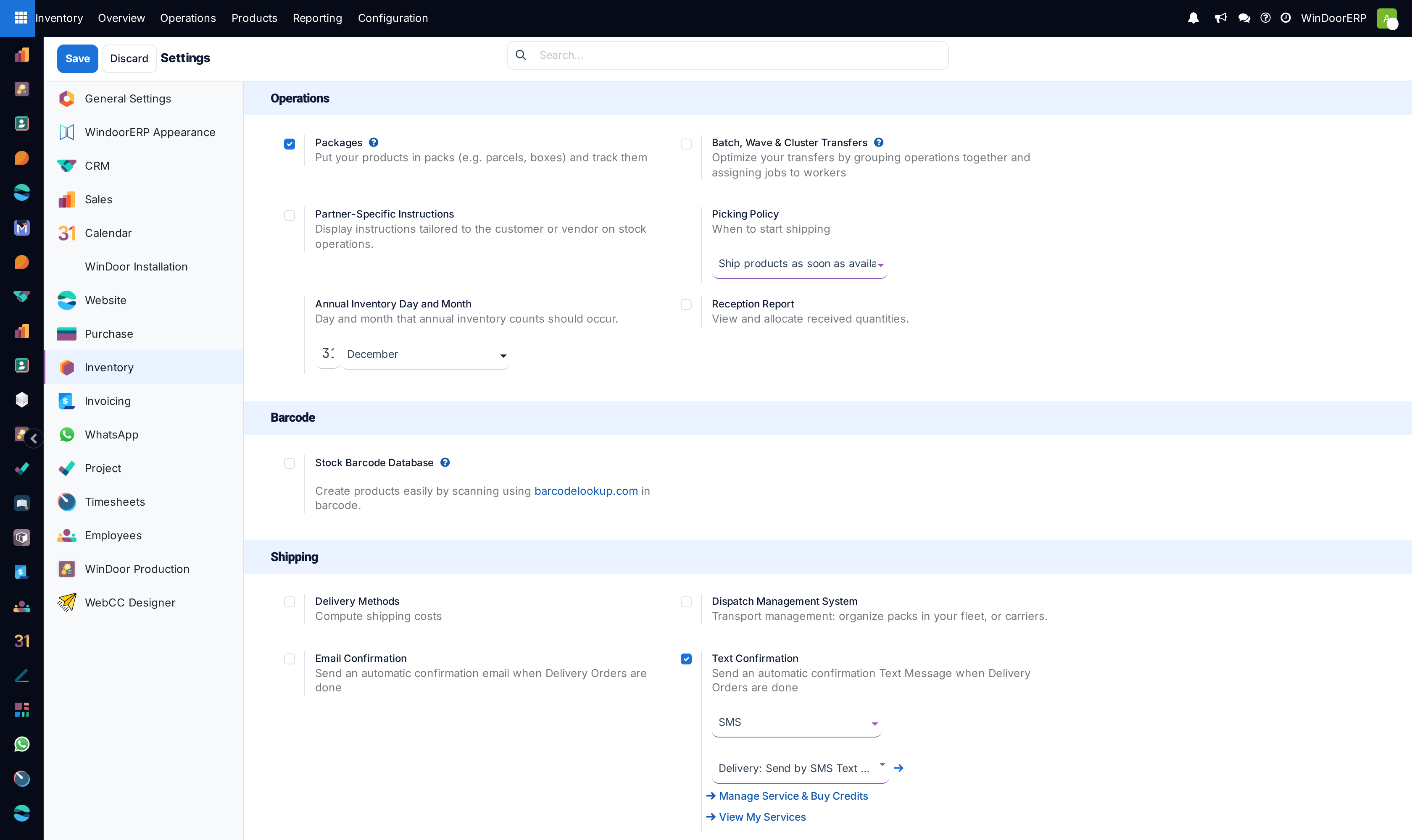
Configure essential inventory and warehouse settings
What this does
Centralizes all global warehouse policies and operational switches across WindoorERP. From here, you enable multi-step routing, package crating, storage capacities, barcode nomenclatures, and automated stock reservation policies.
Before you start
- Sign in as an administrator with full Inventory Configuration rights.
- Decide on company-wide logistics standards: whether you manage picking packages and crating, and your default annual inventory date.
Steps
Important
Enabling Multi-Step Routes reveals route configuration on warehouses and locations. Once enabled, standard routes continue working uninterrupted until custom rules are added.
-
01
Open Inventory › Configuration › Settings.
-
02
Under Operations, enable Packages to track window stillages and accessory crates, and Multi-Step Routes for complex staging.
-
03
Under Warehouse, activate Storage Categories if you need weight and volume capacity constraints per bay.
-
04
Under Traceability, enable Lots & Serial Numbers for extrusion mill cert tracking and glass packs.
-
05
Click Save at the top left of the configuration screen.
Common mistakes
- Enabling lot tracking without configuring lot generation on raw material templates.
- Forgetting to click Save before navigating to another configuration menu on the left rail.
Was this article helpful?
Thanks — your feedback helps.
Running a window or door factory?
Ask for a demo