Send arriving goods to the right shelf
What this does
A putaway rule decides where a product goes when it arrives, so the storeman is told the shelf instead of choosing one. It is also how you keep incompatible materials apart — sealants away from glass, for instance.
Before you start
- Enable Multi-Step Routes in Inventory › Configuration › Settings (storage locations come with it).
- The Store to location must be a sub-location of
the arrival location —
WH/Stock/Rack 3insideWH/Stock.
Steps
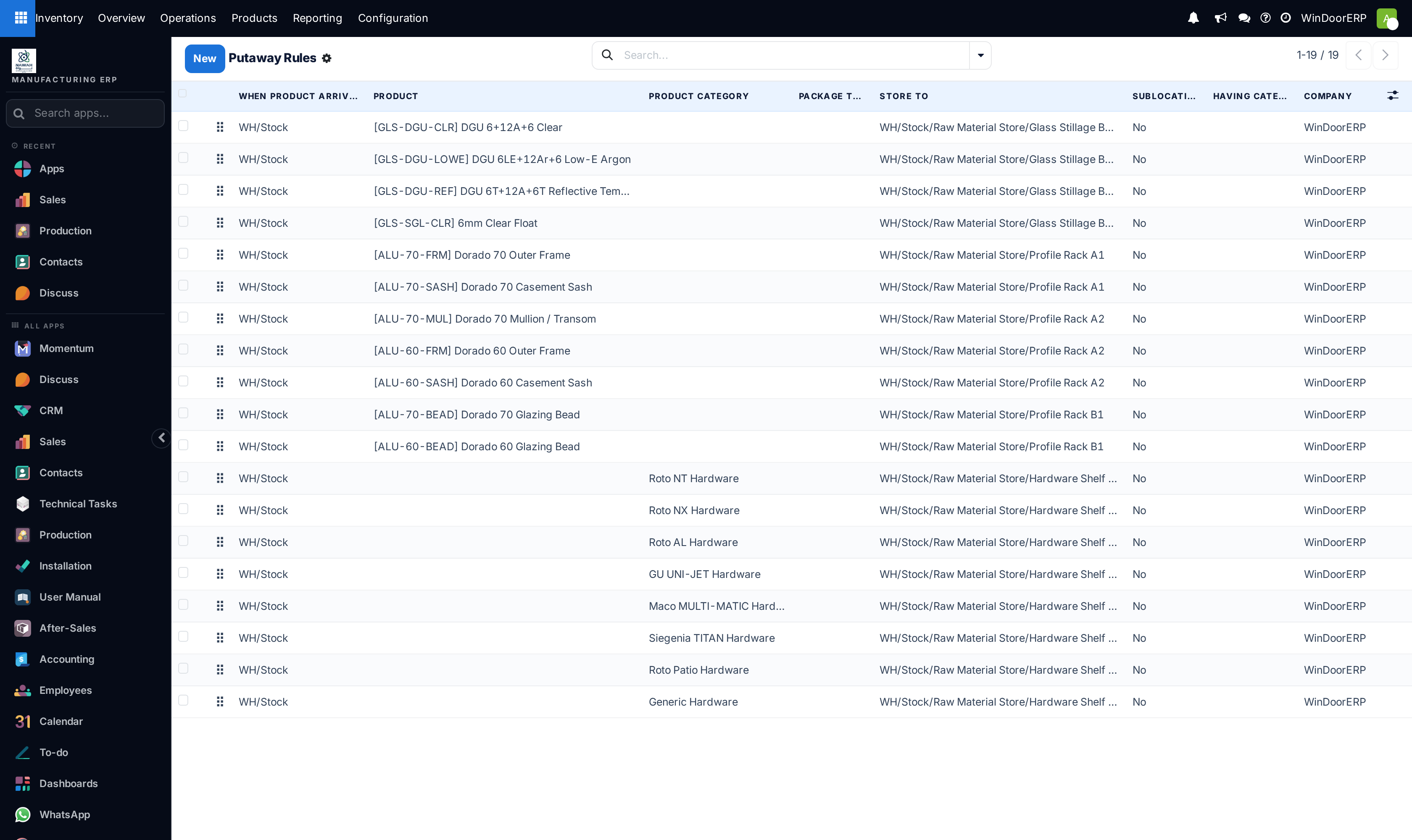
Putaway is the process of routing products to appropriate storage locations upon shipment arrival.
WindoorERP can accomplish this seamlessly using putaway rules, which dictate how products move through specified warehouse locations.
Upon shipment arrival, operations are generated based on putaway rules to efficiently move products to specified locations, and ensure easy retrieval for future delivery orders.
In warehouses that process specific kinds of products, putaway rules can also prevent volatile substances from being stored in close proximity, by directing them to different locations determined by the warehouse manager.
-
01
Go to Inventory › Configuration › Putaway Rules and click New.
-
02
Choose the Product or the Product Category the rule covers — and optionally a package type.
-
03
Set When product arrives in to the location goods land in.
-
04
Set Store to — the shelf they belong on.
-
05
Choose the Sublocation behaviour: No, Last Used, or Closest Location (which needs a storage category).
-
06
Save, and repeat per product family.
Configuration
To use putaway rules, navigate to Inventory app › Configuration › Settings, and activate the Multi-Step Routes feature under the Warehouse section. By doing so, the Storage Locations feature is also automatically activated.
Finally, click Save.
Define putaway rule
To manage where specific products are routed for storage, navigate to Inventory app › Configuration › Putaway Rules. Use the New button to configure a new putaway rule on a Product or Product Category that the rule affects.
Important
Putaway rules can be defined either per product/product category, and/or package type (the Packages setting must be enabled in Inventory app › Configuration › Settings for that). Additionally, a storage category can be defined to limit capacities of a storage location and route products accordingly.
In the same line, the When product arrives in location is where the putaway rule is triggered to create an operation to move the product to the Store to location.
For this to work, the Store to location must be a sub-location of the first (e.g., WH/Stock/Fruits is a specific, named location inside WH/Stock to make the products stored here easier to find).
Example
In a warehouse location, WH/Stock, there are the following sub-locations:
- WH/Stock/Fruits
- WH/Stock/Vegetables
Ensure all apples are stored in the fruits section by filling the field Store to with the location WH/Stock/Fruits when the Product, Apple arrives in WH/Stock.
Repeat this for all products and hit Save.
Use the Sublocation field to specify whether to use a sublocation or specify a storage category:
- No: no sublocation is used. Products are directed to whatever is specified in the Store to field.
- Last Used: the last location that had a move associated with it for that product or product category is used. If there is no last location used, the destination is whatever is specified in the Store to field.
- Closest Location: the locations specified as part of a storage category are used. A storage category is mandatory in the Having Category field.
To apply a putaway rule to all products, create an empty putaway rule with no specified Product or Product Category. All products are stored in the location specified in the Store to field.
Note
A best practice for an empty putaway rule is to specify the Last used Sublocation. Specifying Last used ensures that WindoorERP suggests the last location used to store a product.
Putaway rule priority
WindoorERP selects a putaway rule based on the following priority list (from highest to lowest) until a match is found:
- Package type and product
- Package type and product category
- Package type
- Product
- Product category
Example
The product Lemonade can has the following putaway rules configured:
- When receiving a
Pallet(Package Type) ofLemonade cans, it is redirected toWH/Stock/Pallets/PAL1. Lemonade can's Product Category isAll/drinks, and when receiving aBoxof any item in this product category, items are redirected toWH/Stock/Shelf 1.- Any product on a
Palletis redirected toWH/Stock/Pallets - The product
Lemonade canis redirected toWH/Stock/Shelf 2 - Items in the
All/drinksproduct category are redirected toWH/Stock/Small Refrigerator.
Which rule wins
The most specific match is used, in this order: package type and product, package type and product category, package type, product, product category. A rule with no product and no category at all becomes the catch-all — usually set to Last Used so the system suggests wherever that item went last time.
Common mistakes
- A Store to location that is not inside the arrival location — the rule never fires.
- Rules per product on a catalogue of thousands. Work by category and add exceptions.
- Expecting putaway to split a delivery across shelves. It routes the lot to one location, even if that location is over capacity.
Was this article helpful?
Thanks — your feedback helps.
Running a window or door factory?
Ask for a demo