Run one deal through it
Quote it, and see the whole setup work
Why this step
Quote it from the opportunity itself. If the template, the pricelist and the engine were set up correctly the document mostly builds itself — and if something is wrong, this is where you find out, not in front of a customer.
What this does
Raising a quotation from an opportunity keeps the two joined: the quotation knows which deal it came from, the deal shows what has been quoted and what has been won, and the marketing attribution follows across so a signed order can still be traced to the campaign that produced the enquiry.
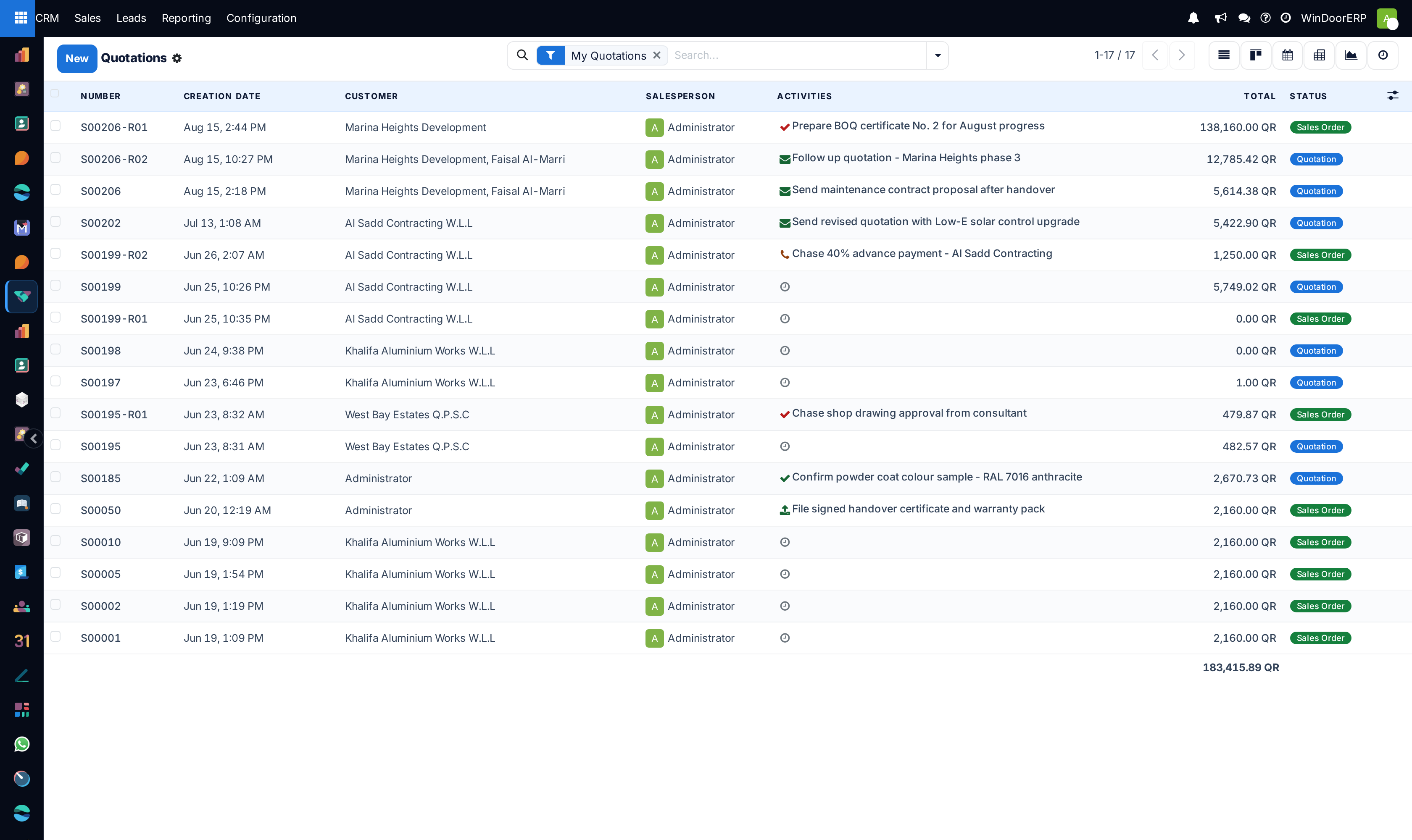
CRM › Sales › My Quotations is the other half — your own quotations in one list, without the rest of the company's.
Before you start
- The opportunity needs a customer. The quotation is raised for that contact, and quoting to an unnamed deal means correcting it later.
- Get the customer right before pressing the button rather than after: their pricelist, payment terms and addresses all arrive from the contact record when the quotation is created.
Steps
-
01
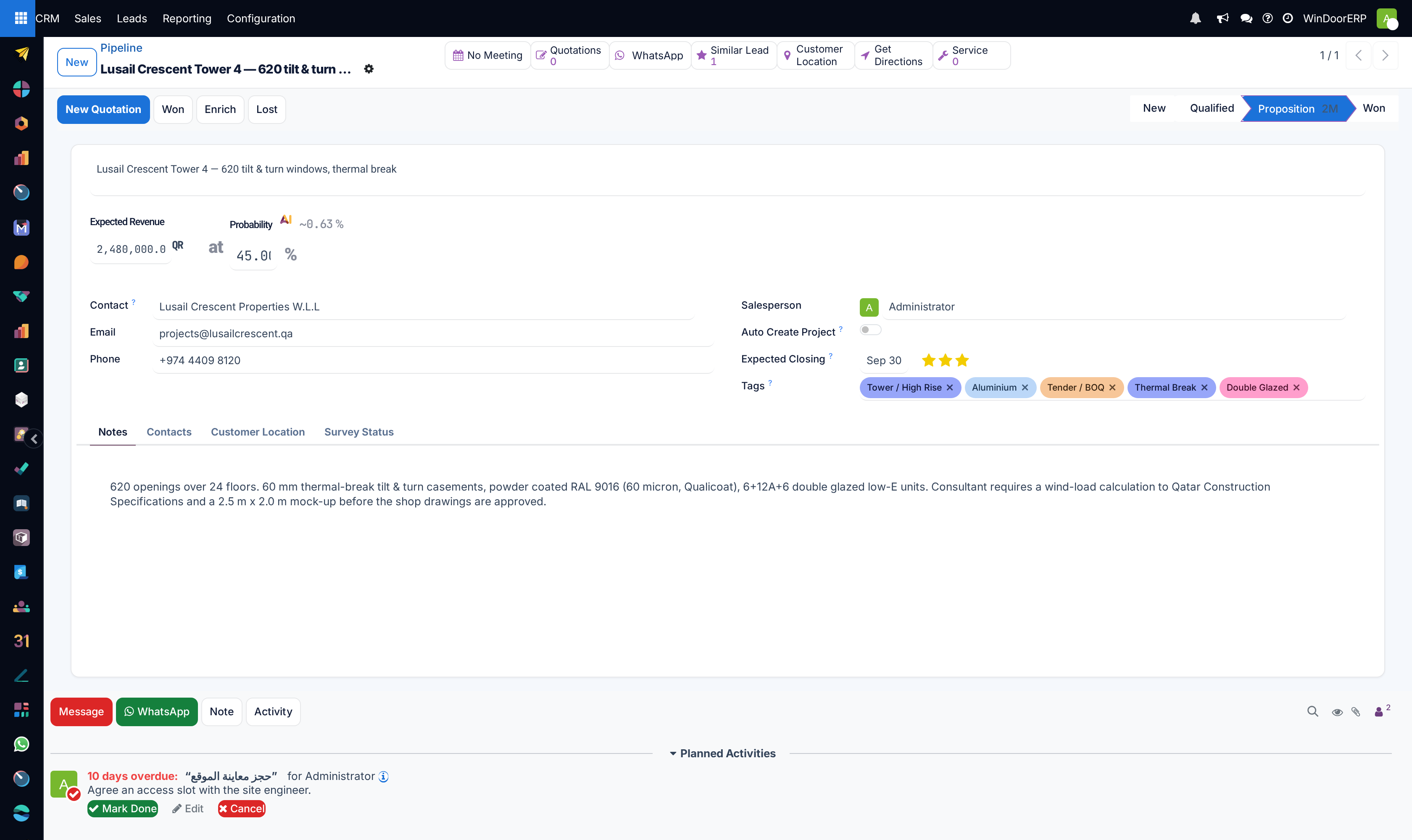
Open the opportunity in the pipeline.
-
02
Click New Quotation in the header. A quotation opens, already tied to the deal and its customer.
-
03
Add the lines. For made-to-measure work this is where the designer is used, so the drawing and its calculated quantities sit behind the line rather than being typed.
-
04
Check the expiry and the terms, then Send by Email — or Print if the proposal is being delivered by hand.
-
05
Back on the opportunity, the Quotations button counts what is outstanding; press it to reopen them.
-
06
Find your own work later under CRM › Sales › My Quotations.
What the quotation inherits from the deal
Pressing New Quotation carries a specific set of values across, and it is worth knowing exactly which, because everything else has to be filled in by hand.
| Opportunity | The link back to the deal. It is what makes the counters and the reporting work; clear it and the quotation becomes an ordinary one. |
|---|---|
| Customer | The opportunity's customer. Their pricelist, payment terms, addresses and language then arrive from the contact record, not from the deal. |
| Source document | Set to the opportunity's own name, so the quotation shows what it came from even in a list. |
| Campaign, Medium, Source | The marketing attribution, copied across. This is what lets revenue be reported back to a campaign months later. |
| Tags | The deal's tags are copied onto the quotation. |
| Sales Team | The deal's team, so the order counts towards the right team's figures. |
| Company | The deal's company, or the active one if the deal has none. |
The expected revenue is not copied. The two numbers stay independent on purpose: the deal keeps the forecast, the quotation carries the priced offer, and comparing them is how a forecast is judged.
The counters on the opportunity
| Quotations | How many quotations are still open on this deal. Pressing it opens them, and when there is only one it opens that one directly rather than a list of one. |
|---|---|
| Orders | Appears once something is confirmed: how many confirmed orders came from this deal. |
| Sum of Orders | The untaxed total of the confirmed orders — what the deal has actually produced, as opposed to what was hoped for. |
All three are live counts rather than stored figures, so they follow the orders as those change state.
Confirming an order does not win the deal
The two are separate records with separate states. A confirmed order shows in the counters and in Sum of Orders, but the opportunity stays exactly where it was in the pipeline until somebody marks it won. A pipeline full of deals that have already been ordered and delivered is the usual symptom — check the counters against the stage before trusting a forecast.
My Quotations
CRM › Sales › My Quotations is the ordinary quotations screen filtered to the ones you are the salesperson on. It is the fastest way to answer "what have I got out that has not come back", and the search offers the usual filters — sent, expired, to invoice — on top of that.
Because it filters on the salesperson, a quotation reassigned to a colleague leaves your list and appears on theirs. If something has vanished from it, check who owns it now.
Troubleshooting
| The New Quotation button is missing | The record is still a lead, not an opportunity. Convert it first. |
|---|---|
| The quotation has the wrong prices | The pricelist comes from the customer, not the deal. Correct it on the contact, then re-select the products. |
| The quotation is not counted on the deal | Its Opportunity field is empty — usually because it was created from the Sales app rather than from the deal. Set the field and the counters pick it up. |
| The deal shows a quotation that is no longer wanted | The counter shows open quotations. Cancel the quotation rather than deleting it, so the history stays. |
| A quotation is missing from My Quotations | You are not its salesperson. It is a personal filter, not a permission. |
Common mistakes
- Creating the quotation in the Sales app and losing the link to the deal, which quietly breaks the pipeline reporting.
- Editing the expected revenue to match the quotation. Leave the forecast alone — the comparison is the point.
- Treating a confirmed order as a won deal and leaving the opportunity open.
- Quoting before the customer record is right, then correcting the contact and expecting the quotation to catch up. It will not.
Checkpoint
A priced quotation has been sent from the opportunity, and its total, validity and layout are all what you configured.